Article Nov 09, 2026
 11 min read
Missed-Call Text-Back Messages: Templates and Follow-Up Rules for Service Businesses
Nov 09, 202611 min read Nov 09, 202611 min read
A missed-call text-back message identifies your business, acknowledges the call, and gives the caller an easy way to continue the conversation. Check that the contact is permitted before sending, then offer a practical next step rather than placing the person into a marketing sequence.
For example, if the caller is eligible to receive the message:
Hi, this is [Business]’s automated assistant. We missed your call. Reply 1 for a callback, 2 for our booking link, or tell us what you need. Reply STOP to unsubscribe.
The examples below are illustrative options for different situations—not twelve texts to send to every caller. Adapt them to your business, messaging provider, and applicable requirements.
Identify the business, explain the missed call, offer a reply option, and include opt-out instructions when required. Identify an automated assistant as such. Don't ask for the address, access details, frequency, and budget all at once.
Replace [Business], [Booking link], and [Approved answer] with your actual approved information. Check the final message length: substituted text, links, and special characters affect SMS segmentation.
The first two messages are alternative openings. The later examples fit different replies or follow-up decisions; their use depends on the contact’s status and your configured workflow.
When to use: A call was missed and your contact checks permit an SMS. Use the opening example above.
What happens next: Route the reply; confirm the callback request or link action succeeded. Skip or stop: Do not send after an opt-out or when the number cannot receive SMS.
When to use: A missed call was held during your configured quiet hours and the next permitted sending window has arrived.
Hi, this is [Business]’s automated assistant. We missed your earlier call. Reply 1 for a callback, 2 for our booking link, or tell us what you need. Reply STOP to unsubscribe.
What happens next: Handle the reply using verified support hours. Skip or stop: Recheck eligibility; skip after opt-out, decline, or resolution.
When to use: The caller has replied and indicated that the request concerns a home.
Thanks for the details. What type of home cleaning are you looking for?
What happens next: Route the enquiry. Skip or stop: Skip if the caller already provided the answer or staff has taken over.
When to use: The caller has indicated a business or commercial property enquiry.
Thanks for contacting [Business]. What type of premises would you like cleaned?
What happens next: Share the answer with the person assessing the request. Skip or stop: Don't repeat a known answer or promise an unverified price or appointment.
When to use: The caller asks for a callback and the request has been successfully recorded or passed to the responsible team.
Thanks. We’ve recorded your callback request. Is there a preferred time for our team to try to reach you?
What happens next: Pass the preferred time to the team and track the call; the preference is not a reserved slot. Skip or stop: Never claim an unconfirmed record; stop follow-ups after opt-out or staff takeover.
When to use: The caller requests a booking link and your business has an approved, working booking system.
You can choose a time here: [Booking link]. Your appointment is confirmed only when the booking system confirms it.
What happens next: Record the sent link and check for separate booking confirmation. Skip or stop: Don't use this wording for a request-only form; route an invalid link to the team.
When to use: The caller asks a question your current, applicable business information answers.
[Approved answer] Would you like a callback about anything else?
What happens next: Continue if the caller needs help. Skip or stop: If information is missing, stale, or inapplicable, don't guess a policy, price, or service area.
When to use: The caller asks for a price or time that the workflow cannot verify.
I can’t confirm that yet. Our team can review your request. Would you like a callback?
What happens next: Record and route any callback request. Skip or stop: Don't claim team receipt without confirmation or invent a price or slot.
When to use: An active enquiry has a response, but the next step needs one additional detail.
Thanks—that helps. Is this for a home or business premises?
What happens next: Route the enquiry and pause generic reminders. Skip or stop: Don't repeat an answered question or send a no-response reminder during an active conversation.
When to use: The initial message received no reply, contact remains permitted, and your business has chosen a limited reminder as appropriate for this enquiry.
Hi, this is [Business] following up on your earlier call. If you still need help, reply here and our team can assist. Reply STOP to unsubscribe.
What happens next: A reply stops the generic sequence. Skip or stop: Skip after reply, decline, opt-out, or staff contact; choose your own permitted timing and limit, not an assumed template default.
When to use: Your chosen, permitted sequence allows a closing message and the caller has not replied.
We’ll stop our automatic follow-ups about your call. If you need help later, you can contact [Business].
What happens next: End the sequence; create an internal review task if appropriate. Skip or stop: Don't send after opt-out or decline, or promise deletion unless it occurred.
When to use: A caller opts out and an acknowledgement is appropriate under your provider’s configuration—but the provider has not already sent one.
You have been unsubscribed. You will not receive further automated messages from [Business].
What happens next: Stop the sequence, record suppression, and check pending sends. Skip or stop: Don't duplicate a provider confirmation or add a sales message.
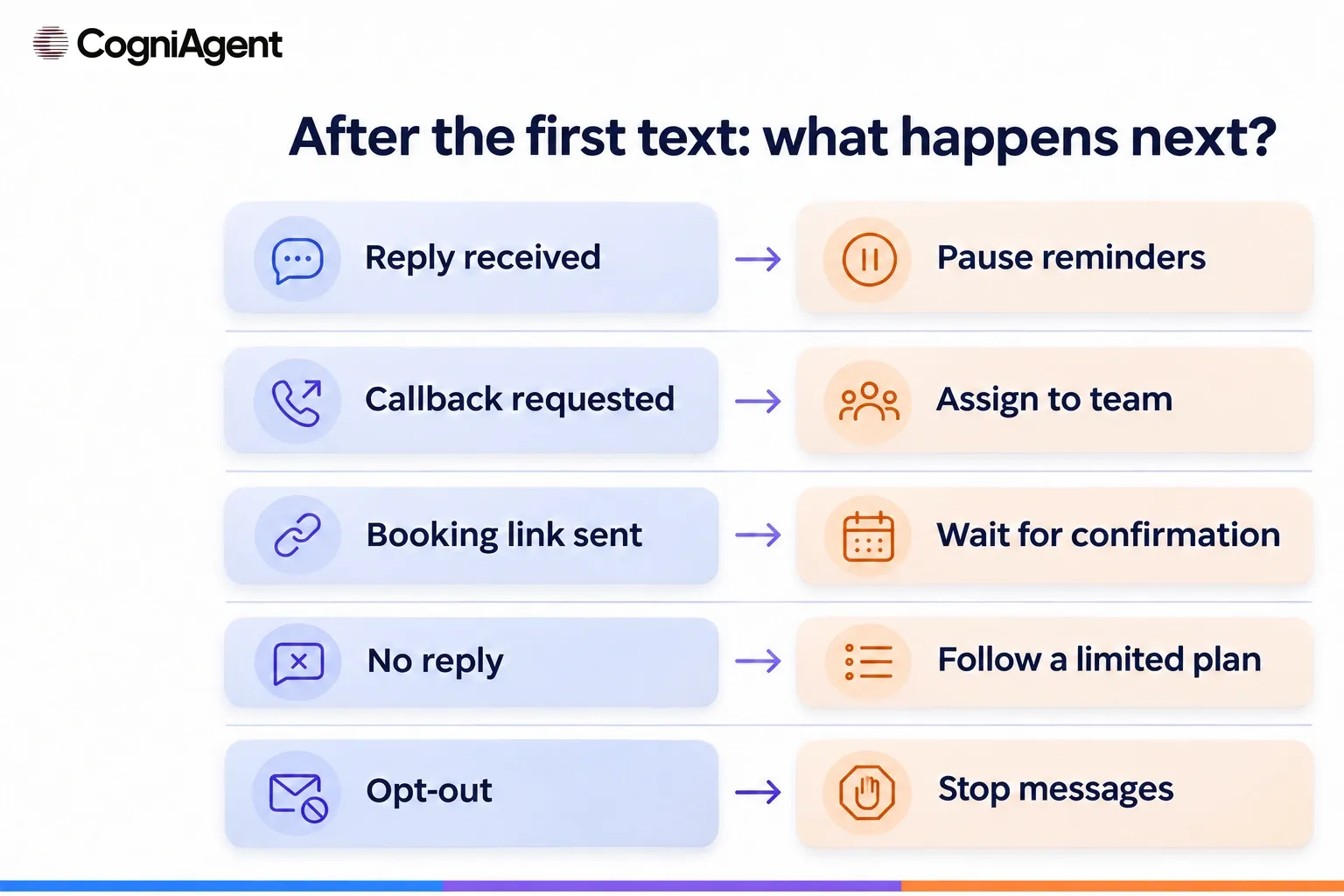
Use the events below to design and test your process. These are recommended workflow requirements, not a claim that every safeguard is already implemented in a particular template.
|
Event |
Next action |
Check before another outbound contact |
|---|---|---|
|
Reply |
Pause generic reminders; respond to the enquiry. |
Opt-out and staff ownership. |
|
Callback requested |
Assign an owner and pass context. |
Request recorded, assigned, and completed. |
|
Booking link sent |
Record the link action separately. |
Actual booking confirmation. |
|
No reply |
Apply a finite window and limit, then stop. |
Permission, contact status, staff contact, and schedule. |
|
STOP, decline, wrong number |
Stop outreach and update the state. |
Pending sends; never bypass a refusal through another number or channel. |
|
Another missed call |
Review the existing enquiry and suppression. |
Prior message, stopped sequence, or staff ownership. |
|
Quiet hours |
Hold an eligible message until permitted. |
Time zone, permission, opt-out, and resolution. |
|
Delivery failure or unknown line |
Use an exception route, not endless retries. |
Provider status and SMS capability; don't assume it was read. |
|
Staff handling request |
Coordinate ownership; pause automation if verified. |
Staff activity and pending messages. |
A missed voice call does not by itself establish permission for every kind of SMS, especially recurring marketing. Before launch, check the requirements for your country, your use case, consent, sender registration, and the rules of your provider and carriers. The Twilio Messaging Policy describes the provider’s expectations around consent, sender identification, and opt-out.
Make sure a STOP response stops future automated messages, including messages already queued. An opt-out list alone does not prove that every queue or provider is synchronized; test the full path.
For Twilio configurations using Advanced Opt-Out, the provider may already send the configured confirmation. Check the actual setup before sending an additional acknowledgement. Quiet hours are another configured contact rule; choosing a window does not automatically establish compliance everywhere.
This example is illustrative and does not represent a customer interaction or a tested CogniAgent installation.
An AI receptionist for cleaning companies addresses a broader intake process. If the team later sends a quote, the next stage is a separate cleaning quote follow-up, not a reminder about an offer that has not yet been made.
The Missed-Call Text-Back Agent is a starting point for this workflow. Its public description lists Twilio, Google Sheets, and Gmail; you need a business number that can receive calls and send messages, plus your business information, quiet hours and time zone, booking link, and team and escalation email addresses.
According to the template description, a watcher checks Twilio every five minutes for inbound calls with no-answer, busy, or cancelled status. It ignores outbound calls and withheld caller IDs. Before the opening text, the described checks include the opt-out list, line type, quiet hours, and suppression of another opening text within one hour. A reported landline is routed to the team for a callback rather than sent an SMS.
The five-minute polling interval is not a delivery guarantee. The one-hour suppression concerns repeat opening texts after calls; it is not a universal follow-up schedule. The template describes a callback request that stays open until a person confirms it was made, with escalation after three checks if it remains incomplete. Those checks are not three customer messages. Sending the configured booking link does not itself create a booking.
The described workbook includes MissedCalls, OptOut, and Log. Prepare approved answers and verify the rules during setup. Public documentation does not establish editing fields for every sample or the full follow-up schedule; confirm how to configure and test any different branch.
An AI agent builder can help configure the conversation and connected steps. With no-code AI agents, setup still includes permissions, provider configuration, and testing. AI workflow automation links events to checks and notifications; a no-code AI builder platform does not by itself prove that a customer received a message or a staff member completed a callback.
The template’s callback route is asynchronous; it is not a promise that a human joins the conversation live. For a different approach, the guide to building an inbound response workflow describes a custom webhook-based build, not the installation of this polling template. The broader AI receptionist and missed-call text-back automation pages provide additional context.
Use isolated test numbers and resources; do not contact real prospects for the sake of a demonstration. Before launch, test:
Check the conversation, provider delivery status, saved record, and team task separately. API acceptance is not proof of delivery or reading; an email notification is not a completed callback. For a broader review, see how to test an AI agent before launch.
It depends on the workflow, contact checks, quiet hours, provider, and delivery conditions. The CogniAgent template describes a five-minute watcher, but that interval is not a promise of SMS delivery within five minutes.
Set a finite limit that is appropriate and permitted for the enquiry, and stop when the caller replies, declines, opts out, or staff takes ownership under your process. The example messages are alternatives, not a required sequence.
No. A link gives the caller a route to request or choose a time. Treat the appointment as confirmed only when the relevant booking system or your team confirms the actual booking.
Stop further automated messages, update the relevant suppression state, and check queued sends. If the messaging provider already sent the configured opt-out confirmation, do not duplicate it.
Choose one missed-call scenario, adapt the message to your business, and test the complete path on safe test resources before using it with callers.