An AI agent is a system that uses a model and available context to choose steps toward a goal within configured limits. It may read information or use tools when those tools are provided and authorized. What it can actually do depends on the surrounding system: its connections, permissions, execution controls, and checks.
You may also see the phrase “agent AI.” In this article, both terms refer to software that can make task-specific choices about what to do next. An agent does not need to act without supervision, and a convincing answer is not proof that an external action happened.
What does an AI agent need to work?
An AI model can generate a response or select a next step. A working agent system also needs the surrounding components that supply context, enforce limits, run permitted tools, and report results. In its description of agent and workflow patterns, Anthropic distinguishes predefined workflow paths from agents that dynamically direct their process and tool use. A practical application can combine both.
|
Component |
Role |
Question to ask |
|---|---|---|
|
Instruction and goal |
Defines the task and boundaries |
What outcome is the agent trying to reach? |
|
Input and context |
Supplies the current request and relevant information |
What does the agent know for this task? |
|
State |
Records information needed during or across steps |
What has already happened, and where is it stored? |
|
Tools |
Provide specific ways to read or act |
Which operations are actually available? |
|
Permissions |
Limit which operations and data are allowed |
Who authorized access and what can be changed? |
|
Evidence |
Shows the result of a step |
Where can someone verify the external outcome? |
These elements should not be treated as interchangeable. A tool connection does not automatically give an agent permission to perform every operation. A system can have stored information without the model being retrained, and a tool response can require a separate check in the destination system.
Context, state, retrieval, and learning
Conversation context is information supplied to the model for the current interaction. It can include a user’s request and earlier messages that the application includes. It is not necessarily a permanent record.
Persisted state is information a system stores for later use, such as a request identifier or an approval status. Where it is stored and how long it remains available depend on the implementation.
Retrieved information comes from a source the system looks up, such as an approved knowledge base. Retrieval-augmented generation, or RAG, combines retrieved material with generation; it is not simply another name for an internet search. The original RAG paper describes a retrieval-based approach for knowledge-intensive generation. Whether retrieved information is current depends on the source and how it is maintained.
Model training changes the model through a separate training process. Saving an interaction, retrieving a newer document, or recording feedback does not by itself establish that model weights changed. Nor does an agent need to retrain after each task to use updated information.
How does an AI agent complete a task?
Consider an illustrative internal IT request. An employee says a laptop will not connect to Wi-Fi. This example describes a possible system design; it is not a CogniAgent demonstration or a claim that the workflow has been tested on the platform.
- Receive the request. The system identifies the connectivity problem and notes the employee’s description.
- Read approved guidance. A read-only tool retrieves a relevant help article from the organization’s approved knowledge base.
- Ask for missing context. If the device type is needed, the agent asks the employee instead of guessing.
- Prepare a ticket draft. It summarizes the issue and device detail without claiming that a ticket already exists.
- Obtain approval. In this example, the employee approves creating the draft ticket before any write action.
- Use the authorized tool. The system sends the approved fields to the service desk only if the connection and its permissions allow ticket creation.
- Verify the result. The system checks the returned ticket ID and reads the ticket in the service desk to confirm the saved fields.
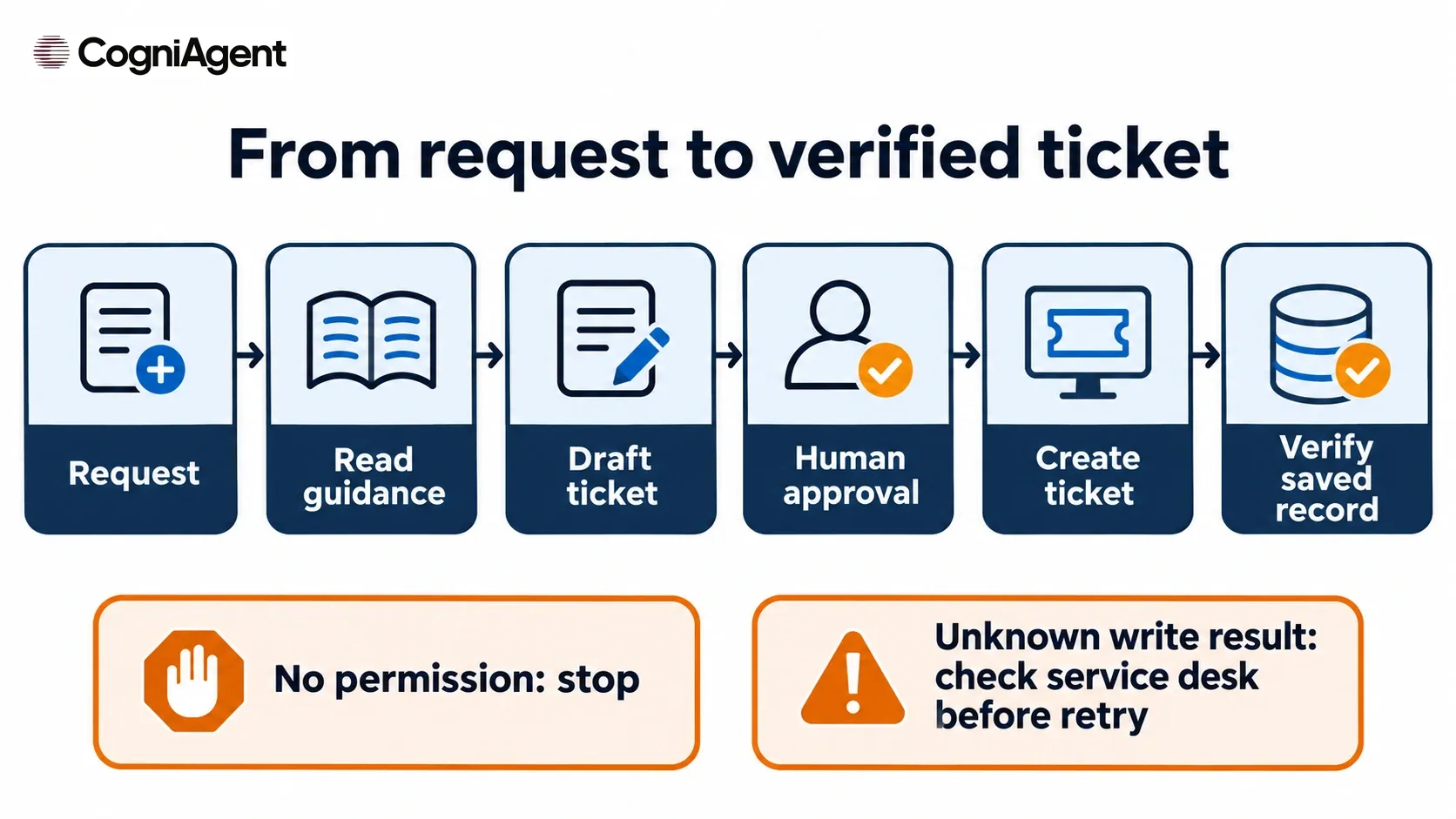
An illustrative agent workflow separates a proposed action from an approved write and a verified record.
The employee can see three different states: draft ready, tool returned a result, and ticket found with the expected fields. A draft is not a ticket. A tool response may indicate an accepted request or an error; it should be interpreted according to the tool’s actual response. The destination record provides a separate check of what was saved.
If the tool lacks permission, the agent should stop the write and report that the ticket was not created. If a request times out after being sent, the result may be unknown. The system should report that uncertainty and check the service desk before trying again, so a retry does not blindly create a duplicate.
This example does not require the employee to provide a password to the agent. In an actual implementation, access and verification must follow the organization’s security and service-desk rules.
Where does autonomy end?
Autonomy is a design choice about which decisions and actions a system can take. It is not a promise that every agent can operate independently or access every connected system.
Compare three ways to handle an IT request:
- A fixed routing rule sends every Wi-Fi issue to a predefined support queue.
- A conversational answer explains a troubleshooting step using an approved article, without changing a record.
- An agent can select among allowed steps, such as requesting a missing detail, reading guidance, or preparing a ticket, within its configured limits.
The same application can contain all three. An agent might select a permitted action while a fixed rule controls which queue receives a ticket. For a closer comparison, see AI Agent vs Chatbot.
Four practical action scopes
These scopes are implementation choices, not an industry maturity scale. A single workflow may use several of them.
|
Scope |
What the system may do |
Review or stop condition |
|---|---|---|
|
Read only |
Retrieve permitted information |
Stop or ask for help when access is denied or the source is missing. |
|
Draft |
Prepare an answer or proposed record |
A person reviews it before any external change. |
|
Approved write |
Perform a specific write after the required approval |
Stop if approval is denied, missing, expired, or does not match the action. |
|
Limited automatic action |
Execute a predefined class of permitted actions without per-action review |
Enforce limits and stop or report exceptions outside the configured scope. |
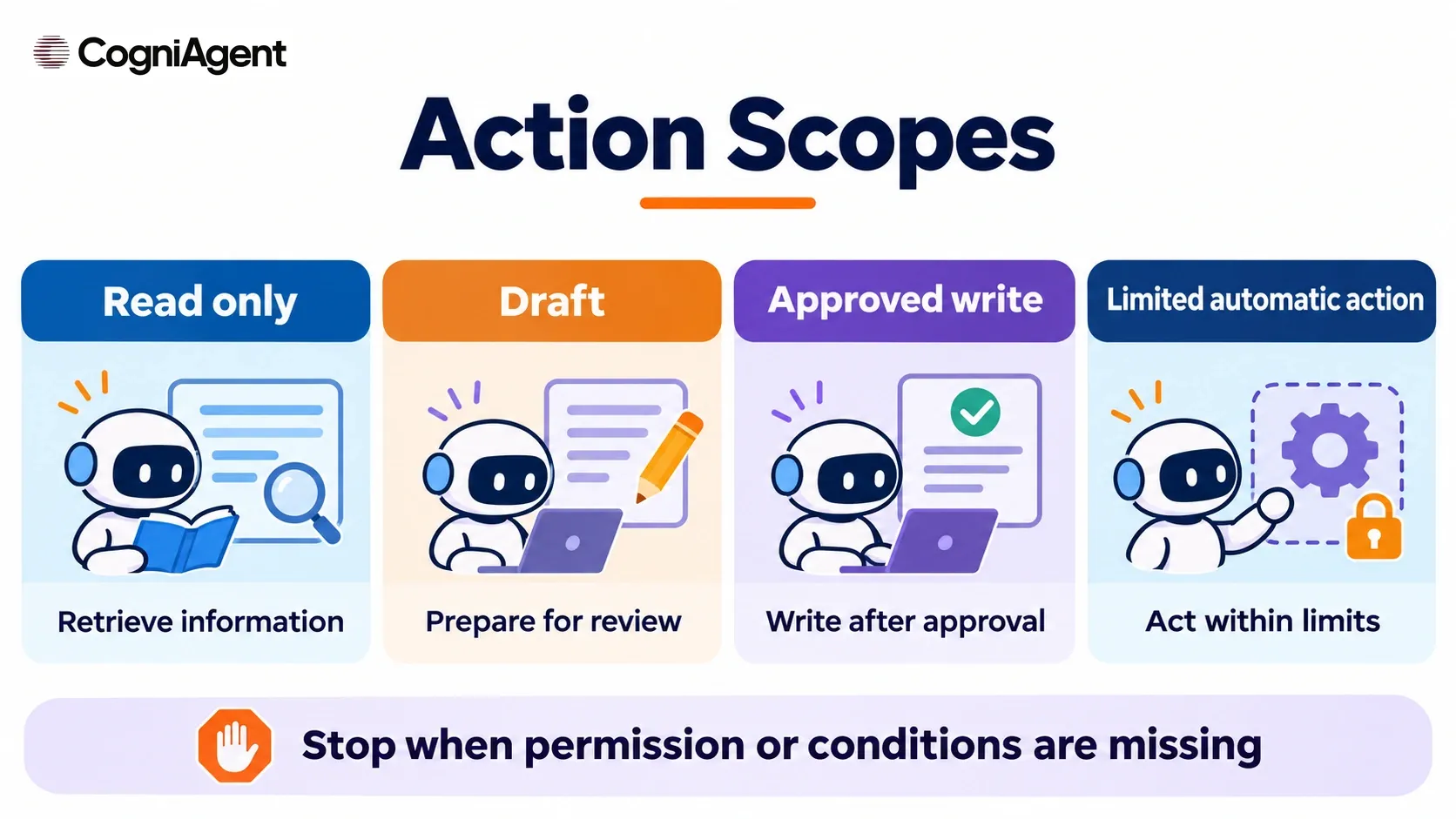
Action scopes define what a system may do and when it must stop.
For a low-risk task, read-only retrieval may be sufficient. For a write action, identify the reviewer, the allowed operation, the fields that can change, and the evidence of completion. If the system cannot determine the result, it should say so rather than presenting the task as complete.
What can AI agents do in a business?
The useful question is not “Can an agent do everything?” but “Which step can this implementation perform, and how will we check it?” Depending on the tools and access actually configured, an agent might retrieve an approved policy, prepare a support response, summarize a request, or send an approved operation to another system.
Each task has different boundaries. A policy answer depends on the source material; an external write depends on permissions and a functioning integration. Both need checks appropriate to their consequences. A system that drafts a response should not be described as having sent it unless sending was authorized and confirmed.
Where should you start?
Choose one narrow process with a clear owner and a result that can be inspected. For the IT example, that might be preparing a ticket from synthetic test requests and, after explicit approval, creating it in a test service desk.
Before launch:
- Define normal inputs and edge cases, including missing information.
- Identify the approved source, one permitted action, and the account that has access.
- Specify when a person must review or approve the proposed action.
- Decide what evidence proves completion, such as the saved ticket and its fields.
- Test denied access, failed writes, timeouts, and duplicate retries.
An AI agent builder is one way to configure an agent without writing every component from scratch. CogniAgent describes its platform as a no-code AI builder platform; the actions available in a particular workflow depend on its configured tools, connections, and permissions. For a more detailed set of checks, use How to Test an AI Agent Before Launch.