Campaign Response Notifications
Let AI monitor campaign engagement live and notify your team immediately when key thresholds are met
Core Automation Capabilities

Continuous Engagement Monitoring

Threshold-Based Alert Triggering

Slack, Email, or Multi-Channel Notifications

CRM & Dashboard Integration

Contextual & Actionable Alert Summaries

Automated Alert Optimization & Learning
Every Campaign Interaction Is a Signal Waiting to Be Acted On
Delayed Awareness
Teams often only discover campaign performance hours or days later, missing opportunities to optimize.
Missed Optimization Windows
Without real-time alerts, high-performing segments go under-leveraged and low-performing campaigns continue without intervention.
Manual Monitoring Is Inefficient
Tracking opens, clicks, and replies manually across multiple campaigns is slow, error-prone, and stressful.
How It Works
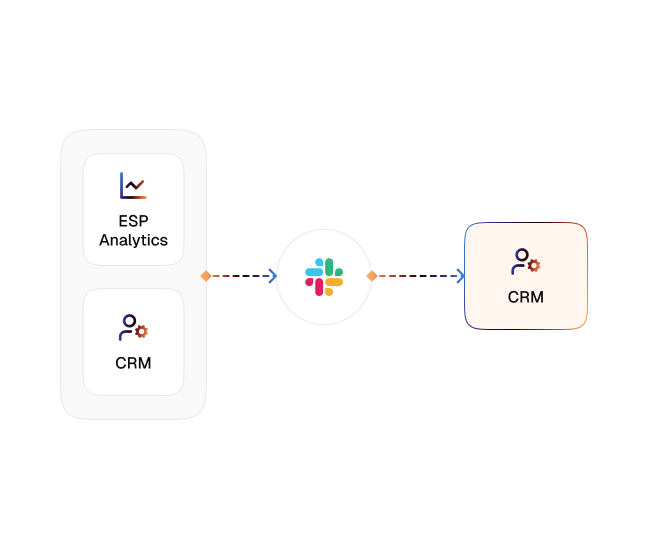
Engagement Monitoring
CogniAgent continuously tracks opens, clicks, replies, and other engagement metrics across your campaigns.
Threshold Detection
Alerts are triggered when engagement metrics cross your defined thresholds, such as open rate, click rate, or reply volume.
Multi-Channel Notification
Sends real-time notifications via Slack, email, or both, so the right stakeholders are informed instantly.
CRM & Dashboard Integration
Engagement data is automatically fed back into your CRM or analytics dashboards for reporting and follow-up.
Actionable Insights
Alerts include context, segment details, and performance metrics, allowing your team to act immediately — optimize, pivot, or amplify campaigns.
Continuous Optimization
CogniAgent learns patterns and fine-tunes alerts to focus on the most meaningful engagement signals for your team.
The Real Impact for Marketing Teams
| Metric | Before Automation | After (With AI Agent) |
|---|---|---|
| Time spent monitoring campaigns | 2–4 hrs/day | <10 mins/day |
| Alerts for high engagement | Manual & delayed | Real-time |
| Campaign optimization speed | Hours or days | Instant |
| Response to low-performing campaigns | Reactive | Proactive |
| CRM engagement logging | Manual | Fully automated |
Step-by-Step Setup
Step 1
Connect your email service provider or marketing automation platform to CogniAgent.
Step 2
Define which engagement metrics matter most (opens, clicks, replies) and set thresholds for alerts.
Step 3
Choose your notification channels (Slack, email, or both) and assign recipients.
Step 4
Monitor campaigns in real time, receive alerts, and feed engagement data back into your CRM or dashboards automatically.


![Best AI Tools for Auto Repair Shops [2026 Guide]](https://cogniagent-preview-def77a0f.nyc3.digitaloceanspaces.com/media/2026/07/Best-AI-Tools-for-Auto-Repair-Shops-2026-Guide.png)

Frequently Asked Questions
CogniAgent monitors opens, clicks, replies, and other engagement signals in real time. You can customize thresholds for each metric based on campaign goals.
Alerts are sent via Slack, email, or both simultaneously. Each alert includes context such as campaign name, segment, and metric details.
Yes. All engagement metrics and alert information can automatically feed into your CRM, dashboards, or analytics tools for reporting and follow-up.
Alerts are triggered in real time, as soon as metrics cross the thresholds you define. Most teams are notified within minutes of engagement spikes or drops.

No results