Article Oct 21, 2026
 13 min read
Cleaning Quote Follow-Up: When to Send Reminders and When to Stop
Oct 21, 202613 min read Oct 21, 202613 min read
Cleaning quote follow-up should help a customer resolve a question or make a decision. It should not keep asking them to book after they have replied, declined, or moved forward through another channel.
Start with the customer’s agreed decision date. If none was discussed, choose a limited sequence that fits the requested service date, the proposal’s validity, and the complexity of the decision. There is no single proven schedule that suits every cleaning company.
Following up on a sent quote is different from answering a new enquiry, reminding someone about a confirmed visit, or collecting an unpaid invoice. Keep those processes separate so the customer receives a message that matches their situation.
A reminder cannot fix an unclear proposal. Before contacting the customer, check that:
Use “quote” and “estimate” according to your own terms. If an estimate is provisional or depends on a site inspection, say so. Do not assume those words carry identical legal meaning in every country.
Keep the proposal reference and version attached to the follow-up. A message about an earlier price can create confusion even when it reaches the correct person.
The table below is an illustrative sequence for a routine residential cleaning enquiry. It is a starting point to adapt, not a research-backed optimum or a requirement to send every message.
|
Stage |
When to consider contact |
Purpose |
When to skip it |
|
Send the proposal |
Once the scope and commercial terms are ready |
Explain the offer and the next step |
The proposal is incomplete or awaiting approval |
|
First follow-up |
After one or two working days, if no different timing was agreed |
Invite questions about the proposal |
The customer replied, declined, booked, or requested a later contact |
|
Further follow-up |
After another few working days, if still appropriate |
Clarify whether scope or next steps need attention |
A staff member is handling the enquiry, the proposal changed, or the service date is too close |
|
Final contact |
At the end of the company’s chosen follow-up window |
Explain that routine reminders are ending |
The customer asked not to be contacted, the contact failed, or the offer is no longer current |
Set a contact limit and an end date before the sequence begins. A shorter sequence—or one agreed follow-up—may be enough.
Adjust the timing when:
A price-validity date does not reserve a cleaning team. Unless a slot has been held through an authorized process, do not imply that the requested time remains available.
These five templates serve different situations. They are not five messages to send automatically to every customer.
Replace every bracketed field before use. Keep the proposal reference consistent with the current version, and use one simple next step per message.
Use when: the proposal was sent successfully, remains current, and the customer has not replied.
Channel: email.
Subject: Questions about your [Service] quote — [Quote reference]
Hi [First name],
I’m following up on the [Service] quote we sent from [Company], reference [Quote reference].
What questions can I help with about the scope or next steps?
Best,
[Sender name]
[Company]
Adapt: identify the service precisely. If replying within the original email thread, check that it contains the current proposal rather than a superseded attachment.
Use when: SMS is an appropriate, approved channel for this enquiry. Use it instead of a simultaneous email reminder.
Channel: SMS.
Hi [First name], it’s [Sender name] from [Company]. Any questions about your [Service] quote, [Quote reference]? You can reply here and I’ll help.
Adapt: use a recognizable sender and a short reference. Do not include property-access information or assume that an email address and phone number belong to the same person without checking.
Use when: the customer has said the price does not fit. This is a response to their message, not another no-response reminder.
Channel: email.
Subject: Reviewing the scope of quote [Quote reference]
Hi [First name],
Thanks for letting us know about your concern with the price for [Service].
Which part of the proposed work would you like us to review?
We’ll check the scope before suggesting any changes.
Best,
[Sender name]
[Company]
Adapt: acknowledge the actual concern. Any revised price, discount, or scope must come from an authorized employee. Do not imply that a lower price is already available.
Use when: a proposal has been sent after a site walk-through and the contact has not provided a different follow-up instruction.
Channel: email.
Subject: Next review date for cleaning proposal [Quote reference]
Hi [First name],
Following our walk-through of [Site], we sent proposal [Quote reference] for [Service], including the agreed scope and frequency.
Would [Proposed review date] be a suitable date for us to check back about your review?
Best,
[Sender name]
[Company]
Adapt: confirm that the proposal actually reflects the walk-through. If a review date was already agreed, refer to that date rather than asking the customer to choose again.
Use when: the selected follow-up limit has been reached, the proposal remains current, and no stop request or other change makes this message inappropriate.
Channel: email.
Subject: Closing routine reminders for quote [Quote reference]
Hi [First name],
I’ll stop routine reminders about your [Service] quote, [Quote reference], after this message.
If you’d like to revisit it, reply to this email. We’ll recheck the scope, price, and availability before taking the next step.
Best,
[Sender name]
[Company]
Adapt: make sure the sequence actually stops. Do not send this as a “final” message and then continue the same reminders.
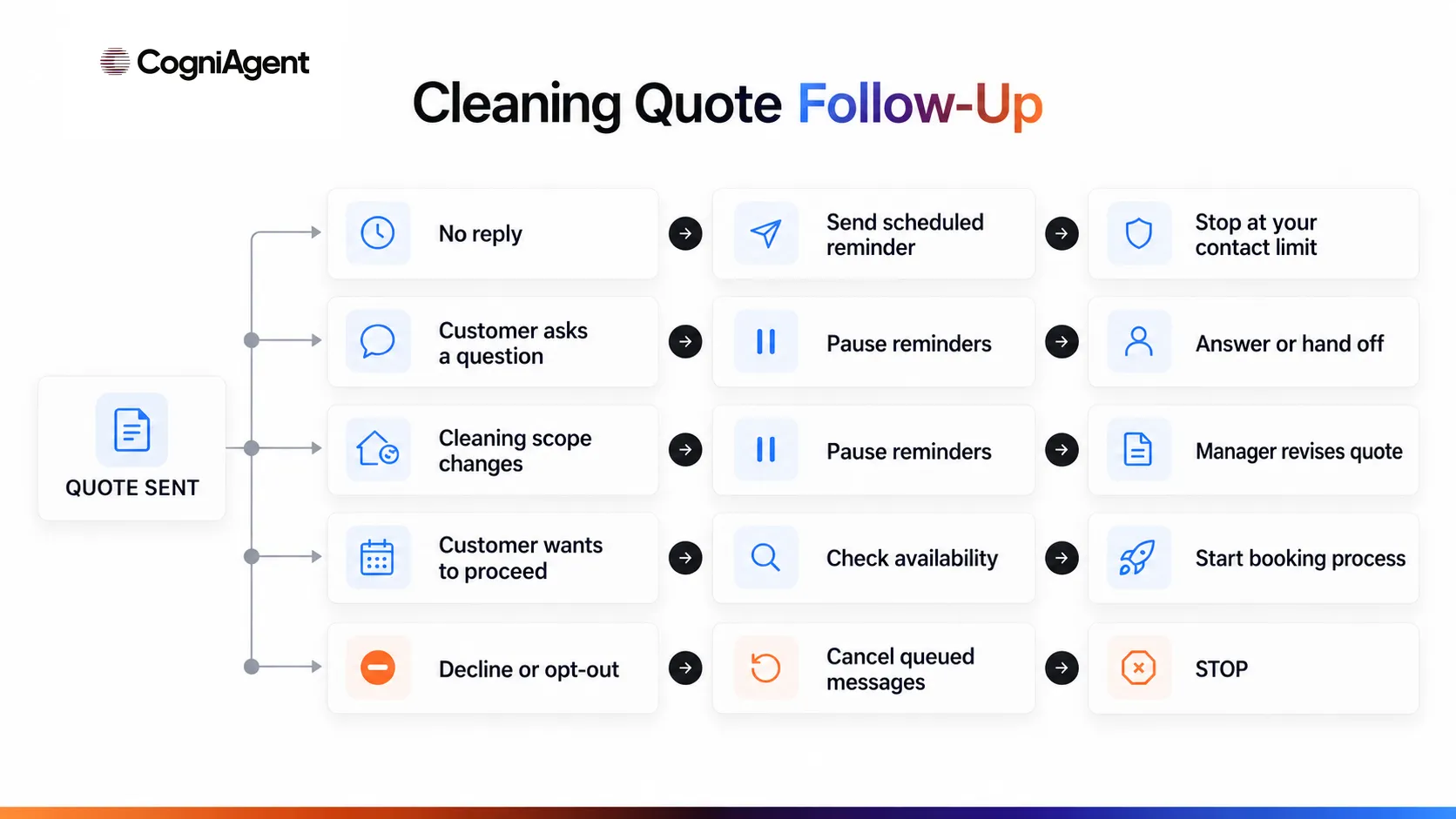
Any reply should stop the generic no-response sequence while its meaning is checked. It may start a specific conversation, but it does not automatically mean the customer has accepted the offer.
|
Customer response |
Next action |
What happens to the sequence |
|
Has a question about the proposal |
Answer using the current proposal and approved information |
Stop standard reminders while the question is handled |
|
Changes the scope |
Send the revised requirements to the responsible employee |
Pause until the updated proposal is approved and sent |
|
Says the price does not fit |
Clarify the concern and request authorized review where needed |
Stop the generic sequence; do not issue an automatic discount |
|
Wants to proceed |
Check acceptance requirements, current terms, and availability |
Move to the appropriate booking process |
|
Asks to be contacted later |
Record the agreed date and channel |
Cancel the previous schedule and use the new agreement |
|
Declines or asks for no more messages |
Record the decision and contact restriction |
Stop |
|
Does not reply |
Apply the company’s existing contact limit |
End after the permitted final contact |
A question about whether a date is available is not a booking. An accepted proposal is also not necessarily a confirmed appointment: complete the relevant scheduling and approval steps before reporting success.
For routine answers, maintain approved service descriptions, exclusions, and policies. CogniAgent’s Knowledge Base setup guide explains how documents can support agent responses. Use the actual proposal record for customer-specific terms; a general pricing document should not overwrite an agreed quote.
If the answer is missing or documents conflict, pass the question to a person instead of guessing.
For a residential enquiry, focus on the service type, property scope, requested date, included work, and optional extras.
Consider this illustrative situation: a homeowner receives a proposal for a one-off deep clean and then asks whether internal oven cleaning is included. Pause the standard reminders. Check the proposal’s exclusions and approved service information, then answer the question. If adding the oven changes the price, request an authorized revision.
After the revised proposal is sent, decide whether another follow-up is appropriate. Do not keep sending messages about the earlier version.
Complete initial information makes this easier. The guide to residential cleaning lead qualification covers gathering the details needed before preparing the offer.
For a commercial cleaning proposal, keep track of the site, proposal version, service frequency, walk-through findings, decision process, and agreed next-contact date.
In an illustrative office-cleaning enquiry, a property manager requests a proposal but explains that a facilities director must approve it at a later meeting. Record that review date. Do not apply the residential reminder schedule while the proposal is awaiting the agreed review.
Silence is not necessarily a rejection, and the employee who requested the proposal may not be authorized to accept it. Ask about the next step without assuming either.
The guide to commercial cleaning lead qualification provides context on collecting facility details and the procurement process. A commercial tender or extended approval process needs its own follow-up plan.
Check the enquiry’s current state before every send—not just when the sequence starts.
Stop or pause when:
Cancel queued messages when the status changes. Marking an enquiry “closed” is not enough if the sending system still holds an active reminder.
Keep “no response,” “declined,” “accepted,” and “booked” as different outcomes. Silence is not consent, and ending reminders does not mean the customer rejected the offer.
Define the business process before deciding which parts need AI. Scheduling a fixed reminder can use ordinary automation. Interpreting a free-form question may justify AI assistance, with clear limits and human review.
A controlled process can follow six steps:
|
Source |
What it should establish |
What it does not establish by itself |
|
CRM or quoting system |
Proposal reference, version, status, responsible employee, and relevant activity |
A scheduled slot unless booking data is reliably connected |
|
Knowledge Base |
Approved services, exclusions, policies, and general answers |
Customer-specific acceptance, payment, or live availability |
|
Calendar or booking system |
Current appointments and availability within its configured scope |
That the customer accepted commercial terms or paid |
|
Messaging provider or inbox |
Send results, delivery information where available, and received replies |
That a clean was completed |
CogniAgent’s quote follow-up automation page describes scheduled contact, question handling, and handoff. Evaluate the actual connections and controls needed for your business rather than assuming every CRM is ready to use.
For a company linking enquiry handling with later follow-up, the AI receptionist for cleaning companies provides broader product context. Keep this sequence bounded to already-sent proposals.
New prices, discounts, changed terms, and unusual commitments require an authorized employee. Do not let a reminder workflow silently become a tool for renegotiating the offer.
Before launch, check these cases:
For each case, verify that stale messages are suppressed or the process pauses for review. A duplicate event should not create a second active sequence.
If a send times out and its outcome is unknown, inspect the provider’s records before retrying. Otherwise, the customer may receive the same message twice.
The guide to testing an AI agent before launch explains how to verify both the conversation and the resulting actions. Test with controlled contacts and check the actual message queue and destination records.
Visit reminders should begin only after a confirmed booking, under a separate process.
Set an observation period and define which proposals qualify for follow-up before comparing results.
|
Measure |
Definition to use |
|
Planned-contact completion |
Share of eligible, due follow-up actions completed according to the plan; exclude actions correctly cancelled after a status change |
|
Substantive responses |
Share of contacted proposals receiving a meaningful reply; separate questions, declines, and requests to proceed |
|
Accepted proposals |
Share of eligible sent proposals with verified acceptance under the company’s process |
|
Confirmed bookings |
Appointments verified in the booking system, counted separately from proposal acceptance |
|
Declines and stop requests |
Recorded refusals and requests to end contact, tracked separately |
|
Errors and duplicates |
Wrong versions, repeated messages, failed sends, or contact after closure |
|
Employee handling time |
Time spent reviewing, answering, revising, correcting, and managing exceptions |
Keep the unit consistent: proposal, customer, message, and booking are not interchangeable. Report the number of proposals in the comparison and give them a reasonably comparable response window.
Do not attribute every later sale to follow-up. A response is not an accepted proposal, and acceptance is not a completed, paid cleaning job.
Start with a limited sequence, test its replies and stop conditions, and review the actual messages before extending it to more enquiries.