Quote Follow-Up Sequence
Every quote you send gets followed up — automatically, on schedule, in conversation. No deal left to die in an inbox because a rep got busy.
Core Automation Capabilities

Trigger-Based Follow-Up Engine

Multi-Touch Cadence Sequencing

Objection & Question Handling

Live Re-Quote & Terms Clarification

CRM Status Sync & Deal Updates

Rep Handoff on Buying Signals
Why Quotes Go Cold
The Follow-Up That Never Happens
A quote goes out, the rep moves to the next deal, and the reminder to circle back never comes. Most quotes are followed up once, if at all, and the ones that go silent are written off as "not interested" when they were only waiting.
Silence Reads as a Dead End
A prospect with a genuine question (a line item, a timeline, a small change) doesn't always ask. Without a nudge that opens the door, hesitation looks identical to rejection, and a winnable deal quietly closes itself.
Manual Follow-Up Doesn't Scale
Chasing every open quote by hand is inconsistent and badly timed. The reps with the most pipeline follow up the least, so the deals with the highest value get the weakest pursuit.
How It Works
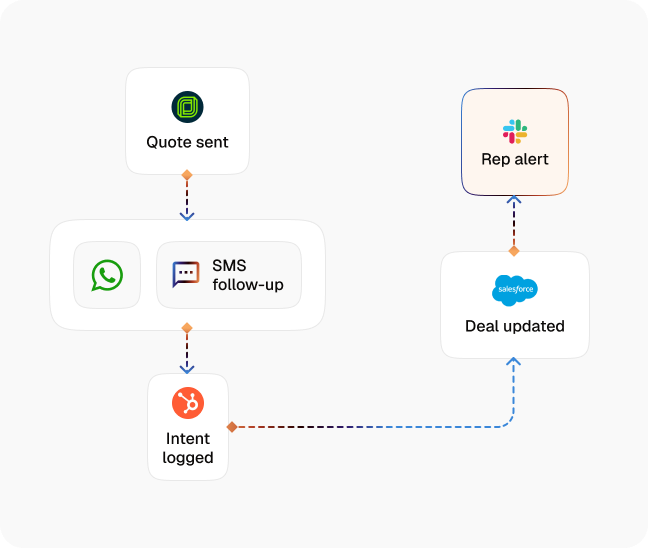
Quote Trigger
A quote is marked sent in your CRM — CogniAgent starts a follow-up sequence on the prospect's channel automatically, timed to your cadence.
Paced Multi-Touch Cadence
The agent reaches out on a schedule you define — not a burst of identical emails, but spaced, contextual touches that reference the specific quote and keep the deal warm.
Questions & Objections Handled
When the prospect replies, the agent answers questions about pricing, scope, terms, or timeline from your Knowledge Base — resolving the small friction that was holding up a yes.
Terms Clarification
Line-item questions and minor scope adjustments are clarified in conversation. Anything requiring a new price or approval is routed to the rep with the full thread attached.
Buying-Signal Handoff
The moment a prospect signals readiness (a question about next steps, a request to proceed) the agent hands the live conversation to the rep, briefed and ready to close.
CRM Sync
Every touch, reply, and status change is logged to HubSpot or Salesforce. The deal stage updates on its own, so the pipeline reflects reality without manual entry.
The Real Impact for Trades & Service Businesses
| Metric | Before Automation | After (With AI Agent) |
|---|---|---|
| Quotes that receive follow-up | 40–50% | 100% |
| Average follow-up touches per quote | 1–2 | 4–6 (paced) |
| Quote-to-close rate | 20–30% | 35%+ |
| Deals lost to no follow-up | 25–35% | Under 8% |
| Rep hours spent chasing quotes | 4–6 hours/week | Under 1 hour/week |
Seamless Setup Timeline
Step 1
Load your pricing rules, terms, and common objection responses into the Knowledge Base.
Step 2
Connect your CRM so the sequence triggers the moment a quote is marked sent — HubSpot, Salesforce, or your quoting tool.
Step 3
Set your follow-up cadence, touch count, and the buying-signal conditions that hand the deal back to a rep.
Step 4
Define escalation rules for re-quotes or approvals that need a human before any new terms go out.


![Best AI Tools for Auto Repair Shops [2026 Guide]](https://cogniagent-preview-def77a0f.nyc3.digitaloceanspaces.com/media/2026/07/Best-AI-Tools-for-Auto-Repair-Shops-2026-Guide.png)

Frequently Asked Questions
The agent follows up proactively over email or SMS and continues the conversation wherever the prospect replies, including WhatsApp and web chat. Cadence and channel are set per deal type.
No. Touches are spaced to your cadence and capped, each one references the specific quote, and the sequence stops the moment a prospect responds, asks to pause, or says no. It's designed to nudge, not badger.
Only within limits you set. The agent clarifies existing terms and answers pricing questions from your Knowledge Base; any new price, discount, or approval is routed to the rep — no unauthorized terms ever go out.
The moment there's a buying signal or a request that falls outside your guardrails, the agent hands the live conversation to the rep with the full thread and quote context, so the close happens with a person.

No results