Article Updated Nov 19, 2026
 10 min read
Conversational AI in Retail: Use Cases, Setup, and Limits
Updated Nov 19, 202610 min read Updated Nov 19, 202610 min read
A retail conversational AI assistant can help answer product questions, check orders, or collect service requests when it has the right information and permitted connections. A useful implementation distinguishes three outcomes: an answer to a question, a request for an action, and a change confirmed in the store’s system. They are not interchangeable.
For a store with online and physical locations, start with a specific question: “Is this item available at my local store, and can I collect it?” The answer depends on the product variant, location, and inventory freshness. A pickup request or reservation needs its own confirmation.
Choose one task with an owner and a completion condition. For example, a store operations manager might start with availability questions for a single location and define completion as an answer based on the correct product variant and an inventory record within the store’s freshness limit.
Choose the conversation channel and identify the source for each answer. A catalog might describe sizes and materials, while another system holds location-specific stock. A returns policy cannot establish whether a particular return has been approved.
Before configuring a workflow, assemble:
Start with read-only answers if writes are not needed. Product lookup does not authorize a reservation, order change, or refund.
These workflow design examples separate customer requests from required sources, permissions, and evidence; they are not prebuilt CogniAgent operations.
|
Customer request |
Required source |
Permitted response or action |
Completion evidence |
When staff must review |
|---|---|---|---|---|
|
Ask about a product |
Approved catalog and product details |
Answer from the applicable product information |
Answer matches the identified product and source |
Missing or conflicting details; advice outside the approved scope |
|
Check a size or color at a store |
Current inventory for the SKU, variant, and location |
Report the source’s availability status and any freshness limit |
Matching record and its update time or other freshness evidence |
Unknown variant, stale data, mismatched store, or unavailable source |
|
Ask about an order |
Order system and an approved customer-identity check |
Provide authorized status information after verification |
Matching order and status in the authorized source |
Identity cannot be verified, information conflicts, or a change is requested |
|
Ask about a return |
Current policy and, where needed, authorized order information |
Explain the policy or collect a return request |
Policy reference or a recorded request, as applicable |
Eligibility is uncertain, an exception is needed, or approval is requested |
|
Request an appointment or pickup |
Store location, relevant availability, and an authorized booking or request system |
Provide options or submit a request if the required action exists |
An identifiable request or confirmed booking in the destination system |
No available slot, a rejected action, or an unclear result |
|
Ask about payment or checkout |
Approved checkout guidance and secure payment process |
Explain the next step or direct the customer to the store’s secure checkout |
Customer receives the correct guidance; payment is verified in the payment system if applicable |
Payment failure, dispute, or a request outside approved guidance |
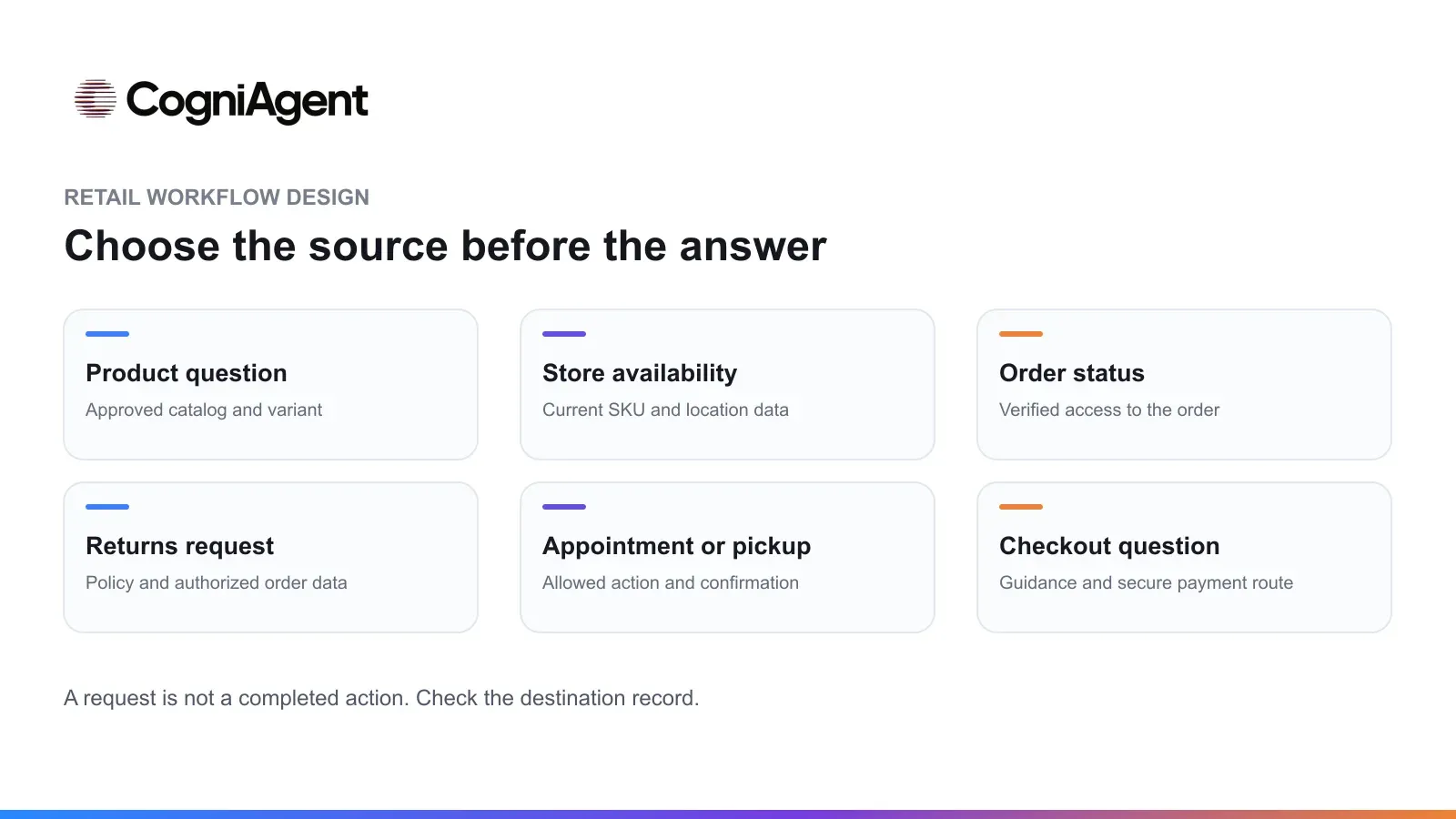
Different retail questions require different sources and, where applicable, evidence of an authorized action.
Do not ask customers for complete card numbers or payment secrets in the conversation. A refund or address-change question is not permission to execute it.
The following is an illustrative workflow, not a customer case or a tested CogniAgent configuration. A shopper asks whether a jacket in a particular size and color is available at a specified store and whether it can be collected there.
First, the assistant identifies the requested product, variant, and location. If the shopper omits the size, color, or store, it asks for the missing detail rather than checking a different variant. If the customer changes the location, the assistant checks the new location instead of reusing the earlier result.
Next, the workflow queries an approved inventory source, assuming a suitable connection and read action exist. It reports what that source establishes, including any relevant qualification about freshness. A stock value is a snapshot: it should not be presented as a guaranteed reservation.
The store should distinguish these outcomes:
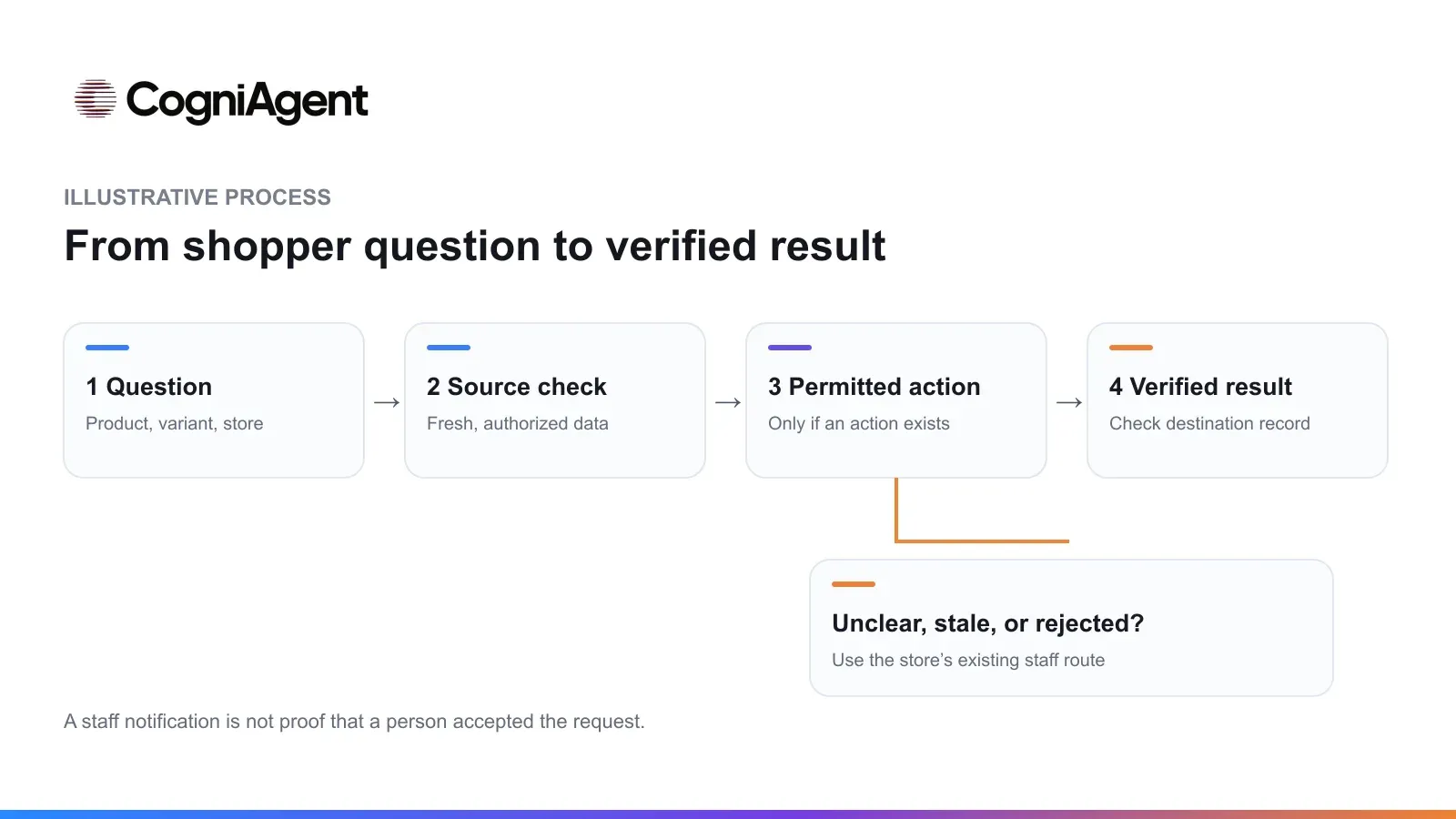
An illustrative workflow separates the source check, any permitted action, and the verified result. Exceptions follow the store’s existing staff route.
Without a reservation action, the assistant should not imply that an item is held.
Failure paths need equally clear responses. If inventory is unavailable or too old, say that availability cannot be confirmed. If a booking or reservation action is rejected, do not report success. If a tool response is ambiguous, check the destination record or direct the request to the store’s existing staff process rather than making another write immediately.
If the customer asks for an employee, explain the available route—such as the store’s existing phone or support channel. AI-to-human handoff describes the design problem, but CogniAgent’s human handoff feature is not currently available and no release date has been announced. Routing between AI actors is not the same as transferring a conversation to an employee. An integration notification, if configured, also does not prove that a person has accepted the request.
These are implementation recommendations, not interface instructions.
CogniAgent’s capabilities documentation describes knowledge access and connected capabilities. Actual implementation still depends on the application, connection, selected action, permissions, and the systems the retailer uses.
A reassuring response does not prove that a query returned the correct variant or created a reservation. Check the source and destination records.
|
Test scenario |
Expected result |
Where to verify |
|---|---|---|
|
Normal availability request |
The answer refers to the correct product variant and store |
Conversation and matching inventory record |
|
Unknown SKU |
The assistant asks for clarification or says it cannot find the item |
Conversation and lookup result; no substituted item |
|
Another person’s order without sufficient verification |
No private order details are disclosed |
Identity-check outcome and conversation |
|
Inventory is stale or unavailable |
Availability is not represented as confirmed |
Source freshness evidence and response |
|
Booking or reservation write fails |
No successful booking or reservation is claimed |
Tool result and destination system |
|
Customer repeats a request |
The process checks for an existing result before another write |
Request identifier or other deduplication evidence in the destination |
|
Customer asks for a person |
The assistant provides the store’s existing staff contact route |
Conversation and, if applicable, the store’s notification record |
Define and test the duplicate check; do not assume it happens automatically. A notification record shows a message was sent, not that an employee accepted ownership.
Choose measures that reflect the task and the evidence available. Define the scope, observation window, and sources before comparing results.
If you measure conversion, specify the eligible population, the event counted as a conversion, the observation window, and the source of that event. A before-and-after comparison can help identify a change worth investigating, but it does not by itself prove that the assistant caused it.
Review failed and uncertain cases alongside completed ones before expanding the workflow.
CogniAgent’s conversational AI platform can be considered for a workflow that combines approved knowledge with selected actions in connected applications. Its conversation flow overview describes actors within a flow; the required connections and actions must still be checked for the retailer’s specific systems. A sandbox can be part of a test process where available and appropriately configured.
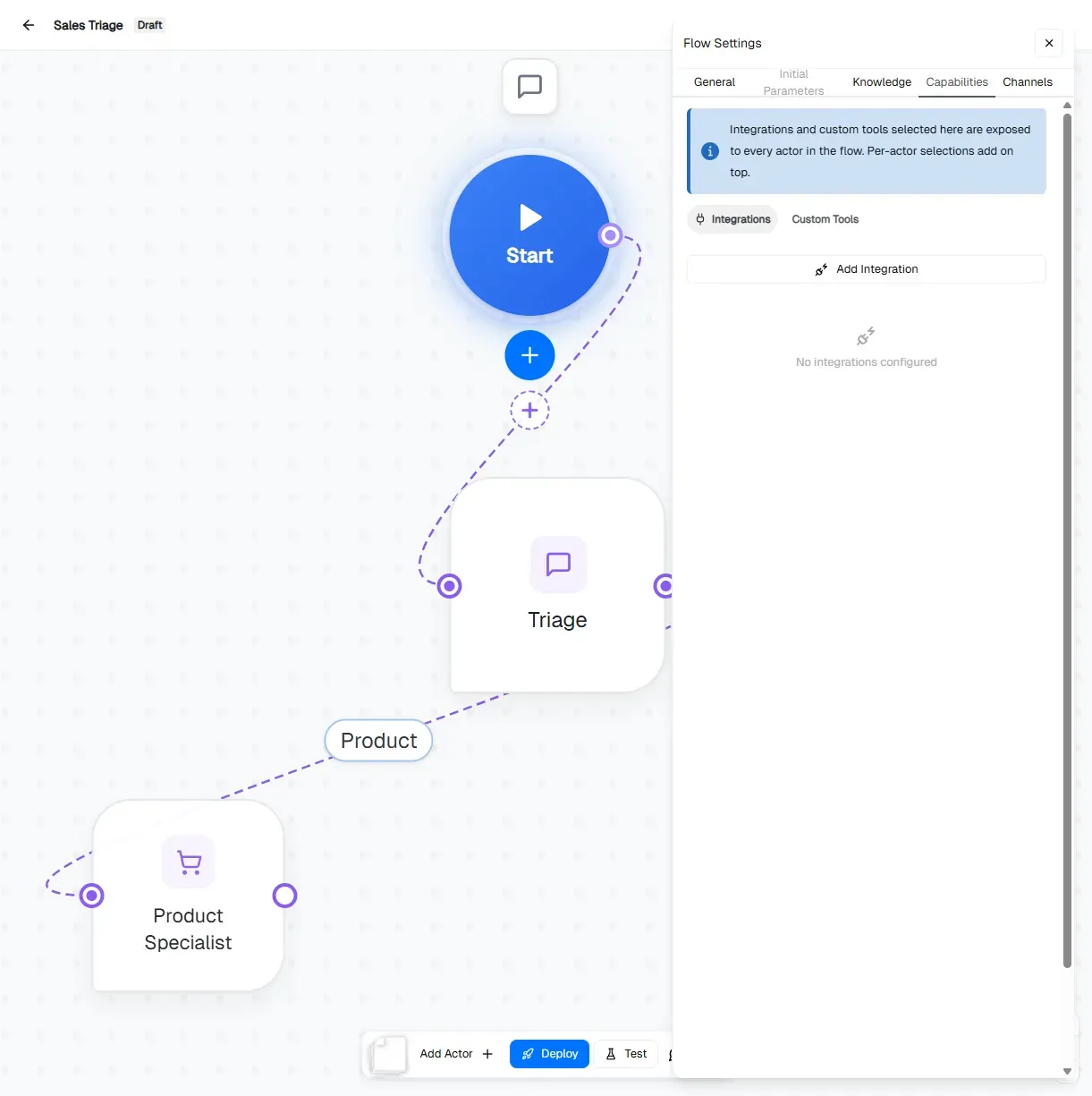
An example from the CogniAgent documentation shows a conversation flow and its capabilities settings. It is not a configured retail workflow.
The platform does not replace the retailer’s responsibility for data freshness, permissions, exception handling, or verification. A store also needs a named owner and an existing way for customers to reach staff when the workflow cannot complete a request.
To explore the product in this context, see conversational AI for retail. Start by selecting one customer request and writing down the evidence that will show whether a limited pilot has completed it correctly.