Article Updated Oct 26, 2026
 10 min read
AI-to-Human Handoff: When to Escalate and What Context to Transfer
Updated Oct 26, 202610 min read Updated Oct 26, 202610 min read
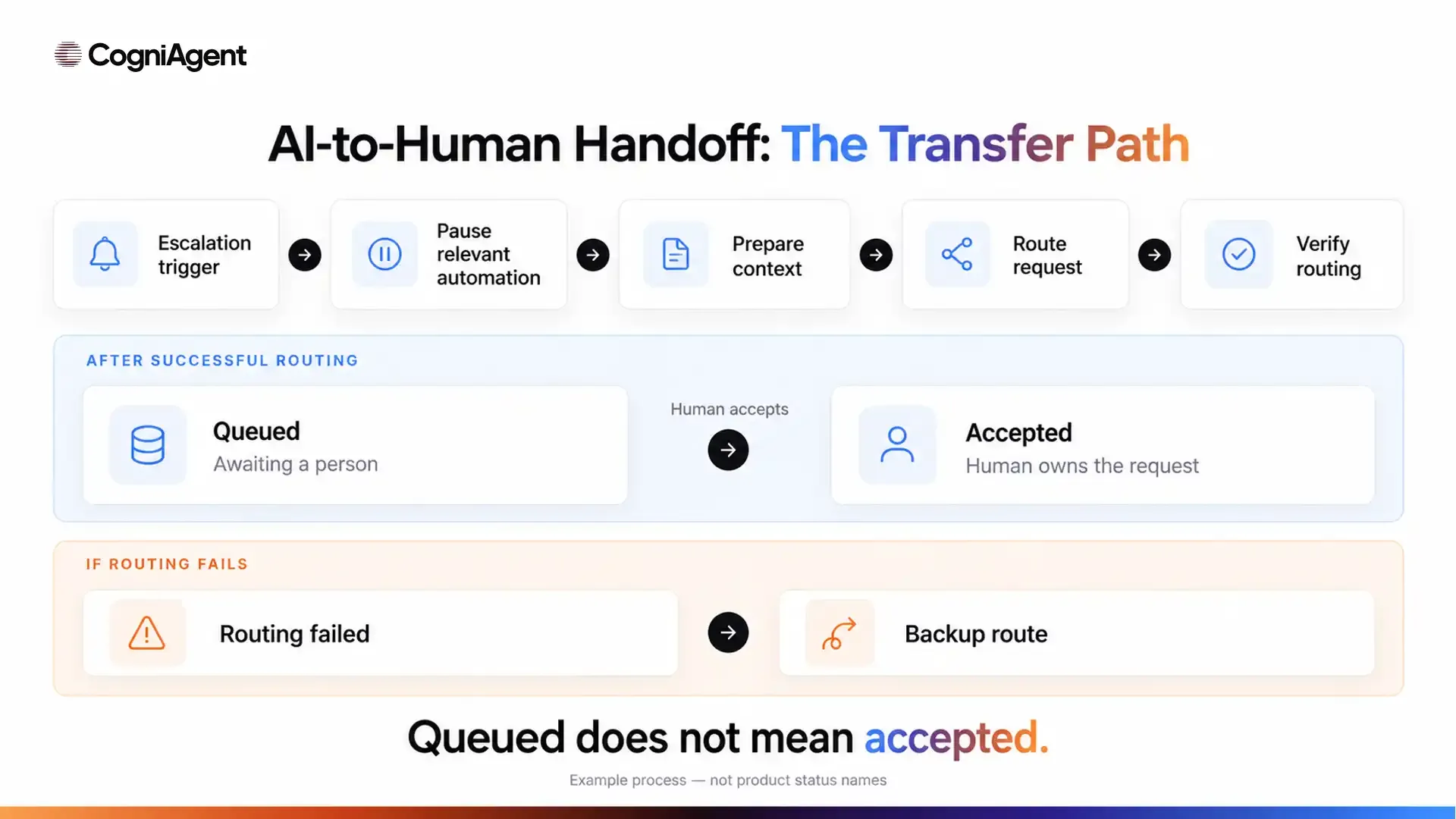
An AI-to-human handoff transfers responsibility for a request, along with the information needed to handle it, from an automated system to a designated person or team. It needs a trigger, a receiving owner, a fallback, and evidence that the intended transfer step succeeded.
“I’ve contacted our team” is not that evidence. A created ticket may establish that a request entered a queue. It does not establish that someone accepted it, joined the conversation, or resolved the problem.
CogniAgent availability: Human handoff is not currently available on the platform. It is planned for an upcoming release, with no release date announced. This guide explains general handoff design principles, not a feature you can enable in CogniAgent today.
Escalation flags a request for additional authority, expertise, or support. Human takeover means a person actually begins handling the interaction. Your workflow may provide one without immediately providing the other.
Keep these outcomes distinct:
Sending an email does not prove it was read. Routing between specialist AI actors is still automated routing.
The distinction applies across conversational systems; the separate AI agent vs chatbot article covers terminology rather than handoff implementation.
Define triggers around observable situations and business authority. Do not make customers complete additional dialogue loops simply to discourage escalation.
|
Trigger |
What AI should stop doing |
What it may still collect |
Human owner |
|---|---|---|---|
|
Customer explicitly requests a person |
Continuing automated troubleshooting as a condition of transfer |
Preferred contact method, if needed |
Support queue or available representative |
|
Request falls outside approved rules |
Inventing an answer or commitment |
The request and desired outcome |
Relevant service specialist |
|
Price, refund, or terms require an exception |
Approving the exception |
Relevant order or booking reference |
Authorized manager |
|
Material details conflict |
Choosing one version without clarification |
The correction and unresolved discrepancy |
Record owner or coordinator |
|
Repeated clarification is not helping |
Repeating the same questions |
A short description for staff |
Support representative |
|
A required tool is unavailable |
Claiming it checked or changed something |
Details needed for follow-up |
Operational owner |
|
An attempted action has an unknown result |
Reporting success or blindly retrying |
The attempted operation and reference |
Integration support or process owner |
|
A complaint requires a staff decision |
Offering an unauthorized remedy |
Factual account and requested resolution |
Complaints owner |
Set clarification limits and other thresholds through testing. There is no universal confidence percentage or mandatory number of unsuccessful answers that fits every process.
Collect only what helps the receiving person act. A handoff should not become another long intake interview.
The method must match the channel, staff availability, and capabilities of the systems you choose. The options below describe general implementation patterns, not currently available CogniAgent handoff features.
|
Method |
When it fits |
What it requires |
Evidence of success |
|---|---|---|---|
|
Live chat takeover |
A representative can continue the current chat |
Supported shared conversation access and ownership controls |
Representative joins the correct conversation |
|
Live call transfer |
A caller needs another person during the call |
Supported telephony transfer and a valid destination |
Receiving connection is established, not merely dialed |
|
Assigned ticket or review queue |
Work can continue asynchronously |
A record destination, assignment rules, and queue ownership |
Correct record exists in the intended queue with an assigned team or owner |
|
Callback request |
Live assistance is unavailable or unsuitable |
Contact details, callback ownership, and a follow-up process |
Request is recorded and routed; the later callback is a separate outcome |
Do not describe a callback request as a transferred call.
When nobody is available, explain the verified next step: “Your request is recorded for the service team to review.” Promise a response time only when an applicable service rule supports it.
Define who monitors the fallback queue and what happens when its assigned owner is unavailable. Otherwise, successful routing can still leave the customer without follow-up.
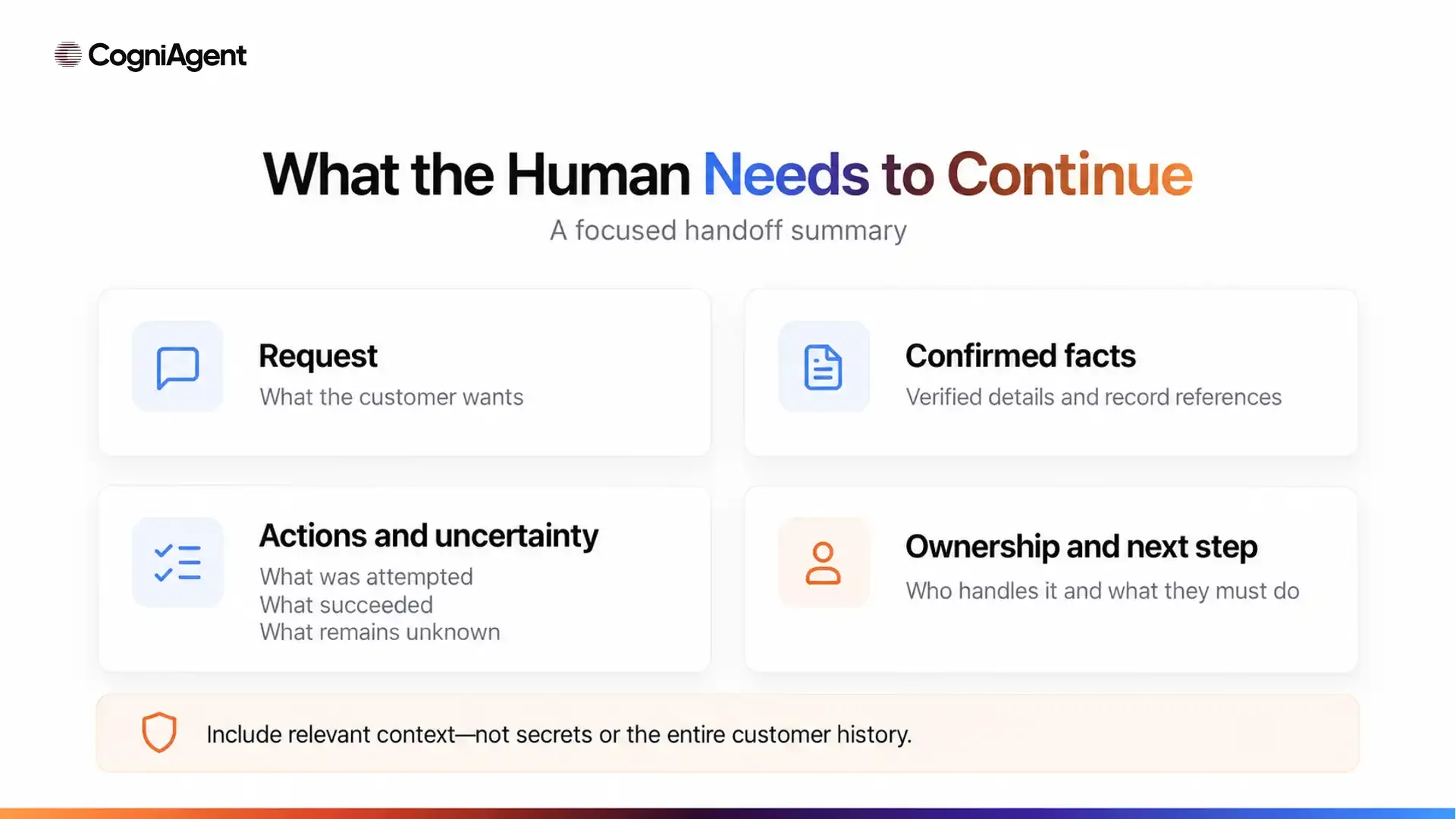
Transfer enough information to continue the work without exposing unrelated customer history. The recipient needs the current request, reliable facts, unresolved issues, and the next decision—not an unfiltered transcript dump.
Use this handoff template:
Conversation/reference ID:
Channel and timestamp, including time zone:
Customer’s request and desired outcome:
Relevant confirmed details:
Verification status, where applicable:
Reason for escalation:
Actions already attempted:
Verified outcomes and unresolved results:
Pending approvals or scheduled messages:
Assigned team or owner:
Next required action:
Relevant transcript or system-record reference:
Distinguish three kinds of information:
Do not present an AI-generated summary as independent verification. Give staff access to the relevant source passage or record where appropriate.
When the customer corrects a detail, update the active handoff information. Retain a clear change history where necessary, but do not leave the old value appearing current.
Keep credentials, payment details, and unrelated sensitive information out of the summary. Use controlled record references rather than copying private data into every notification.
Consider an illustrative cleaning company whose customer wants to move an agreed appointment and add oven cleaning. The additional work requires a manager to review scope and price. This is a proposed process, not a customer case or a tested CogniAgent deployment.
The assistant may retrieve the existing booking through a permitted read action and record the requested change. It must not approve a new price or describe the revised appointment as confirmed.
A filled handoff summary could look like this:
Conversation/reference ID: DEMO-042
Channel and timestamp: Web chat; 22 October 2026, 09:30 UTC
Request and desired outcome: Move the existing cleaning appointment to the afternoon and add oven cleaning.
Confirmed details: Booking DEMO-B17 exists for 26 October, 10:00 UTC; its current scope excludes oven cleaning.
Verification status: Booking reference matched; any additional identity checks remain with the approved change process.
Reason for escalation: Added scope requires manager pricing approval.
Actions attempted: Read booking; record requested changes; queue review.
Outcomes: Existing booking unchanged; review record created.
Unresolved: Revised price and afternoon availability.
Pending activity: Scope-related follow-up held in this example workflow.
Assigned owner: Cleaning operations review queue.
Next action: Manager checks scope, availability, and revised price.
Record reference: Linked test booking and relevant conversation excerpt.
Tell the customer what is actually established: “Your change request is recorded for review. Your existing booking has not changed, and the additional service needs manager approval.”
In this proposed workflow, hold automated messages that would treat the requested scope or time as approved. Do not silently cancel the original appointment or suppress necessary service communications without an explicit rule.
If the manager is unavailable, retain the request in the monitored queue and use the approved follow-up channel. Confirm queuing only after verifying the record.
The AI receptionist for cleaning companies page provides sector-specific product context, and the AI receptionist implementation guide covers agent setup. Neither link should be read as an offer of currently available human handoff in CogniAgent.
Assign one active owner for the request. Decide which parts of automation can continue and which must wait for human review.
A proposed process model is:
Requested → Queued → Accepted → Resolved
These are suggested workflow states, not CogniAgent status names.
Keep routing failures visible rather than marking them queued.
Identify pending reminders, quote follow-ups, retry jobs, and generated responses associated with the request. Hold messages that would conflict with staff handling.
Check already queued jobs as well as future triggers. A conversation instruction alone should not be assumed to cancel messages scheduled in another system.
During live takeover, configure the assistant to stop competing with the person. For asynchronous review, it may provide a verified status update without reopening the disputed decision.
Use a conversation or case reference to recognize repeated events. Check for an existing escalation before creating another record.
If the customer returns with a correction, attach it to the active case and alert the owner where necessary. Do not make them start over or create a disconnected second request.
Resume automation only after an authorized status change or explicit handback. Check that obsolete messages have been canceled or updated and that the next action reflects the human decision.
Resolution may mean ending the workflow rather than restarting it.
Test the promised outcome, not just the assistant’s wording.
Record creation, assignment, and human acceptance require separate evidence. A notification result can support “notification sent”; it cannot support “a representative is reviewing your request.”
|
Scenario |
Expected behavior |
Evidence to inspect |
|---|---|---|
|
Customer asks for a person |
Route without forcing further troubleshooting |
Conversation and escalation event |
|
Employee is available |
Use the configured live or assigned route |
Correct representative joins or explicitly accepts |
|
Employee is unavailable |
Record the fallback request and explain the next step |
Monitored queue record and customer message |
|
Notification fails |
Flag failure and use the defined backup |
Failed delivery result and fallback record |
|
Task-creation result is unknown |
Check before retrying; do not claim success |
Destination search and execution record |
|
Same event is processed twice |
Reuse the escalation instead of duplicating it |
One active case linked to the source event |
|
Customer corrects details before transfer |
Pass the latest information with necessary history |
Summary, source excerpt, and destination fields |
|
Automated follow-up is already queued |
Hold or revise conflicting communication |
Scheduler state and actual send history |
|
Human accepts the request |
Update ownership and prevent competing replies |
Acceptance event, owner record, and conversation |
|
Case closes |
End or resume according to the recorded outcome |
Final status, pending jobs, and next action |
Include missing contact details and unavailable backup owners in the pilot. Assign someone to investigate failures and repeat affected checks after corrections.
The broader guide to testing an AI agent before launch covers permissions and external-state verification beyond this handoff-specific checklist.
Human handoff is a planned addition to CogniAgent’s conversational AI platform. It is not currently available, and no release date has been announced.
The scenarios, transfer methods, and verification checklist in this guide describe how a handoff process should be designed and evaluated. They are not a specification of the upcoming feature or a promise that every method listed will be supported.
For existing agent configuration, consult the CogniAgent capabilities documentation. Integration actions, workflow calls, and routing between AI actors should not be treated as evidence that human takeover is available.
While planning a future handoff process, write down the receiving owner, backup route, and exact evidence needed before an assistant may tell the customer that a transfer step succeeded. Confirm the supported behavior against the released documentation before implementing it.