Showing Appointment Scheduler
Let buyers book showings instantly — without back-and-forth
Core Automation Capabilities

Real-Time Agent Calendar Sync

Online Showing Booking Links

Email & SMS Confirmation Automation

CRM Event Logging & Activity Tracking

Automated Reminders & Follow-Ups

Self-Service Rescheduling & Cancellations
Every Scheduling Delay Costs You Momentum
Back-and-Forth Slows Buyers Down
Email and text coordination creates friction and often causes buyers to disengage before a showing is confirmed.
Agent Availability Isn’t Always Clear
Without real-time calendars, agents double-book or miss opportunities altogether.
Manual Scheduling Creates Errors
Missed confirmations, wrong times, or forgotten reminders lead to no-shows and lost trust.
How It Works
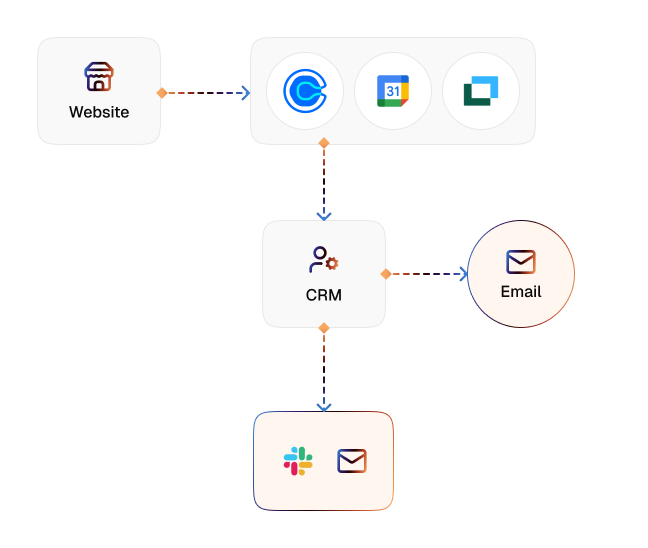
Availability Sync
CogniAgent connects to agent calendars and displays real-time availability for showings.
Online Booking Experience
Prospects select a date and time directly from your website, listing page, or follow-up email.
Instant Confirmation
Auto-sends confirmation emails and SMS messages to buyers, agents, and listing contacts.
CRM Event Creation
Logs the showing as an event in your CRM with full context: property, lead, agent, and time.
Smart Reminders
Sends automated reminders before the showing to reduce no-shows.
Reschedule & Cancellation Automation
Allows buyers to reschedule or cancel with one click, keeping calendars accurate.
The Real Impact for Real Estate Teams
| Metric | Before Automation | After (With AI Agent) |
|---|---|---|
| Time to schedule a showing | 1–3 days | Under 2 minutes |
| No-show rate | 20–30% | <10% |
| Manual scheduling effort | 100% manual | Fully automated |
| Calendar conflicts | Frequent | Near zero |
| Showings booked per lead | 1.2 avg | 1.8–2.3 avg |
| Agent availability visibility | Limited | Real-time |
| Lead drop-off before showing | High | Reduced by 40–55% |
Step-by-Step Setup
Step 1
Connect agent calendars, your CRM, and property listings.
Step 2
Define booking rules, availability windows, and buffer times.
Step 3
Embed booking links on listing pages, emails, or auto-responses.
Step 4
Watch prospects schedule showings instantly, while calendars stay perfectly in sync.


![Best AI Tools for Auto Repair Shops [2026 Guide]](https://cogniagent-preview-def77a0f.nyc3.digitaloceanspaces.com/media/2026/07/Best-AI-Tools-for-Auto-Repair-Shops-2026-Guide.png)

Frequently Asked Questions
Yes. Prospects can book directly from available time slots based on the agent’s real calendar. Agents stay in control while eliminating unnecessary back-and-forth.
CogniAgent syncs with agent calendars in real time and automatically blocks booked slots across all connected systems, ensuring no overlaps or conflicts.
Yes. Buyers can reschedule or cancel with one click. All updates instantly reflect in the agent’s calendar and CRM, keeping everyone aligned.
Absolutely. The scheduler supports multiple agents, territories, and shared listings, making it ideal for brokerages and high-volume teams.
Yes. You can fully customize confirmation and reminder messages with branding, property details, agent contact info, and compliance disclaimers.

No results