Reservation Confirmation & No-Show Reduction
Fill every slot. Eliminate no-shows without lifting a finger.
Core Automation Capabilities

Booking-Triggered Confirmation Flow

Two-Way Acknowledgment Handler

Tiered Multi-Channel Reminder Engine

In-Conversation Reschedule Manager

No-Show Recovery Outreach

Calendar & CRM Sync Connector
No-Shows Are a Hidden Revenue Leak
Unconfirmed Bookings
Reservations made without explicit confirmation are treated as optional by customers, leading to last-minute cancellations and empty slots.
Manual Reminder Burden
Calling or texting every customer ahead of their appointment consumes staff time that should be on billable work.
No Structured Reschedule Path
When a customer cancels, there's no automatic mechanism to offer a new slot — that revenue walks out the door.
How It Works
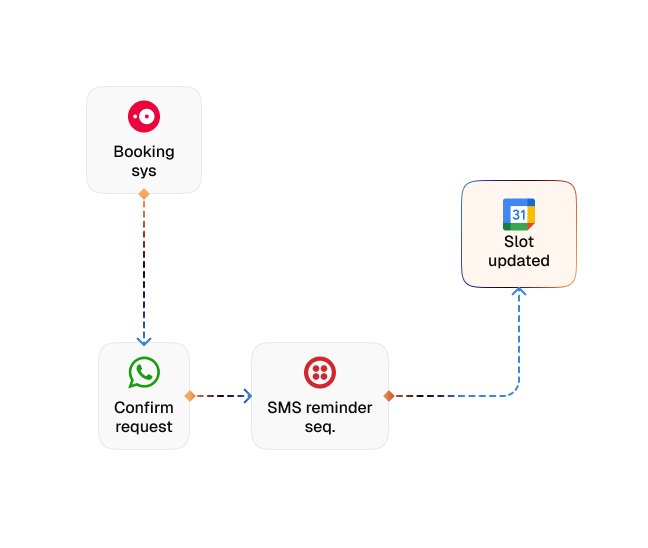
Booking Trigger
The moment a reservation is created in your scheduling system, CogniAgent initiates a confirmation conversation automatically.
Confirmation Collection
The agent sends a structured message requesting explicit acknowledgment — not just a reminder, but a confirmed yes or reschedule.
Tiered Reminder Sequence
Automated reminders are sent at defined intervals (48 hours, 24 hours, and same-day) across the customer's preferred channel.
Reschedule Handling
If a customer can't make it, the agent offers available alternative slots and completes the reschedule in the same conversation.
No-Show Follow-Up
For missed appointments, the agent automatically reaches out with a rebooking prompt, recovering the slot rather than writing off the revenue.
Calendar & CRM Sync
Every confirmation, reschedule, or cancellation is logged and synced to your scheduling tool and CRM in real time.
The Real Impact for Service & Hospitality Businesses
| Metric | Before Automation | After (With AI Agent) |
|---|---|---|
| No-show rate | 15–25% | <5% |
| Confirmation rate before appointment | 40% | 95%+ |
| Staff time spent on reminders (weekly) | 3–6 hours | 0 |
| Rescheduled slots recovered | <20% | 70%+ |
| Revenue lost to unfilled slots (monthly) | High | Significantly reduced |
Seamless Setup Timeline
Step 1
Connect your booking or scheduling system.
Step 2
CogniAgent starts sending confirmation requests and reminder sequences automatically for every new booking.
Step 3
Reschedules and cancellations are handled in conversation, with your calendar updated in real time.
Step 4
Your team sees a full schedule, fewer empty slots, and zero time spent on manual reminders.


![Best AI Tools for Auto Repair Shops [2026 Guide]](https://cogniagent-preview-def77a0f.nyc3.digitaloceanspaces.com/media/2026/07/Best-AI-Tools-for-Auto-Repair-Shops-2026-Guide.png)

Frequently Asked Questions
CogniAgent reaches customers on their preferred channel — SMS, WhatsApp, or voice — based on how they originally booked or what your team configures. The confirmation conversation is two-way, so the agent handles replies, reschedule requests, and cancellations without any staff involvement.
Yes. When a customer cancels, the agent acknowledges the cancellation, updates your calendar in real time, and immediately initiates a rebooking prompt to offer an alternative slot. The goal is to recover the revenue from the cancelled appointment, not just log the loss.
CogniAgent integrates with most major scheduling and booking platforms — including Calendly, Acuity, Mindbody, Vagaro, Square Appointments, Jobber, and any system with a calendar API. Your onboarding expert will confirm compatibility and configure the connection during setup.
Yes. You control the timing and number of reminders — for example, 48 hours out, 24 hours out, and same-day morning. You can also set different reminder cadences for different appointment types or customer segments.
CogniAgent handles both individual and group bookings. For group reservations, confirmation can be sent to the primary contact with details covering the full party, and reschedule logic accounts for group size when checking availability.

No results