Interview Scheduling Agent
Book interviews across complex multi-person calendars in seconds — with zero back-and-forth emails between recruiters and candidates.
Built to Run Without Intervention

Real-Time Multi-Calendar Integration

Candidate Self-Select Booking Flow

Automated Video Link & Room Assignment

Time Zone Detection & Conversion

Reschedule Management & Re-booking Engine

Pre-Interview Reminder Sequences
The Scheduling Problem That Slows Every Hire
Calendar Coordination Eats Recruiter Hours
Aligning a candidate, a recruiter, and two panel members across different time zones can take a full day of emails, and that's before anyone reschedules.
Candidate Experience Suffers From the Wait
Top candidates move fast. Every day spent exchanging availability messages is a day your competitor could be making an offer.
Reschedules Create Compounding Delays
A single last-minute cancellation can push an interview by a week when rescheduling is handled manually, adding drag to an already long hire cycle.
How It Works
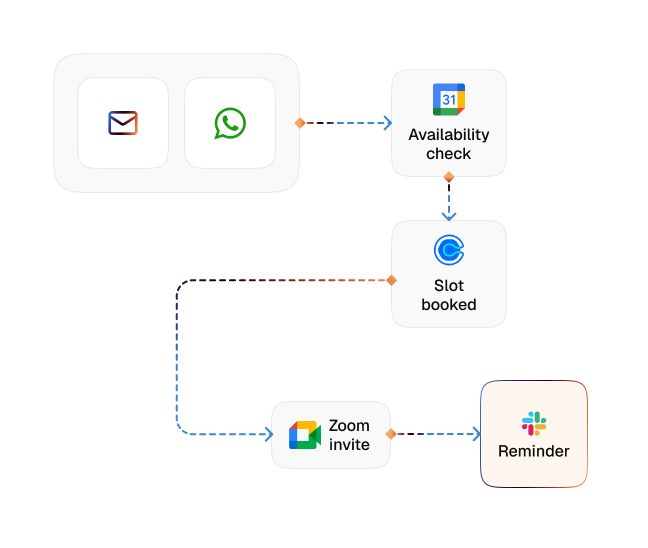
Schedule Request Trigger
When a candidate advances to the interview stage, CogniAgent automatically opens a scheduling workflow, no manual kick-off needed.
Multi-Calendar Availability Check
The agent pulls real-time availability from all required participants (candidate, recruiter, and panel members) simultaneously.
Optimal Slot Proposal
Based on overlapping windows and configured preferences (time zones, buffer times, preferred hours), CogniAgent proposes the best available slots to the candidate.
Candidate Confirmation
The candidate selects a slot via a simple link — no account creation, no back-and-forth. The agent confirms the booking instantly.
Calendar Invites & Room/Link Setup
Invitations are sent to all participants, with video conferencing links or room booking details included automatically based on the interview format.
Reminder & Reschedule Handling
The agent sends timely reminders to all parties and manages reschedule requests autonomously, rebooking within the same approved window without recruiter involvement.
See the Difference
| Metric | Before Automation | After (With AI Agent) |
|---|---|---|
| Avg. time to schedule an interview | 1–3 days | Under 10 minutes |
| Recruiter emails per interview booked | 6–12 | 0 |
| Last-minute cancellation recovery time | 1–4 days | Same day |
| Candidate scheduling drop-off rate | 15–20% | Under 3% |
| Interviews scheduled per recruiter/week | 8–12 | 40+ |
Step-by-Step Setup
Step 1
Connect your calendar system (Google Calendar, Outlook/Microsoft 365) and define scheduling rules — buffers, preferred hours, and panel requirements per interview stage.
Step 2
Integrate your ATS so candidate stage progressions automatically trigger scheduling workflows.
Step 3
Link your video conferencing platform (Zoom, Teams, Google Meet) for automatic link generation.
Step 4
CogniAgent handles all scheduling from trigger to confirmation — recruiters receive a booked calendar notification, nothing more.

![Best AI Tools for Auto Repair Shops [2026 Guide]](https://cogniagent-preview-def77a0f.nyc3.digitaloceanspaces.com/media/2026/07/Best-AI-Tools-for-Auto-Repair-Shops-2026-Guide.png)

Frequently Asked Questions
CogniAgent connects with Google Workspace and Microsoft 365/Outlook natively. For other calendar systems, integration is available via CalDAV or API.
Yes. The agent checks availability across all required attendees simultaneously and only proposes slots where everyone is free — no manual cross-referencing needed.
The agent sends configured follow-up reminders after set intervals. If there's still no response after a final nudge, the recruiter is notified to decide on next steps.
Absolutely. You define the boundaries (no interviews before 9 AM, no Fridays, specific slots reserved for senior hires) and CogniAgent works within them automatically.

No results