Employee Offboarding Coordinator
Trigger every departure task automatically the moment an exit is confirmed — from IT revocation to final payroll, without a checklist in sight.
The Full Scope of Automation

HRIS-Triggered Offboarding Workflow

Automated IT Access & Account Revocation

Equipment Return Tracking & Logistics

Exit Survey Delivery & Response Capture

Payroll & Benefits Finalisation Trigger

Offboarding Closure Audit Log
Where Offboarding Goes Wrong Without Automation
Security Risks from Delayed Access Removal
Former employees retaining system access after their last day is a security and compliance issue that happens more often than organisations admit, because manual IT tickets get missed or delayed.
Payroll and Benefits Errors
Final pay calculations, accrued leave payouts, and benefits termination dates are prone to mistakes when handled reactively under time pressure.
Exit Insights Lost in the Process
When offboarding is chaotic, exit survey completion rates drop, and companies lose the feedback they need to address the root causes of attrition.
How It Works
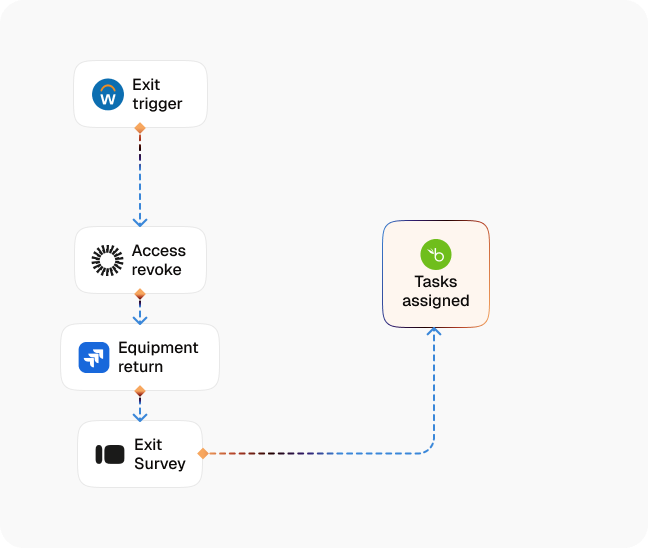
Exit Event Detection
A resignation, termination, or contract end is logged in your HRIS — CogniAgent detects the trigger and opens the offboarding workflow immediately.
IT Access Revocation
The agent sends automated provisioning requests to revoke system access, deactivate accounts, and disable SSO — timed to the employee's final working moment.
Equipment Return Workflow
The departing employee receives clear instructions and a pre-paid shipping label or in-office return schedule for company hardware.
Exit Survey Delivery
An exit survey is sent at the right moment in the departure timeline — early enough for the employee to respond thoughtfully, not on their final day.
Payroll & Benefits Finalisation
The agent triggers final pay calculations, accrued leave reconciliation, and benefits termination notices to the relevant teams with the required data pre-populated.
HR Closure Confirmation
Once all tasks are complete, a structured offboarding summary is logged, confirming IT, payroll, and documentation steps are resolved and the record is closed.
When the Process Finally Works
| Metric | Before Automation | After (With AI Agent) |
|---|---|---|
| Time to revoke system access after exit | 1–3 days | Same day (automated) |
| HR admin time per departure | 3–5 hours | Under 40 minutes |
| Payroll/benefits error rate on exits | 12–18% | Under 2% |
| Exit survey completion rate | 30–45% | 75%+ |
| Security incidents from delayed offboarding | Recurring | Near zero |
Step-by-Step Setup
Step 1
Connect your HRIS so CogniAgent detects exit events (resignation, termination, or contract end) and opens the workflow automatically.
Step 2
Map your offboarding checklist by employee type — full-time, contractor, and part-time may require different steps and timelines.
Step 3
Integrate with your IT provisioning system and payroll platform so revocation and finalisation requests are sent automatically.
Step 4
CogniAgent runs every step in parallel where possible — HR receives a live status view and a closed confirmation when the process is complete.

![Best AI Tools for Auto Repair Shops [2026 Guide]](https://cogniagent-preview-def77a0f.nyc3.digitaloceanspaces.com/media/2026/07/Best-AI-Tools-for-Auto-Repair-Shops-2026-Guide.png)

Frequently Asked Questions
Revocation requests are sent the moment the exit event is detected in your HRIS. Timing of actual access removal depends on your IT system's processing speed, but the trigger is immediate.
Yes. You can configure separate workflows for different exit types — terminations may require immediate IT action and a different communication tone than standard resignations.
The agent generates a pre-paid return shipping label and sends step-by-step instructions automatically. Tracking is monitored and HR is notified when hardware is received.
You control the survey audience. Many clients send separate surveys to the departing employee and their line manager to capture both perspectives on the exit.

No results