Consultation Booking Agent
Respond to every inbound lead in seconds, qualify the fit, and book the consultation straight into a rep's calendar — while your competitors are still drafting a reply.
Core Automation Capabilities

Instant Lead Response Engine

Qualification & Fit Scoring

Live Calendar Availability Booking

CRM Sync & Lead Enrichment

Automated Reminder & No-Show Recovery

Rep Routing by Territory or Product
Why Consultations Never Get Booked
The Form Is Where Leads Go to Wait
A high-intent visitor fills out "Book a Consultation" and waits a day for a reply. By the time a rep follows up, they've already had the conversation with someone who answered first.
Reps' Calendars Fill With the Wrong Calls
Without qualification up front, discovery slots get booked by prospects who were never a fit. Your most expensive people spend their week on calls that close nothing.
Booked Calls That Never Happen
A consultation booked with no confirmation and no reminder is a coin flip. No-shows waste the slot, cool the pipeline, and leave reps staring at an empty calendar block.
How It Works
Instant Engagement
A lead arrives through web chat, an ad click, or a form — CogniAgent responds within seconds, at any hour, before the intent fades.
Qualification in Conversation
The agent captures need, company size or budget, timeline, and decision-making role through natural dialogue — not a ten-field form the prospect abandons halfway.
Fit Routing
Qualified leads move straight to booking. Low-fit inquiries are handled gracefully or pointed to self-serve, so no rep time is spent on prospects who won't convert.
Live Booking
The agent reads real calendar availability and books the consultation into the right rep's schedule — no back-and-forth, no double-booking, no "what times work for you?"
CRM Logging
The lead, qualification summary, and booking are written to HubSpot or Salesforce automatically. The rep walks into the call already briefed on who they're meeting and why.
Reminders & Recovery
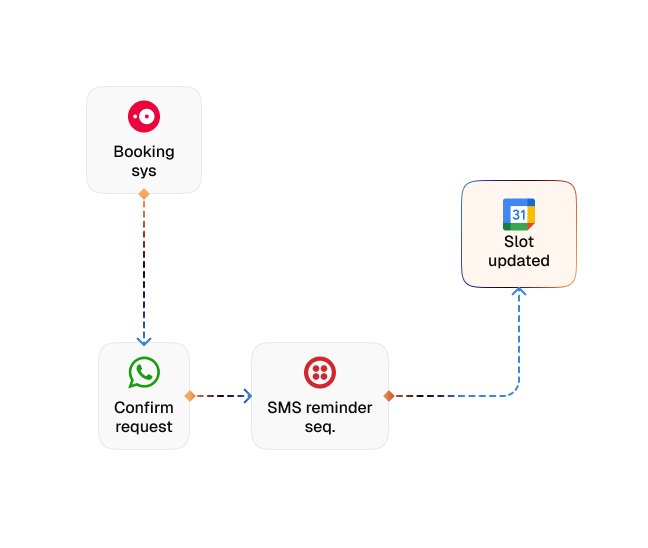
The agent confirms the booking, sends paced reminders, and (if the prospect misses or goes quiet) re-engages and rebooks instead of letting the lead disappear.
Impact of AI That Delivers Real Operational Wins
| Metric | Before Automation | After (With AI Agent) |
|---|---|---|
| Speed to first response | 12–24 hours | Under 1 minute |
| Lead-to-consultation booking rate | 15–25% | 40%+ |
| Unqualified calls on rep calendars | 40–50% | Under 10% |
| Consultation no-show rate | 25–35% | Under 12% |
| Sales hours spent scheduling | 5–8 hours/week | Under 1 hour/week |
Step-by-Step Setup
Step 1
Load your qualifying criteria, product or service details, and FAQs into the Knowledge Base.
Step 2
Connect your calendar and CRM — HubSpot, Salesforce, Calendly, or Google Calendar.
Step 3
Set qualification thresholds and routing rules by territory, product line, or deal size.
Step 4
Define your reminder cadence and the no-show recovery flow that rebooks missed slots automatically.


![Best AI Tools for Auto Repair Shops [2026 Guide]](https://cogniagent-preview-def77a0f.nyc3.digitaloceanspaces.com/media/2026/07/Best-AI-Tools-for-Auto-Repair-Shops-2026-Guide.png)

Frequently Asked Questions
The agent engages leads on your website widget and continues the conversation wherever they prefer — SMS, WhatsApp, or email. It can also proactively follow up over SMS or email when a lead goes quiet.
Against the criteria you set — need, budget or company size, timeline, decision-making authority. It draws on your Knowledge Base to answer product questions accurately, and only advances leads that clear your threshold; the rest are handled or routed without consuming rep time.
Yes. The agent reads live availability from the connected calendar and books the consultation into the correct rep's schedule, routed by your rules — no manual coordination and no double-booking.
The agent sends a confirmation and a capped series of spaced reminders before the call. If a prospect misses or stops responding, it automatically re-engages to rebook rather than leaving the slot lost.

No results