Appointment Reminder & Confirmation
Every appointment confirmed. Zero staff hours spent.
Core Automation Capabilities

Scheduling System Integration

Preferred Channel Delivery Engine

Two-Way Confirmation Handler

In-Conversation Reschedule Flow

Real-Time Calendar Sync

Staff Escalation Trigger
Unconfirmed Appointments Are Unreliable Revenue
Front Desk Overload
Manually calling or texting every client before their appointment is time-consuming and doesn't scale, especially as your booking volume grows.
Channel Mismatch
Reminders sent through the wrong channel (email to someone who only checks SMS) get ignored and generate no-shows.
No Two-Way Handling
One-way reminder blasts can't handle replies, reschedule requests, or cancellations, leaving staff to manage the fallout manually.
How It Works
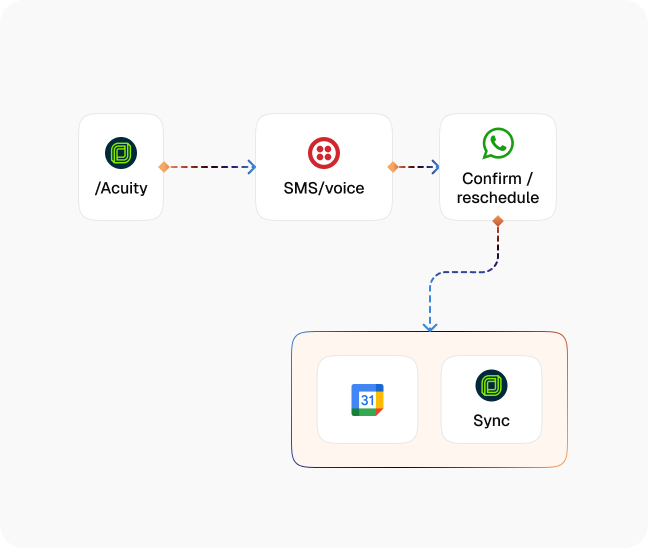
Appointment Detection
CogniAgent pulls upcoming appointments from your scheduling or calendar system and prepares personalized reminders.
Channel Selection
The agent identifies the customer's preferred communication channel (SMS, WhatsApp, or voice) and delivers the reminder there.
Confirmation Request
Each reminder prompts an explicit confirmation, giving the customer a simple way to confirm, reschedule, or cancel.
Reply Handling
Responses are processed in real time — confirmations are logged, reschedule requests are handled in conversation, and cancellations trigger the appropriate workflow.
Calendar Sync
Every status change is reflected immediately in your scheduling tool.
Escalation When Needed
If a customer raises a question outside the agent's scope, the conversation is escalated to a staff member with full context attached.
The Real Impact for Appointment-Based Businesses
| Metric | Before Automation | After (With AI Agent) |
|---|---|---|
| Staff time on reminder calls/texts (weekly) | 4–8 hours | 0 |
| Appointment confirmation rate | 50–65% | 95%+ |
| No-show rate | 15–20% | <5% |
| Reschedules handled without staff involvement | <30% | 90%+ |
| Customer satisfaction with communication | Moderate | High |
Seamless Setup Timeline
Step 1
Connect your calendar or scheduling platform and configure reminder timing.
Step 2
CogniAgent begins sending personalized, channel-matched reminders for every upcoming appointment.
Step 3
Replies, reschedules, and cancellations are handled automatically — your calendar stays accurate.
Step 4
Your team spends zero time on reminder logistics and focuses entirely on delivering the service.


![Best AI Tools for Auto Repair Shops [2026 Guide]](https://cogniagent-preview-def77a0f.nyc3.digitaloceanspaces.com/media/2026/07/Best-AI-Tools-for-Auto-Repair-Shops-2026-Guide.png)

Frequently Asked Questions
CogniAgent delivers appointment reminders via SMS, WhatsApp, and voice, based on the customer's preference or your default configuration. Each reminder is personalized with appointment details and prompts an explicit confirmation, so you always know who's coming.
Reminder timing is fully configurable. A common setup is three touchpoints (48 hours, 24 hours, and a same-day message), but you can adjust the timing and number of reminders to match your business type and appointment length.
Yes. Every reminder includes a clear option to confirm, cancel, or request a reschedule. If a customer asks to reschedule, the agent presents available alternative slots and completes the change in conversation, your calendar is updated immediately with no staff involvement.
CogniAgent connects to most booking and scheduling platforms, including Calendly, Acuity, Mindbody, Vagaro, Jobber, ServiceTitan, and Google Calendar, among others. Your onboarding expert will confirm your specific platform during setup.
If there's no response after the configured reminder sequence, CogniAgent can trigger a final outreach — a voice call, a direct SMS nudge, or a staff alert flagging the unconfirmed appointment for manual follow-up.

No results