Agent Task Assignments
Eliminate manual lead distribution and ensure every inquiry reaches the best-fit agent instantly
Built-In Automation Modules

Rule-Based & Round-Robin Lead Routing

Territory, Property & Price-Based Assignment

Priority Overrides for High-Value Leads

CRM Task Creation & Ownership Tracking

Slack & Email Agent Notifications

Manager Dashboards & Reporting
Manual Lead Assignment Doesn’t Scale
Managers Become Bottlenecks
As lead volume grows, assigning leads manually slows response time and creates internal friction.
Uneven Lead Distribution
Some agents are overloaded while others wait for opportunities—hurting morale and performance.
Missed Follow-Ups and Accountability Gaps
Without clear ownership, leads slip through the cracks or go untouched for hours.
How the Automation Works
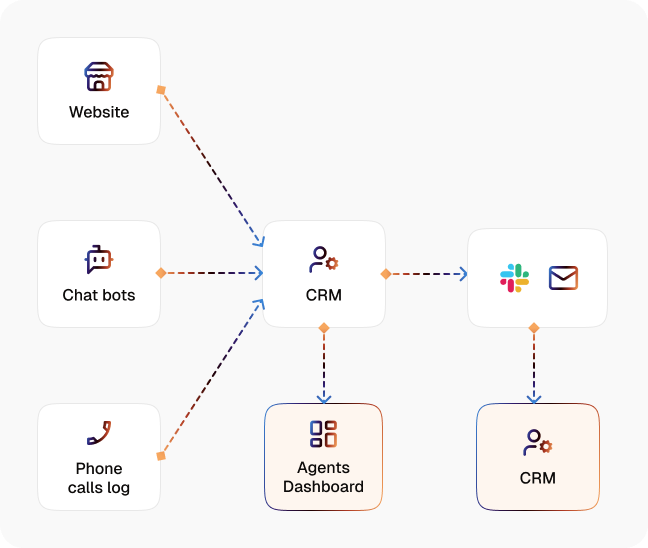
Lead Intake
CogniAgent captures new leads from forms, listing pages, portals, or campaigns.
Smart Routing Engine
Automatically assigns leads based on property type, territory, price range, agent workload, or round-robin logic.
Priority Rules & Overrides
High-value or VIP leads can bypass standard rules and route to senior agents instantly.
CRM Task Creation
Creates a task in the agent’s CRM with due dates and context.
Instant Agent Notification
Sends lead details to agents via Slack and/or email the moment assignment happens.
Manager Visibility
Brokers and team leads can track assignments, response times, and workload distribution.
Results You’ll See in Your Brokerage
| Metric | Before Automation | After (With AI Agent) |
|---|---|---|
| Lead assignment time | 15–60 minutes | Instant |
| Speed-to-first-contact | 30–90 minutes | <5 minutes |
| Leads with clear ownership | 70–80% | 100% |
| Agent workload balance | Uneven | Automatically balanced |
| Manager time spent assigning leads | 5–10 hrs/week | 0 |
| Missed or unworked leads | Frequent | Near zero |
Get Up and Running in Minutes
Step 1
Connect your CRM, lead sources, and communication tools.
Step 2
Define routing rules by location, property type, price range, or agent group.
Step 3
Set priority overrides and notification preferences.
Step 4
Go live, leads are assigned instantly, tracked automatically, and never missed.

![Best AI Tools for Auto Repair Shops [2026 Guide]](https://cogniagent-preview-def77a0f.nyc3.digitaloceanspaces.com/media/2026/07/Best-AI-Tools-for-Auto-Repair-Shops-2026-Guide.png)

Frequently Asked Questions
CogniAgent is built specifically to eliminate the manual coordination that slows growing teams. Instead of managers assigning leads one by one, the system routes leads instantly using predefined rules, freeing leadership to focus on coaching and growth rather than admin work.
Yes. You can distribute leads using round-robin logic, workload-based rules, or performance tiers. This ensures newer agents get opportunities while top performers still receive high-value or priority leads.
CogniAgent can track response time and escalate unclaimed or overdue tasks. Leads can be reassigned automatically or flagged to managers to ensure no opportunity goes cold.
Absolutely. Buyer agents, listing agents, luxury teams, or commercial specialists can each have their own routing logic based on property type, price, or region.
Each assigned lead generates a CRM task with clear ownership, deadlines, and full context. This keeps your CRM clean, auditable, and aligned with daily agent workflows.
No. The system improves clarity, not control. Agents know exactly which leads are theirs, managers gain visibility without chasing updates, and performance conversations become data-driven rather than subjective.

No results