Repeat Customer Re-Booking Agent
Re-engage past customers at exactly the right moment (a service anniversary, a seasonal cycle, or a quiet stretch) with personalized outreach that books the next job in one conversation
Core Automation Capabilities

Date & History-Based Re-Engagement Triggers

Personalized Outbound Outreach

One-Conversation Re-Booking

Seasonal & Maintenance Cycle Timing

Loyalty & Package Upsell Prompts

Job Management Tool Sync
Why Repeat Business Gets Left on the Table
The Follow-Up Never Happens
The easiest job to win is the customer you already served, and it's the one nobody gets around to. Re-booking depends on someone remembering to reach out, and between live jobs, no one does. Past customers drift to whoever markets to them next.
The Right Moment Passes Unnoticed
Every service has a natural re-book window — the annual tune-up, the seasonal cleaning, the maintenance interval. Miss it and the customer either forgets or books a competitor. Tracking those windows by hand across a full customer list is impossible.
"We'll Call You Next Season" Turns Into Silence
A customer who'd happily rebook rarely does it themselves. Without a nudge at the right time, a loyal, high-lifetime-value relationship quietly lapses, and reacquiring them later costs far more than a timely reminder would have.
How It Works
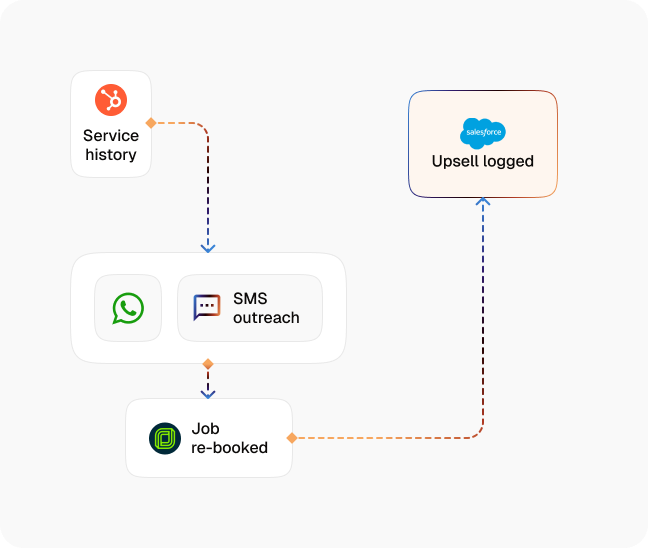
Re-Engagement Trigger
The agent watches service history and dates (anniversaries, seasonal cycles, and inactivity windows) and fires outreach at the moment each customer is due, automatically.
Personalized Outreach
It reaches out referencing the specific customer and their last service ("time for your annual system check," not a generic blast) so the message reads like a business that remembers them.
One-Conversation Booking
For a returning customer whose details you already have, there's no re-intake. The agent confirms the service, checks live availability, and books the slot in a single back-and-forth.
Loyalty & Upsell Prompts
Where it fits, the agent surfaces a relevant package, maintenance plan, or loyalty offer during the conversation — lifting ticket value without a hard sell, only when the customer's already saying yes.
Handle Not-Now Gracefully
A customer who isn't ready is captured for a later window, not dropped or pestered. The agent stops on request and re-times the next touch instead of burning the relationship.
Job Management Sync
Every booking, updated preference, and outcome is written to your job management tool, so the customer record and schedule stay current without manual entry.
Impact of AI That Delivers Real Operational Wins
| Metric | Before Automation | After (With AI Agent) |
|---|---|---|
| Past customers re-engaged at the right window | 15–25% | 95%+ |
| Repeat-booking rate | 20–30% | 40%+ |
| Revenue from returning customers | Untracked / ad hoc | Consistent, recurring |
| Average ticket on rebooked jobs | Baseline | +15–25% with upsell |
| Office hours spent on re-booking outreach | 4–6 hours/week | Near zero |
Seamless Setup Timeline
Step 1
Define your re-engagement triggers — service anniversaries, seasonal cycles, and inactivity thresholds by job type.
Step 2
Connect your job management tool or CRM so the agent can read service history and write bookings — Jobber, ServiceTitan, or Housecall Pro.
Step 3
Set your outreach cadence, message personalization, and the loyalty or package offers to surface per service.
Step 4
Define the booking logic and how not-now customers are re-timed for a future window.


![Best AI Tools for Auto Repair Shops [2026 Guide]](https://cogniagent-preview-def77a0f.nyc3.digitaloceanspaces.com/media/2026/07/Best-AI-Tools-for-Auto-Repair-Shops-2026-Guide.png)

Frequently Asked Questions
It reads each customer's service history and the dates that matter (last service, the natural re-book interval for that job, seasonal timing, and how long they've been inactive) then triggers outreach when the customer is genuinely due. The timing rules are yours; the tracking runs automatically across your whole list.
CogniAgent integrates with 2,700+ tools including Jobber, ServiceTitan, Housecall Pro, Google Calendar, and most field service management platforms. If your scheduling tool has an API, the connection is straightforward to configure during onboarding.
Yes. Because their details are already on file, there's no re-intake — the agent confirms the service, checks live availability, and books the slot in one conversation, then syncs it to your job management tool.
They're re-timed, not dropped. The agent captures a preferred future window, stops the moment a customer asks it to, and picks the conversation back up at the next appropriate interval — so a "not now" stays a warm lead instead of a lost one.

No results