Internal Help Desk Agent
Answer the IT, HR, and operations questions your own staff ask every week, inside Slack or Microsoft Teams, without those questions becoming a queue for somebody else's afternoon
Core Automation Capabilities

Answers Staff Questions Inside Slack and Microsoft Teams

Grounded in Your Internal Policies, Handbooks, and Runbooks

Collects What a Request Needs Before It Reaches a Person

Routes Anything It Cannot Resolve to the Right Internal Team
Why Internal Questions Cost More Than They Look
The Answer Exists, in a Document Nobody Opens
Expense limits, leave policy, access requests, VPN setup. All written down, and all faster to ask a colleague about than to find.
Senior People Become the Help Desk
The person who knows gets asked directly, in a direct message, outside any system. The interruption is invisible and the answer is never reused.
Requests Arrive Half-Formed
A one-line message with none of the detail needed to action it, so the first reply is always a request for more information.
How It Works
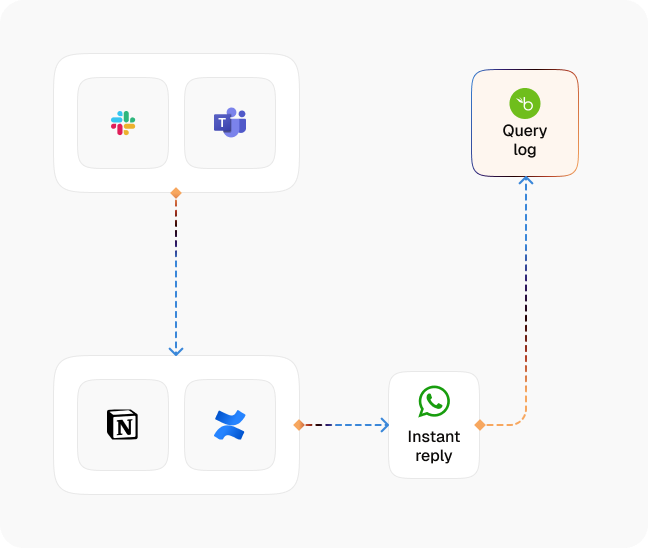
Live Where Staff Already Ask
The agent runs in Slack and Microsoft Teams, so people ask in the place they were already going to ask a colleague.
Ground It in Internal Documentation
Answers come from the handbooks, policies, runbooks, and process notes you uploaded to the Knowledge Base, not from general assumptions about how companies work.
Answer the Question Actually Asked
The agent works out what the person means, including when their wording does not match the wording in your documentation.
Collect the Details a Request Needs
For anything that becomes a ticket, it gathers the required fields in conversation first, so the request arrives complete.
Route to the Right Team
IT, HR, finance, or facilities, with the collected detail and the conversation attached, rather than a one-line message in a shared inbox.
Show Where the Documentation Fails
The questions it could not answer point at the gaps in your internal documentation, so each update removes another recurring interruption.
Impact of AI That Delivers Real Operational Wins
| Metric | Before Automation | After (With AI Agent) |
|---|---|---|
| Routine policy questions | Answered by whoever gets asked | Answered from the documented policy |
| Interruptions to senior staff | Direct messages, all day | Only for cases that need judgment |
| Request quality | One line, missing the detail | Complete before it reaches a person |
| Answer consistency | Depends who replied | The same documented answer each time |
| Coverage across time zones | Whenever that person is online | Around the clock |
| Documentation gaps | Invisible | Surfaced by the questions that failed |
Seamless Setup Timeline
Step 1
Upload your handbooks, IT runbooks, HR policies, and internal process notes to the Knowledge Base, or point a Knowledge Collection Task at your existing intranet.
Step 2
Connect Slack or Microsoft Teams and register the agent in the channels your staff already use.
Step 3
Define the request types that must become tickets, and which fields each one needs collected.
Step 4
Set the routing rules so unresolved requests reach IT, HR, finance, or facilities with the conversation attached.


![Best AI Tools for Auto Repair Shops [2026 Guide]](https://cogniagent-preview-def77a0f.nyc3.digitaloceanspaces.com/media/2026/07/Best-AI-Tools-for-Auto-Repair-Shops-2026-Guide.png)
Frequently Asked Questions
Inside Slack and Microsoft Teams, which is where most internal questions already get asked. It can also run on the web widget if you prefer a dedicated internal portal.
No. The internal agent answers from the Knowledge Base content you give it, in the channels you register it on. It is a separate configuration from any customer-facing agent.
You update the document in the Knowledge Base. The agent answers from the current version, so you are not chasing down a separate copy inside a chatbot tool.
It can. For request types you define, it collects the required fields in conversation and routes a complete request to the right team rather than a one-line message.

No results