Inbound Sales Conversation Agent
Answer inbound buying questions the moment they arrive, qualify in the same conversation, and book the meeting before the prospect goes back to comparing options
Core Automation Capabilities

Responds to Inbound Interest Within the Same Minute

Qualifies Against Your Own Criteria in Conversation

Answers Pricing and Product Questions From Your Knowledge Base

Books Qualified Prospects Straight Into a Rep's Calendar
Why Inbound Leads Leak
Speed Decides the Deal
The prospect filled in the form because they were thinking about it right then. An hour later they are thinking about something else, or about a competitor.
The Form Asks, It Does Not Listen
Five fields and a submit button collect what you wanted to know and answer nothing the buyer wanted to ask.
Good Leads Wait Behind Bad Ones
Reps work the list in the order it arrived, so the prospect who was ready to buy waits behind three who were browsing.
How It Works
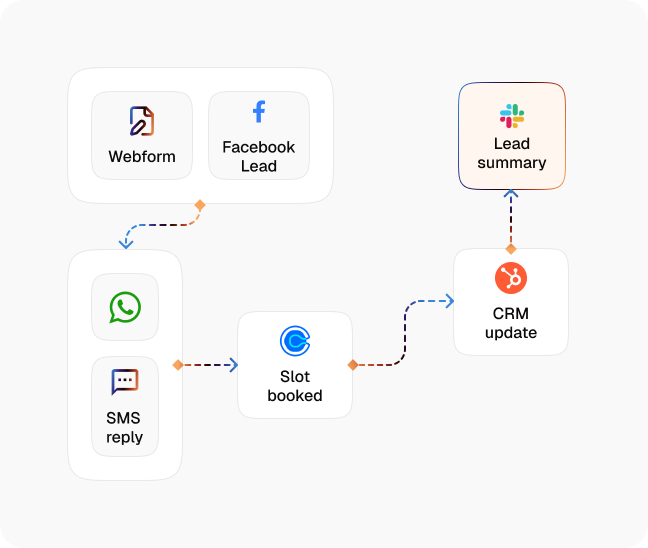
Catch the Inbound Immediately
Web widget, email, SMS, and WhatsApp Business all route into the same workflow, so the response does not depend on who is watching which inbox.
Answer the Question First
Pricing, fit, availability, and how it works, answered from your Knowledge Base, because a buyer who gets nothing will not stay for the qualification.
Qualify in the Conversation
Budget, timing, scope, and authority collected through dialogue rather than a form, using the criteria you define.
Score and Route
Qualified prospects are prioritised and routed to the right rep or team, so the ready buyer is not stuck behind the browser.
Book While the Intent Is Live
The agent offers real availability from the connected calendar and confirms the meeting inside the same conversation.
Hand Over With the Detail
The rep gets the qualification answers, the questions asked, and the full transcript in the CRM before the call starts.
Impact of AI That Delivers Real Operational Wins
| Metric | Before Automation | After (With AI Agent) |
|---|---|---|
| First response time | Depends who is at their desk | Immediate, on every channel |
| Qualification | A form, then a discovery call | Collected in the first conversation |
| Buyer questions before booking | Unanswered until the call | Answered from your Knowledge Base |
| Lead prioritisation | First in, first worked | Routed by fit and intent |
| Meeting booking | A separate scheduling thread | Confirmed in the same conversation |
| Coverage | Business hours, when staff are free | Around the clock |
Seamless Setup Timeline
Step 1
Upload your pricing rules, product detail, and qualification criteria to the Knowledge Base, or point a Knowledge Collection Task at your existing site.
Step 2
Connect the inbound channels, including the web widget, Gmail, Outlook, SMS through Twilio, and WhatsApp Business.
Step 3
Set the qualification questions and the routing rules for which rep or team receives which type of prospect.
Step 4
Connect the calendar the agent books into and the CRM it writes the record to.


![Best AI Tools for Auto Repair Shops [2026 Guide]](https://cogniagent-preview-def77a0f.nyc3.digitaloceanspaces.com/media/2026/07/Best-AI-Tools-for-Auto-Repair-Shops-2026-Guide.png)
Frequently Asked Questions
It answers the buyer's questions from your Knowledge Base first, then qualifies against your criteria in the same conversation. A form collects; this holds a conversation.
By the criteria you define, not a generic score. You set what matters, what disqualifies, and which prospects must reach a person regardless.
The pricing rules you uploaded to the Knowledge Base. It stays inside what your business has approved rather than estimating.
It transfers immediately, with the conversation and any detail already collected attached, so the rep does not start from nothing.

No results