HR Policy Q&A Bot
Give every employee instant, accurate answers to HR questions (any time of day) without routing a single ticket to your HR team.
Automation That Covers Every Angle

Policy Knowledge Base Builder & Sync

Multi-Channel Query Detection (Slack, Teams, Email, Web)

Intent Classification & Policy Matching Engine

Contextual Answer Generation with Source Reference

Human Escalation Routing with Context Transfer

Query Analytics & Policy Gap Reporting
The Tier-1 HR Ticket Problem
The Same Questions, Every Single Week
PTO balances, parental leave eligibility, expense submission deadlines — HR teams field the same questions repeatedly, consuming time that should go to strategic work.
Answers That Vary by Who You Ask
When policy questions are answered verbally by different managers or HR contacts, employees receive inconsistent guidance, creating confusion and potential compliance risk.
Delays That Frustrate Employees
Waiting 24–48 hours for a response to a straightforward policy question damages the employee experience and perception of HR effectiveness.
How It Works
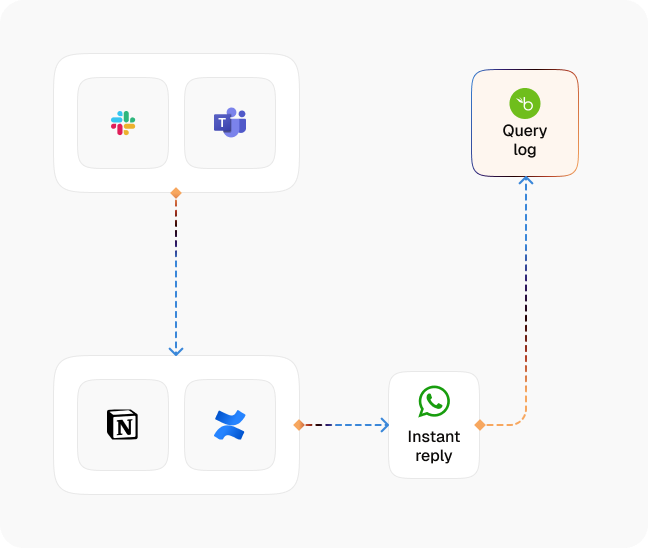
Policy Knowledge Base Ingestion
CogniAgent ingests your employee handbook, HR policies, benefits documentation, and FAQs, building a structured, searchable knowledge layer.
Employee Query Detection
An employee submits a question via Slack, Teams, a web chat widget, or email. CogniAgent detects it and begins processing immediately.
Intent Classification
The agent identifies the nature of the query (PTO, benefits, payroll, compliance, expenses) and routes it to the relevant policy section.
Contextual Answer Generation
A precise answer is generated from your policy content, with the relevant handbook section referenced for transparency.
Edge Case Escalation
If a question falls outside the knowledge base, involves a sensitive situation, or requires human judgment, the agent escalates to the correct HR contact — with the full conversation context attached.
Query Logging & Gap Analysis
Every question is logged. HR receives regular reports showing the most common queries — highlighting where policy documentation needs improvement or clarification.
What Changes When AI Takes Over
| Metric | Before Automation | After (With AI Agent) |
|---|---|---|
| HR tickets from policy questions | 60–80% of total volume | Reduced by 55–65% |
| Avg. response time to policy queries | 4–24 hours | Under 60 seconds |
| Policy answer consistency | Variable | 100% handbook-aligned |
| HR hours on repetitive queries/week | 6–10 hours | Under 1 hour |
| Employee satisfaction with HR responsiveness | 65–72% | 90%+ |
Step-by-Step Setup
Step 1
Upload your HR policies, employee handbook, benefits guides, and FAQs. CogniAgent structures the content into a searchable knowledge base.
Step 2
Connect your preferred employee communication channels — Slack, Microsoft Teams, a web widget, or email alias.
Step 3
Define escalation rules: which query types require a human, and which HR contacts handle each category.
Step 4
Go live. CogniAgent handles incoming questions immediately — your team monitors the dashboard and handles only the exceptions that genuinely need them.

![Best AI Tools for Auto Repair Shops [2026 Guide]](https://cogniagent-preview-def77a0f.nyc3.digitaloceanspaces.com/media/2026/07/Best-AI-Tools-for-Auto-Repair-Shops-2026-Guide.png)

Frequently Asked Questions
CogniAgent syncs with your source documents. When you update the handbook or a benefits guide, the knowledge base updates automatically, or you can trigger a manual refresh at any time.
Yes, if connected to your HRIS. CogniAgent can pull personalised data for authenticated employees, answering 'how many PTO days do I have left?' with accurate, real-time information.
The agent is configured to escalate sensitive queries (mental health support, harassment concerns, disciplinary questions) immediately to a designated HR contact, not attempt to answer them automatically.
Absolutely. You define the scope of the knowledge base. Topics outside the configured scope are redirected to HR without the agent attempting a response.

No results