FAQ Self-Serve Chat Widget
Embed a conversational widget on your website that answers customer questions instantly from your knowledge base, cutting repetitive support tickets without adding headcount
Core Automation Capabilities

Answers Pulled Directly From Your Connected Knowledge Base

Handles Multi-Turn Conversations, Not Just Single Q&A Lookups

Escalates to a Human Agent When It Can't Confidently Answer

Deploys Anywhere in Minutes With an Embeddable Code Snippet
Why the Same Questions Keep Reaching Your Team
Your Team Answers the Same Ten Questions
Opening hours, shipping times, whether you cover a service, how a policy works. Each answer takes a minute and none of them need a person — but together they fill the queue that real problems are waiting in.
A Help Centre Nobody Reads
The answer is already on your site somewhere. Customers still open a ticket, because asking is faster than looking — and a static FAQ page cannot ask a follow-up question.
Support Cost Scales With Traffic
More visitors means more repetitive questions, which means more headcount just to hold response times where they were. The load grows; the answers stay the same.
How It Works
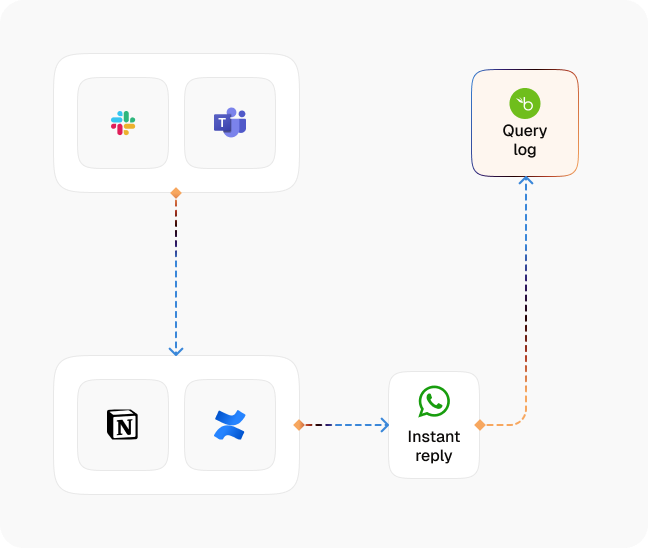
Drop the Widget on Your Site
The widget goes live from an embeddable snippet, so it can sit on any page — pricing, product, checkout, support — without a rebuild.
Ground It in Your Knowledge Base
Answers come from the documents, policies, pricing rules, and FAQs you have uploaded to the Knowledge Base, so the widget says what your business actually says.
Understand the Real Question
The agent works out what the visitor is asking, including when the words they used do not match the words in your documentation.
Answer in Conversation
It answers directly and then keeps going — clarifying, narrowing down, handling the follow-up — rather than returning one lookup and stopping.
Escalate When Unsure
When the agent cannot answer confidently, or the visitor asks for a person, it transfers to a human agent with the conversation so far attached.
Learn What's Missing
The questions the widget could not answer show you exactly where the Knowledge Base has gaps, so each round of updates removes another batch of tickets.
Impact of AI That Delivers Real Operational Wins
| Metric | Before Automation | After (With AI Agent) |
|---|---|---|
| Answer time on routine questions | Queued behind the rest of the inbox | Immediate, inside the conversation |
| Repetitive tickets reaching the team | Most of the inbound volume | Handled before a ticket is ever created |
| Coverage | Business hours, when staff are free | Around the clock |
| Follow-up questions | A second ticket, or a static FAQ dead end | Handled in the same multi-turn conversation |
| Escalation to a human | The visitor starts over | Transferred with the full conversation attached |
| Cost of more traffic | More questions, more headcount | Same answers, no extra headcount |
Seamless Setup Timeline
Step 1
Upload your policies, pricing rules, product details, and FAQs to the Knowledge Base, or point a Knowledge Collection Task at your existing documentation and website.
Step 2
Select the web widget as the channel and connect it to the agent that will answer.
Step 3
Set the escalation path — when to transfer to a human, and where that handoff lands.
Step 4
Copy the embed snippet from settings onto the pages where questions actually get asked.


![Best AI Tools for Auto Repair Shops [2026 Guide]](https://cogniagent-preview-def77a0f.nyc3.digitaloceanspaces.com/media/2026/07/Best-AI-Tools-for-Auto-Repair-Shops-2026-Guide.png)

Frequently Asked Questions
Your Knowledge Base. The widget answers from the documents, policies, pricing rules, and FAQs you have uploaded, so it stays inside what your business has actually approved rather than improvising.
It escalates. When the agent cannot answer confidently, or the visitor asks for a person, the conversation transfers to a human agent with everything said so far attached, so nobody has to repeat themselves.
No. It holds a multi-turn conversation — it can ask a clarifying question, work out which case applies, and handle the follow-up, rather than returning a single match and stopping.
Select the widget as your channel, connect the agent, and copy the embed snippet from settings onto your site. The work that takes real time is getting your Knowledge Base right, not installing the widget.

No results