Cross-Channel Customer Support Agent
One support agent that answers on the web widget, email, SMS, WhatsApp, Slack, and Microsoft Teams, keeping the same knowledge and the same escalation rules on every channel
Core Automation Capabilities

One Agent Configuration Across Every Supported Channel

Answers Grounded in Your Connected Knowledge Base

Carries Conversation Context Through the Handoff to a Person

Logs Every Resolution Back to Your Helpdesk or CRM
Why Support Quality Splits By Channel
Each Channel Grew Its Own Rules
Email says one thing, chat says another, and the WhatsApp number is watched by whoever remembered to open it. Same company, three different answers.
Context Dies at the Handoff
The customer explains the problem once to the agent, again to the first person, and a third time when the case is reassigned.
Adding a Channel Means Rebuilding
Every new place customers can reach you is another tool to configure, another knowledge source to keep current, and another gap where answers drift.
How It Works
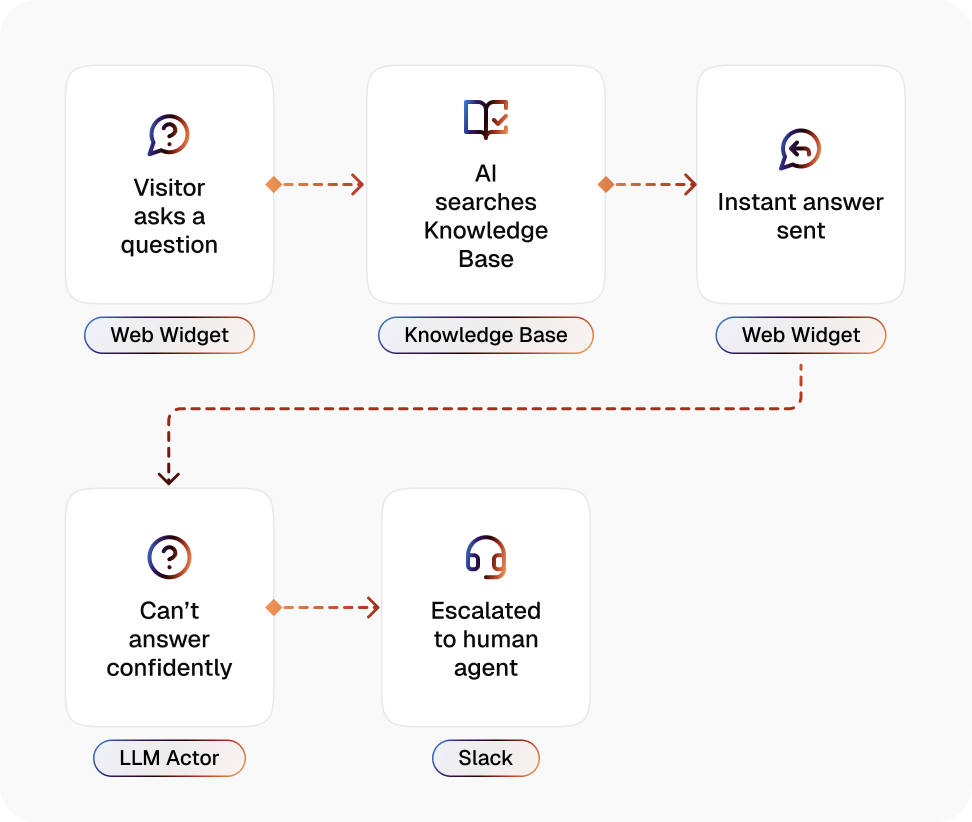
Configure the Agent Once
The knowledge, the tone, and the escalation rules are set on the agent, not on the channel, so behaviour does not drift between inboxes.
Connect the Channels You Use
Web widget, Gmail, Outlook, Slack, Microsoft Teams, SMS through Twilio, and WhatsApp Business all route into the same workflow.
Ground Answers in Your Knowledge Base
Replies come from the documents, policies, and pricing rules you uploaded, so the answer is the same whether it is asked in chat or in email.
Hold the Conversation, Not the Lookup
The agent asks clarifying questions and works through the follow-up rather than returning a single match and stopping.
Escalate With the Context Attached
When judgment is needed, the conversation transfers to a person with everything said so far, so nobody has to repeat themselves.
Write the Outcome Back
The resolution, the collected details, and the transcript land in your helpdesk or CRM without a person retyping them.
Impact of AI That Delivers Real Operational Wins
| Metric | Before Automation | After (With AI Agent) |
|---|---|---|
| Answer consistency across channels | Depends on the channel and the agent | One configuration, one answer |
| Adding a new channel | A separate tool and a fresh setup | Connected to the workflow already running |
| Repeating the problem after a handoff | Standard | Context travels with the conversation |
| Coverage outside business hours | Queued until morning | Handled or triaged immediately |
| Knowledge updates | Applied per tool, when someone remembers | Updated once in the Knowledge Base |
| Case logging | Manual, after the fact | Written back automatically |
Seamless Setup Timeline
Step 1
Upload your support policies, product documentation, and FAQs to the Knowledge Base, or point a Knowledge Collection Task at your existing help centre.
Step 2
Connect the channels your customers already use and register the agent on each one.
Step 3
Set the escalation rules, including which topics always reach a person and where that handoff lands.
Step 4
Connect your helpdesk or CRM so resolutions and transcripts are logged without anyone retyping them.


![Best AI Tools for Auto Repair Shops [2026 Guide]](https://cogniagent-preview-def77a0f.nyc3.digitaloceanspaces.com/media/2026/07/Best-AI-Tools-for-Auto-Repair-Shops-2026-Guide.png)
Frequently Asked Questions
No. The knowledge, tone, and escalation rules live on the agent. Connecting a channel registers the agent there, so behaviour stays the same across the web widget, email, SMS, WhatsApp Business, Slack, and Microsoft Teams.
Both, depending on the channel. Gmail, Outlook, Slack, and SMS through Twilio can be used to open a conversation. The web widget, WhatsApp Business, and Microsoft Teams respond to inbound messages.
It escalates. The conversation transfers to a person with the full history and any details already collected, so the customer does not start over.
No. It works in front of it. Routine questions are resolved before a ticket exists, and the cases that do reach your team arrive logged, summarised, and routed.

No results