Appointment Cancellation & Rebooking Agent
Let customers cancel and rebook themselves in conversation, so a cancellation becomes a new slot on the calendar instead of a gap and a phone call
Core Automation Capabilities

Handles Cancellations Without a Phone Call or a Form

Offers Real Availability From Your Connected Calendar

Applies Your Notice Period and Cancellation Policy Consistently

Rebooks in the Same Conversation Rather Than Losing the Booking
Why Cancellations Turn Into Lost Revenue
Cancelling Is Harder Than Not Showing Up
If the only way to cancel is a call during business hours, some customers will simply not arrive, and you find out when the slot is already gone.
A Cancellation Ends the Conversation
The appointment is removed and nobody asks the obvious next question, so a customer who still wants the service leaves without a new date.
The Gap Is Found Too Late
By the time the calendar is checked, the freed slot is tomorrow and there is no time left to offer it to anyone waiting.
How It Works
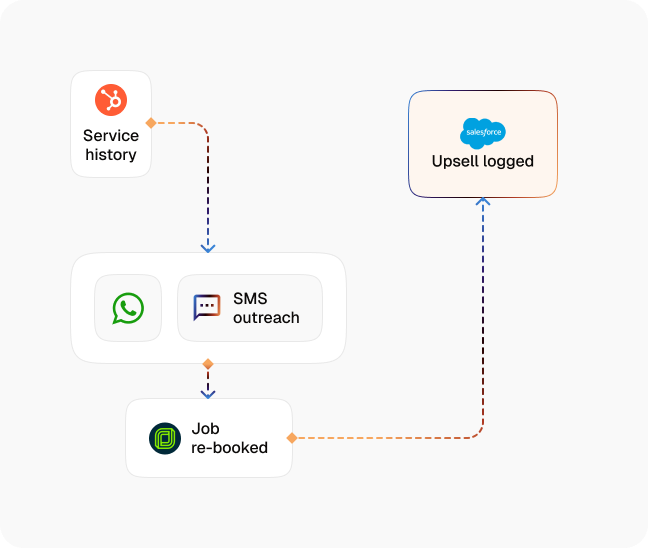
Take the Cancellation Wherever It Arrives
Web widget, SMS, WhatsApp Business, or email, so the customer does not have to wait for opening hours to tell you.
Confirm the Right Booking
The agent identifies the appointment from your connected calendar or booking system rather than guessing from a name.
Apply Your Policy
Notice periods, cancellation windows, and any fee rules come from what you have documented, so the answer is the same for everyone.
Ask for the New Date Immediately
The same conversation moves straight to rebooking, because the moment somebody cancels is the moment they are most likely to rebook.
Offer Slots That Actually Exist
Availability is read live from the connected calendar, so the offered time is real and the confirmation is immediate.
Update Everyone
The calendar, the customer, and the assigned staff member are all updated, and the freed slot is released without anyone checking manually.
Impact of AI That Delivers Real Operational Wins
| Metric | Before Automation | After (With AI Agent) |
|---|---|---|
| Cancelling outside business hours | A voicemail, or a no-show | Handled in conversation, immediately |
| Rebooking after a cancellation | A separate call the customer has to make | Offered in the same conversation |
| Policy application | Depends who takes the call | The documented rule, every time |
| Freed slots | Found when somebody checks the calendar | Released as soon as the cancellation lands |
| No-shows | Some cancellations never get made | Cancelling is easier than not turning up |
| Staff time on schedule changes | Phone calls and manual edits | Only the exceptions |
Seamless Setup Timeline
Step 1
Connect the calendar or booking system the agent should read availability from and write changes back to.
Step 2
Upload your cancellation policy, notice periods, and any fee rules to the Knowledge Base.
Step 3
Choose the channels customers can cancel on, then set which cases must reach a person.
Step 4
Set who is notified when a booking changes and how freed slots are released.


![Best AI Tools for Auto Repair Shops [2026 Guide]](https://cogniagent-preview-def77a0f.nyc3.digitaloceanspaces.com/media/2026/07/Best-AI-Tools-for-Auto-Repair-Shops-2026-Guide.png)
Frequently Asked Questions
It reads availability and writes changes through the calendar or booking system you connect, so the slots it offers are the real ones and the change is made where your team already looks.
It applies the notice period and fee rules you have documented and tells the customer what applies. Whether it actions a charge depends on what you connect and what you allow it to do.
It transfers straight away with the booking and the conversation attached. You also set which cases always reach a person regardless of what the customer asks for.
It removes the friction that causes some of them. When cancelling is as easy as sending a message, customers who cannot attend tell you, which is what frees the slot in time to reuse it.

No results