AI Appointment Booking Agent
Turns booking intent into confirmed meetings, checking real-time availability, assigning the right rep, and sending reminders that keep calendars full and no-shows low, all synced to your CRM
Core Automation Capabilities

Real-Time Availability Across Every Rep's Calendar

Round-Robin & Rule-Based Rep Assignment

Self-Serve Reschedule, Cancel & No-Show Recovery

Automatic CRM & Calendar Sync
Why Booking Intent Dies in the Gap
Back-and-Forth Kills Momentum
A prospect ready to book right now gets "what times work for you?" and a thread that runs for three days. Every reply adds friction, and the people who were most ready are the first to lose interest.
Nobody Knows Who Owns the Meeting
Without a rule for who takes the next booking, meetings land on whoever answered first. Calendars go lopsided, and prospects wait on a rep who is already double-booked.
No-Shows Quietly Eat the Pipeline
A meeting booked a week out with no reminder and no easy way to move it is a meeting that half-happens. The slot is held, the rep blocks the time, and nobody turns up.
How It Works
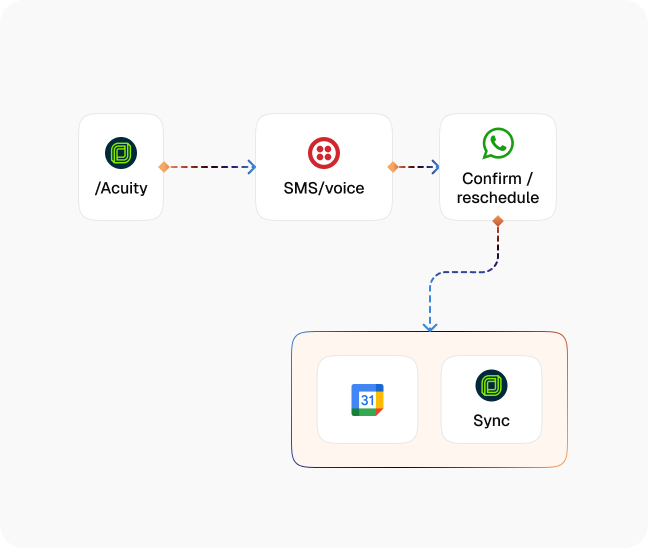
Catch the Booking Intent
The agent picks up the moment someone asks to book — on a call, the website widget, SMS, email, WhatsApp, or Teams — and moves straight into scheduling instead of handing them a form.
Check Real Availability
It reads live calendar availability for the reps who could take the meeting, so every time it offers is a time that actually exists.
Assign the Right Rep
Round-robin keeps the load even. Your own rules override it when territory, product line, or existing account ownership should decide who takes it.
Confirm on the Spot
The slot is booked and confirmed inside the same conversation, with the invite and details sent to both sides before the conversation ends.
Remind and Reduce No-Shows
Automated reminders go out ahead of the meeting on the channel the contact already uses, each one carrying a self-serve reschedule and cancel option.
Sync Everything Back
The booking, the assigned rep, any reschedules, and the outcome are written back to your CRM and calendar, so the record matches reality without anyone updating it by hand.
Impact of AI That Delivers Real Operational Wins
| Metric | Before Automation | After (With CogniAgent) |
|---|---|---|
| Time from booking intent to confirmed slot | Days of email back-and-forth | Confirmed inside the same conversation |
| Booking coverage | Business hours, one channel | Around the clock, every channel |
| Rep assignment | Whoever happens to answer | Round-robin plus your own routing rules |
| Reschedules and cancellations | Handled manually by a person | Self-serve, no staff time |
| No-show handling | Noticed after the fact | Reminders beforehand, recovery afterwards |
| CRM and calendar record | Updated by hand, often late | Written automatically as it happens |
Seamless Setup Timeline
Step 1
Connect the calendars the agent should book into and the CRM it should write back to.
Step 2
Set your meeting types, durations, buffers, and the hours each rep is bookable.
Step 3
Define assignment: round-robin by default, plus the rules that override it by territory, product line, or account owner.
Step 4
Choose the reminder schedule and channels, and the self-serve reschedule and cancel options each reminder carries.


![Best AI Tools for Auto Repair Shops [2026 Guide]](https://cogniagent-preview-def77a0f.nyc3.digitaloceanspaces.com/media/2026/07/Best-AI-Tools-for-Auto-Repair-Shops-2026-Guide.png)

Frequently Asked Questions
The same agent answers on calls, your website widget, SMS, email, WhatsApp, and Teams, and can book from any of them. A conversation that starts on one channel can be followed up on another, so the booking is not tied to where the person first reached you.
Round-robin is the default, so the load spreads evenly across the team. Your own rules sit on top of it — territory, product line, inquiry type, or an existing account owner can all take precedence, and the agent follows whichever rule matches first.
Every confirmation and reminder carries a self-serve reschedule and cancel option, so the contact can move the meeting themselves. The change is written back to the calendar and the CRM, and the rep sees it without anyone forwarding an email.
Yes. When a request falls outside what the agent should decide, it transfers to a human with the conversation and the booking context already attached, so whoever picks it up is not starting from scratch.

No results