Weekly Report Generation
Let AI automatically compile KPIs, consolidate channels, and deliver clear weekly summaries to your team
Core Automation Capabilities
-

Automated KPI Extraction from Analytics, CRM, and Ad Platforms
-

Multi-Channel Data Consolidation
-

Scheduled Email & Slack Report Delivery
-

Standardized Formatting for Leadership & Teams
-

Top-Performing Channels & Campaign Highlights
-

Continuous Report Optimization & Learning
Every Report Is a Workflow Waiting to Be Automated
-
Manual Data Collection Drains Time
Marketing teams spend hours exporting dashboards, copying KPIs, and combining metrics from multiple platforms.
-
Inconsistent Reporting
Manual aggregation introduces errors, inconsistent formatting, and missed insights—making it harder to align leadership and campaign owners.
-
Slow Decision-Making
By the time reports are ready, trends may already have shifted, preventing timely optimizations.
How It Works
-
KPI Collection
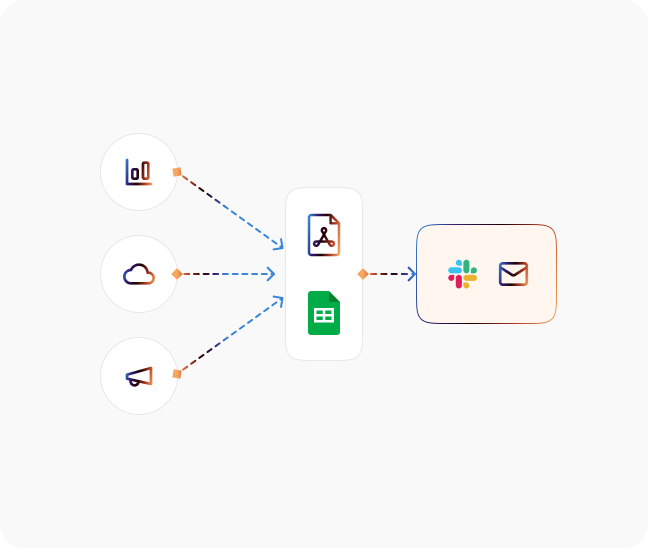
CogniAgent pulls data from Google Analytics, CRM systems, ad platforms, and other core marketing tools automatically.
-
Multi-Channel Consolidation
Combines metrics from different campaigns and channels into a single weekly report for a holistic view.
-
Scheduled Delivery
Sends polished reports via email, Slack, or other preferred channels on a recurring schedule.
-
Standardized Views
Formats reports consistently for leadership, campaign owners, or team dashboards so everyone has the same insights.
-
Performance Highlights
Automatically surfaces top-performing channels, campaigns, and KPIs to focus attention on what matters.
-
Continuous Improvement
Reports learn from engagement and feedback, ensuring the most relevant data and visualizations are delivered over time.
The Real Impact for Marketing Teams
| Metric | Before Automation | After (With AI Agent) |
|---|---|---|
| Time spent compiling reports | 4–8 hrs/week | <10 mins/week |
| Accuracy of KPIs | ~80% | 99.9% |
| Multi-channel visibility | Fragmented | Consolidated automatically |
| Leadership alignment | Manual follow-up needed | Clear, standardized reports delivered automatically |
| Campaign optimization speed | Delayed | Real-time insights via summary highlights |
Step-by-Step Setup
-
Step 1
Connect Google Analytics, your CRM, and advertising platforms to CogniAgent.
-
Step 2
Select KPIs, channels, and campaigns to include in the weekly report..
-
Step 3
Define the delivery schedule and notification channels (email, Slack, or both).
-
Step 4
Monitor weekly reports automatically delivered to your team, complete with consolidated metrics, highlights, and standardized formatting.
![Top AI Receptionists for Cleaning Services [2026]](https://cogniagent.ai/wp-content/uploads/2026/07/Top-AI-Receptionists-for-Cleaning-Services-2026-300x185.webp)

![Best AI Tools for Auto Repair Shops [2026 Guide]](https://cogniagent.ai/wp-content/uploads/2026/07/Best-AI-Tools-for-Auto-Repair-Shops-2026-Guide-300x185.png)

Frequently Asked Questions
CogniAgent integrates with Google Analytics, HubSpot, Salesforce, Pipedrive, ad platforms like Google Ads and Meta Ads, and most other marketing analytics tools.
Yes. You can create tailored views for leadership, campaign owners, or individual teams, with metrics and highlights relevant to each audience.
Reports are delivered on your preferred schedule (weekly, bi-weekly, or custom intervals) via Slack, email, or both.
Yes. CogniAgent formats reports consistently with tables, charts, and KPIs, ensuring every recipient sees a polished, easy-to-understand summary.
Absolutely. All metrics and connected platform data are encrypted in transit and at rest, with role-based access and all the necessary compliance.