Content Distribution Tracking
Finally see where your content actually lives
Core Automation Capabilities
-

Cross-Channel Mention Monitoring Engine
-

Automated URL & Metadata Logging
-

Google Sheets & Notion Sync
-

Platform, Campaign & Creator Tagging
-

Top-Content & Partner Performance Detection
-

Searchable Content Distribution Database
Every Content Mention Is a Signal Waiting to Be Captured
-
Scattered Visibility Across Channels
Content gets shared on social media, blogs, newsletters, and communities—but teams rarely know where or how often.
-
Manual Tracking Doesn’t Scale
Logging URLs, screenshots, and mentions across platforms is time-consuming and quickly becomes outdated.
-
No Clear Attribution or Performance Insight
Without centralized tracking, it’s impossible to identify top-performing content, creators, or distribution partners.
How It Works
-
Mention Detection
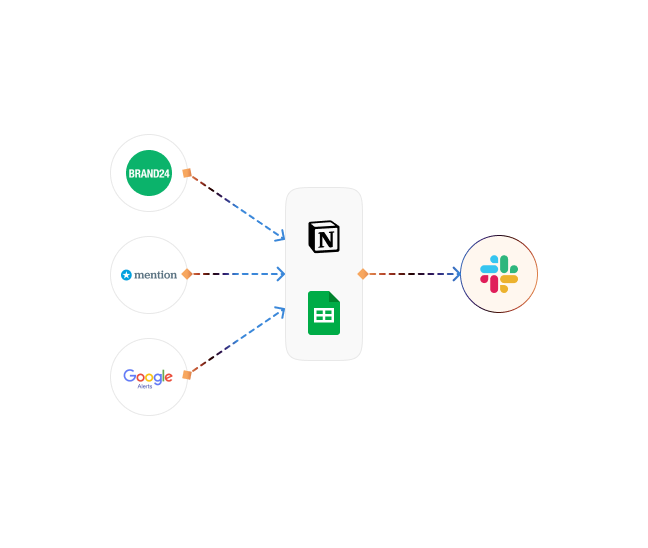
CogniAgent monitors social platforms, blogs, newsletters, and public channels for brand and content mentions.
-
URL & Metadata Capture
Automatically logs URLs, publish dates, platform details, creator info, and engagement metadata.
-
Centralized Logging
Writes all mentions into Google Sheets, Notion, or your internal knowledge base in real time.
-
Tagging & Classification
Applies tags by platform, campaign, creator, region, or content type for easy filtering.
-
Performance Surfacing
Highlights high-performing content and top distribution partners based on engagement signals.
-
Continuous Monitoring
Keeps tracking active so new mentions are captured automatically as they appear.
Impact of AI That Delivers Real Operational Wins
| Metric | Before Automation | After (With AI Agent) |
|---|---|---|
| Time spent tracking mentions | 5–10 hrs/week | 0 hrs (fully automated) |
| Channels monitored | 2–3 manually | 10+ automatically |
| Attribution accuracy | ~50% | 95%+ |
| Identified top partners | Ad hoc | Ranked automatically |
| Reporting time | 1–2 hrs/report | <1 minute |
Step-by-Step Setup
-
Step 1
Connect your brand domains, content sources, and preferred workspace (Google Sheets or Notion).
-
Step 2
Define tracking rules for platforms, campaigns, creators, and keywords.
-
Step 3
Enable real-time monitoring and automatic logging.
-
Step 4
Explore a centralized, searchable view of where your content lives, and who’s amplifying it most effectively.
![Top AI Receptionists for Cleaning Services [2026]](https://cogniagent.ai/wp-content/uploads/2026/07/Top-AI-Receptionists-for-Cleaning-Services-2026-300x185.webp)

![Best AI Tools for Auto Repair Shops [2026 Guide]](https://cogniagent.ai/wp-content/uploads/2026/07/Best-AI-Tools-for-Auto-Repair-Shops-2026-Guide-300x185.png)

Frequently Asked Questions
CogniAgent tracks mentions across social media platforms, blogs, newsletters, community forums, and other public channels. Coverage expands continuously as new sources are added.
Yes. You can log mentions into Google Sheets, Notion, or other internal systems, creating a centralized and searchable content distribution database.
CogniAgent automatically applies tags based on platform, campaign, creator, keywords, or custom rules you define, making filtering and reporting effortless.
The system analyzes engagement signals such as shares, likes, comments, and reach to surface high-performing content and effective distribution partners.
Yes. All collected metadata is encrypted in transit and stored securely, with role-based access controls and compliance with all necessary standards.