Lead Enrichment on Autopilot
Turn raw e-mails into fully-fleshed, sales-ready leads
Core Automation Capabilities
-

Automated Lead Detection & Capture
-

Company & Contact Data Enrichment
-

Role, Industry, Tech Stack, & Size Appending
-

Lead Scoring Enhancement Module
-

Real-Time CRM Update & Sync
-

Continuous Record Refresh & Maintenance
Every New Lead Is a Workflow Waiting to Be Enriched
-
Manual Research Slows Sales
Teams spend hours hunting down emails, company info, or decision-maker details before outreach can begin.
-
Incomplete or Outdated Records
Raw leads in your CRM often lack critical details (job title, company size, industry, or technology stack), making scoring and segmentation unreliable.
-
Missed Opportunities
Without enriched data, sales reps waste time on low-value leads and fail to engage high-intent prospects promptly.
How It Works
-
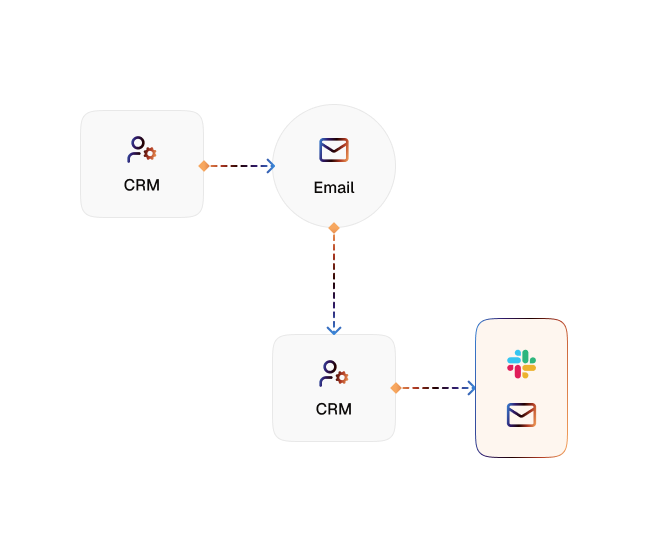
Lead Detection
CogniAgent monitors your CRM for new contacts and incoming leads
-
Data Sourcing
Pulls company and contact information from Clay, Clearbit, Apollo, or similar enrichment tools
-
Attribute Appending
Automatically adds job role, company size, industry, location, and technology stack to each record
-
Lead Scoring Power-Up
Enriched attributes feed directly into your scoring models, helping prioritize high-value prospects
-
CRM Update & Sync
Updates the CRM with enriched data in real time and keeps existing records refreshed automatically
-
Autonomous Maintenance
Continuous enrichment ensures your CRM stays accurate, complete, and actionable over time
The Real Impact for Sales & Marketing Teams
| Metric | Before Automation | After (With AI Agent) |
|---|---|---|
| Time spent researching leads | 1–3 hrs/day | <10 mins/day |
| Data completeness | 50–60% | 99.9% |
| Lead scoring accuracy | Inconsistent | Reliable and actionable |
| CRM record freshness | Manual & outdated | Continuous & automatic |
| High-value lead engagement | Delayed | Instant and prioritized |
Step-by-Step Setup
-
Step 1
Connect your CRM (HubSpot, Salesforce, Pipedrive, Zoho, or similar) and enrichment tool (Clay, Clearbit, Apollo).
-
Step 2
Define which attributes are critical for scoring and segmentation, such as role, industry, company size, or tech stack.
-
Step 3
Enable automatic enrichment - CogniAgent begins appending data to new leads in real time.
-
Step 4
CRM profiles populate automatically, lead scores improve, and sales reps engage the most promising leads instantly.
![Top AI Receptionists for Cleaning Services [2026]](https://cogniagent.ai/wp-content/uploads/2026/07/Top-AI-Receptionists-for-Cleaning-Services-2026-300x185.webp)

![Best AI Tools for Auto Repair Shops [2026 Guide]](https://cogniagent.ai/wp-content/uploads/2026/07/Best-AI-Tools-for-Auto-Repair-Shops-2026-Guide-300x185.png)

Frequently Asked Questions
CogniAgent works seamlessly with Clay, Clearbit, Apollo, and other popular enrichment services. Integration is simple via API or pre-built connectors, ensuring enriched data flows directly into your CRM in real time.
Every lead can be enriched with job title, company size, industry, location, technology stack, revenue, and other key attributes that improve scoring, segmentation, and prioritization.
Once a lead enters your CRM, CogniAgent automatically pulls and appends enriched data within minutes. Your team sees a fully detailed lead profile almost instantly.
Yes. CogniAgent’s enriched attributes feed directly into scoring models, allowing sales teams to focus on high-value prospects and prioritize outreach more accurately.
Yes. All lead and company data is encrypted in transit and at rest, and access is role-based. CogniAgent follows SOC 2 Type II and GDPR compliance standards to keep your records safe and private.