Service Intake & Appointment Agent
Replace inbound phone intake with a structured conversational agent that collects the full job details, qualifies the request, and books the appointment
Core Automation Capabilities
-

Multi-Channel Intake (Call, SMS, Web Chat, WhatsApp)
-

Job Type, Location & Urgency Collection
-

Real-Time Availability & Slot Booking
-

Urgency-Based Triage & Routing
-

Structured Intake Summary Generation
-

Job Management Tool Sync
Why Phone Intake Breaks Down
-
Half the Jobs Come In Half-Described
A rushed phone call misses the details that matter (access, equipment, the actual problem) so the tech shows up under-briefed, the truck rolls twice, and a one-visit job becomes two.
-
The Line Is Busy When It Matters Most
Intake happens when someone's free to pick up, which is never during a rush. Callers hit a busy line or voicemail, hang up, and book the next company that answers — the missed call was a job.
-
Urgent and Routine Get the Same Treatment
Without structured triage, a burst pipe and a routine tune-up land in the same undifferentiated queue. Emergencies wait behind low-priority requests, and the jobs you most need to grab are the ones you're slowest to book.
How It Works
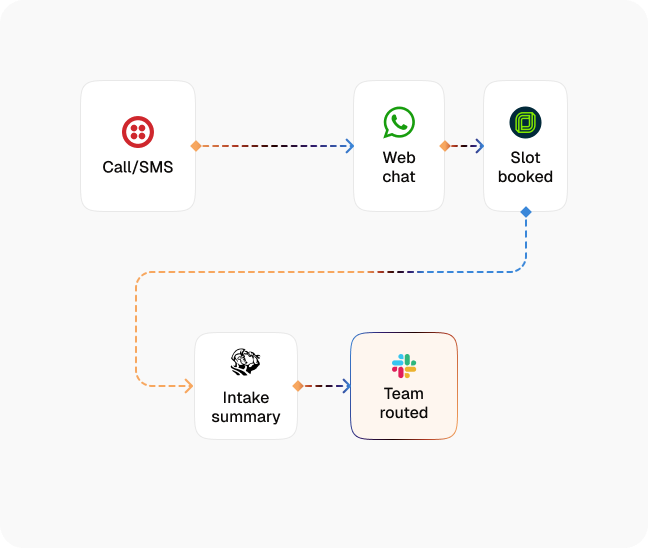
-
Inbound Trigger
A request comes in by call, SMS, web chat, or WhatsApp — CogniAgent picks it up within seconds, on any channel, at any hour.
-
Structured Job Collection
The agent captures job type, location, access details, and the specifics of the problem through natural conversation — the complete picture, not the three fields someone remembered to ask on the phone.
-
Qualification & Urgency Triage
It classifies the request (emergency, standard, or routine) and confirms the job is in your service area and scope, so nothing gets booked that you can't or shouldn't take.
-
Real-Time Booking
The agent reads live availability and books the appointment into the right slot for the job's urgency and location — no callback, no phone tag, no double-booking.
-
Route to the Right Team
Urgent jobs are flagged and routed immediately; standard work is assigned by team, trade, or zone with the full intake attached, so whoever's dispatched arrives already briefed.
-
Job Management Sync
The structured intake summary and booking are written straight to your job management tool, so the schedule and the job record reflect reality without anyone re-keying it.
Impact of AI That Delivers Real Operational Wins
| Metric | Before Automation | After (With AI Agent) |
|---|---|---|
| Inbound requests captured | 60–70% | 100% |
| Jobs booked with complete intake details | 40–55% | 90%+ |
| Time from inquiry to booked appointment | Hours (callback) | Under 5 minutes |
| Urgent jobs mis-triaged or delayed | 25–35% | Under 5% |
| Office hours spent on phone intake | 8–12 hours/week | Under 2 hours/week |
Seamless Setup Timeline
-
Step 1
Define your service types, service area, scope rules, and the intake questions each job type needs.
-
Step 2
Connect your channels, calendar, and job management tool — SMS, web chat, WhatsApp, and Jobber, ServiceTitan, or Housecall Pro.
-
Step 3
Set your urgency tiers and routing rules by trade, team, or zone.
-
Step 4
Define the booking logic and the intake summary that lands with the dispatched team.
![Top AI Receptionists for Cleaning Services [2026]](https://cogniagent.ai/wp-content/uploads/2026/07/Top-AI-Receptionists-for-Cleaning-Services-2026-300x185.webp)

![Best AI Tools for Auto Repair Shops [2026 Guide]](https://cogniagent.ai/wp-content/uploads/2026/07/Best-AI-Tools-for-Auto-Repair-Shops-2026-Guide-300x185.png)

Frequently Asked Questions
The agent takes inbound requests over your website widget, SMS, and WhatsApp, and continues each conversation on the channel the customer started on. Every request runs through the same structured intake, so the data you get is consistent no matter how the customer reaches you.
It classifies each request against your urgency tiers as it collects the details — job type, symptoms, and timing — then flags and routes emergencies immediately while scheduling standard and routine work into the appropriate slot. The rules are yours; the triage is consistent every time.
Yes. The agent reads live availability and books the appointment into the right slot for the job's urgency, trade, and zone, then syncs the booking and full intake summary to your job management tool — no manual scheduling and no double-booking.
The agent checks service area and scope during intake. Requests that don't fit are handled gracefully — declined politely or captured for follow-up per your rules — so techs' calendars only fill with jobs you can actually take.