Estimate Approval Follow-Up
Chase every estimate to a decision through conversation, prompting the customer, answering scope questions, and logging the outcome straight to your job management system.
Core Automation Capabilities
-

Automated Approval Prompt (SMS / WhatsApp)
-

Scope Clarification & Change Request Handling
-

Approve / Decline Decision Routing
-

Job Management Tool Sync
-

Deposit Collection Trigger
-

Auto-Scheduling on Approval
Why Estimates Sit Unapproved
-
Sent, Then Forgotten
The estimate goes out between jobs and the follow-up never happens — you're on-site, not at a desk chasing replies. The customer books whoever circled back first, and it wasn't you.
-
One Unanswered Question Stalls the Whole Job
A customer unsure about a line item, a warranty, or a timeline often won't pick up the phone to ask. The estimate sits in limbo while a small, answerable question quietly kills a job you'd already won on price and quality.
-
Approved Jobs That Never Get Scheduled
A verbal "yeah, go ahead" with no deposit taken and no slot booked isn't a job — it's an intention. Without a capture step, approved work slips through the cracks and the calendar stays half-empty.
How It Works
-
Estimate Trigger
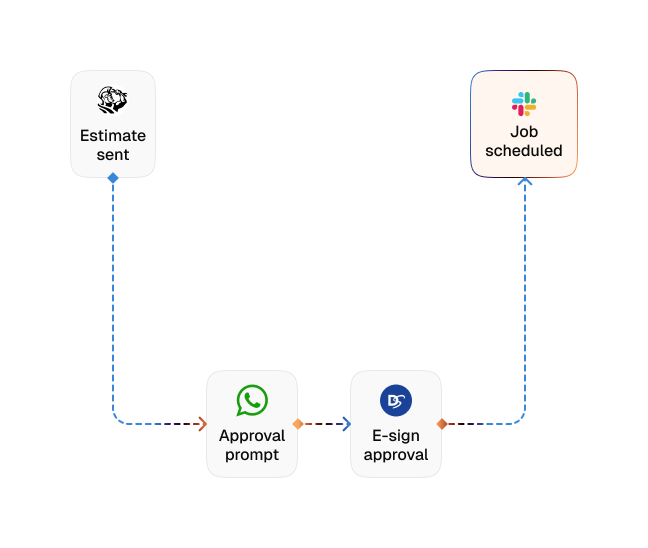
An estimate is marked sent in your job management tool — CogniAgent detects it and opens the approval conversation on the customer's channel automatically.
-
Clear Approval Prompt
The customer gets a plain-language summary of the estimate and a direct ask: approve, decline, or ask a question — no PDF to dig out of their inbox, no phone tag.
-
Scope Questions Answered
The agent draws on your Knowledge Base to answer questions about line items, materials, warranty, and timing on the spot, resolving the hesitation that was holding up the yes.
-
Change Requests Handled
Minor clarifications are captured in conversation. Anything that needs a new price or a re-quote is routed to you or your estimator with the full thread attached — no unauthorized numbers go out.
-
Decision Capture
An approval or rejection is logged straight to your job management tool and timestamped, so every estimate's status reflects reality without manual updating.
-
Deposit & Scheduling Trigger
On approval, the agent triggers deposit collection and books the job into your schedule. On a decline, it captures the reason and closes the conversation cleanly.
The Real Impact for Marketing Teams
| Metric | Before Automation | After (With AI Agent) |
|---|---|---|
| Time from estimate sent to decision | 3–7 days | Under 24 hours |
| Estimates that receive follow-up | 40–50% | 100% |
| Estimate-to-approved-job rate | 30–45% | 55%+ |
| Approved jobs that stall before scheduling | 20–30% | Under 5% |
| Office hours spent chasing approvals | 4–6 hours/week | Under 1 hour/week |
Step-by-Step Setup
-
Step 1
Load your pricing, warranty terms, and common scope questions into the Knowledge Base.
-
Step 2
Connect your job management tool (Jobber, ServiceTitan, or Housecall Pro) so the follow-up triggers the moment an estimate is sent.
-
Step 3
Set your change-request guardrails and the escalation path to the estimator for anything needing a re-quote.
-
Step 4
Define the deposit collection and scheduling actions that fire automatically on approval.
![Top AI Receptionists for Cleaning Services [2026]](https://cogniagent.ai/wp-content/uploads/2026/07/Top-AI-Receptionists-for-Cleaning-Services-2026-300x185.webp)

![Best AI Tools for Auto Repair Shops [2026 Guide]](https://cogniagent.ai/wp-content/uploads/2026/07/Best-AI-Tools-for-Auto-Repair-Shops-2026-Guide-300x185.png)

Frequently Asked Questions
The agent sends the approval prompt over SMS (or email) and continues the conversation wherever the customer replies — including WhatsApp and web chat. Channel and cadence are set per estimate type.
Yes. The agent answers scope, pricing, warranty, and timing questions from your Knowledge Base, and captures minor clarifications directly. Any request that requires a new price or a re-quote is routed to you with full context — no revised terms ever go out on their own.
The approval is logged to your job management tool and timestamped, then the agent triggers deposit collection and slots the job into your schedule, so an approved estimate becomes a booked, funded job without a manual step.
The agent runs a small series of spaced, capped reminders that reference the specific estimate, then flags the customer for you rather than closing silently, so nothing gets written off as "not interested" when it was only waiting.