Article Updated Nov 10, 2026
 8 min read
What Are Autonomous AI Agents? 5 Tools Compared
Updated Nov 10, 20268 min read Updated Nov 10, 20268 min read
An autonomous AI agent can use a goal and available information to choose and carry out permitted actions with limited intervention. A person may start it with a request, or a configured event or schedule may trigger it. The important question is not whether an agent is “fully autonomous,” but which decisions and actions it may take without approval—and how your team checks the outcome.
For example, an agent might summarize an incoming service request and suggest a category. A separate rule can require a service type before the workflow continues. Depending on the permissions and controls configured, a person might approve the creation of a record, or the system might create one automatically. Those are different operating models, even if all three use the same language model.
Retrieval, saved state, and training also have distinct roles. Retrieval supplies information from an available source; saved state preserves information for a later step; model training changes model parameters. Remembering a conversation or reading an updated document does not mean the model retrains itself after every interaction. For a broader introduction, see what an AI agent is.
This comparison uses public vendor documentation reviewed on November 9, 2026. It is not a hands-on benchmark or a ranked test. CogniAgent publishes this article and is one of the providers included.
We consider each tool’s role, how a task or workflow starts, the kind of action described in its documentation, and the oversight and evidence a buyer should request during a pilot. Actual triggers, actions, permissions, pricing, and available controls depend on the configuration and account. Confirm the specific operation you need before committing to a deployment.
|
Tool |
Starting model |
A possible fit |
What to verify before a pilot |
|---|---|---|---|
|
CogniAgent |
Configurable agents and workflows |
A business intake workflow with a connected action |
Exact action, trigger, review route, and external result |
|
Manus |
Delegated task or automation |
A task that needs research or a recurring deliverable |
Sources, connector access, approval, and delivery evidence |
|
n8n |
Workflow with an AI Agent node |
An orchestrated process with explicit steps |
Hosting, tool setup, human review, and execution logs |
|
Zapier Agents |
Triggered agent connected to apps |
A process involving a documented app trigger and action |
Migration status, supported action, credentials, and limits |
|
Microsoft Copilot Studio |
Custom agent with triggers and actions |
An organization building around supported Microsoft connectors |
Licensing, environment, permissions, and event configuration |
CogniAgent describes configurable autonomous agents and workflow actions. Its AI agent builder is a starting point for a team that wants to configure a task and connect tools without writing the entire workflow as code.
A possible pilot is service enquiry intake: collect the details, classify the request and, if the needed action is available, write a test record. Before assuming that workflow is ready, verify the exact trigger, destination action, credentials and review path. During the pilot, retain the trigger event, action result and destination record ID. Check current pricing for your usage; setup time and cost depend on the implementation.
Manus Automations describes scheduled and event-triggered automations for delegated tasks. This model may suit a recurring research assignment or preparation of a report where the agent gathers information and produces a deliverable.
Before extending that task to business systems, check which sources and connectors are available, which account is used, and when the agent asks for approval. For the pilot, retain the trigger, source references, final deliverable and any external action result. A useful document alone does not verify that a connected system was updated.
n8n’s AI Agent node can operate within a wider workflow, while human review for tool calls can be configured for selected actions. The agent node is one part of an orchestrated process; it does not replace the need to define the trigger, credentials and destination.
This can fit a team that wants to design the steps around an agent, such as validating an incoming request, asking an agent to classify it and requiring review before a write. Check the hosting and configuration effort, then inspect the execution log, approval outcome and resulting record.
Zapier’s agent-building guide describes using triggers and connected app actions. The guide also states that Zapier is moving Agents to AI by Zapier. Confirm the current migration path and the product available to your account before building a new process.
An app-based workflow could start with a supported event and use an agent to prepare or perform a configured action. Confirm the specific trigger, action, credentials and any review controls. In a pilot, compare the event received, the action log and the resulting destination record rather than relying on the agent’s summary.
Microsoft’s guidance on autonomous agent capabilities describes agents that can respond to configured events and use available actions. This may fit an organization already evaluating workflows within a Microsoft environment.
For an incoming request, determine which event and connector action are supported in the relevant environment, and who can authorize the action. Confirm licensing, permissions and approval options for the deployment. Collect the event receipt, execution result and record details as pilot evidence.
For a wider survey of agent products and their different purposes, see the LLM agent comparison.
The following is an illustrative workflow, not a claim that every product offers the same setup or controls.
The scope can be increased in stages:
A no-code AI builder platform concerns how a workflow is configured. Delegated execution concerns what the resulting agent may do. No-code AI agents can still require careful decisions about data, permissions and oversight.
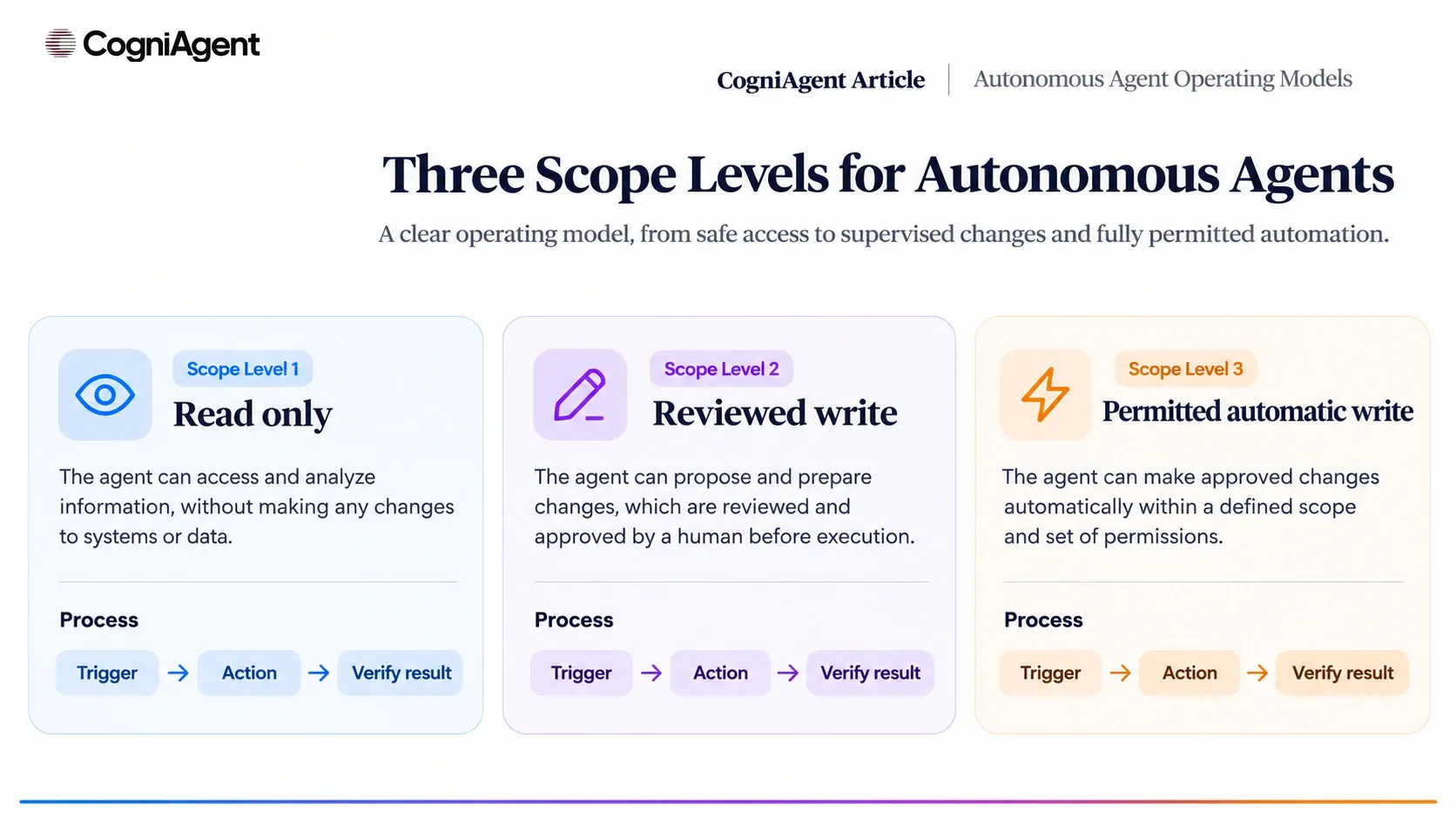
Three illustrative levels of delegated action, with the result verified at each level.
Start with synthetic or isolated data and a read-only task. Assign an owner, define what the workflow must not do, and specify when testing must stop. Progress to a test write only after the team understands the trigger and destination.
|
Test |
Evidence to collect |
|---|---|
|
Valid request |
Trigger received, intended action executed, destination result matches the input. |
|
Missing input |
Request is held or routed for review; no incomplete write is treated as successful. |
|
Disallowed action |
The attempt is denied or stopped, and the owner can inspect the outcome. |
|
Timeout or uncertain result |
The destination is checked before retry; uncertainty is not reported as success. |
|
Duplicate event |
The owner can identify whether one or more records were created and apply the agreed recovery process. |
Separate three events in the evidence: trigger receipt, tool execution and external result. A tool call is not proof that a record was created correctly.
Track valid actions as the number of correct, verified actions divided by eligible inputs. Count denied or unexpected actions and explain whether they were blocked as intended. Measure resolution time from the defined intake point to verified completion or documented review, reporting the number of eligible cases and the observation period. See the AI agent testing checklist for a broader launch review.
Choose the simplest operating model that passes your pilot with the required evidence and controls. AI workflow automation is useful only when the team can tell what happened and take responsibility for exceptions.