Article Nov 20, 2026
 10 min read
Conversational AI for Contact Centers: How to Pilot Your First Call Workflow
Nov 20, 202610 min read Nov 20, 202610 min read
Start with one inbound queue and one request type that has approved rules, a result your team can verify, and a clear route for exceptions. Before routing customer calls, agree on what the agent can do, what each test must show, and who will stop the pilot if a call goes wrong.
A queue holds calls for a service or team. A call type describes what the caller needs. One scheduling queue might receive new bookings, rescheduling requests, cancellations, and complaints. Each request has different rules and consequences. Pick one call type within the queue for the pilot.
Use recent call logs or a reviewed sample to count each request type during the hours you could staff a pilot. Compare those counts with the amount of evidence your team needs to make a decision.
|
Candidate |
Volume and rules |
Data and evidence |
Exception owner and decision |
|---|---|---|---|
|
Hours or booking-policy questions |
Count routine questions. Check that approved answers cover the ones you plan to accept. |
Use a current hours or policy source. Match the spoken answer to that source and test what happens when an answer is missing. |
The support lead owns unanswered questions. Choose this if your first goal is to assess voice dialogue quality. |
|
New booking for one service |
Count new requests for the service. Confirm its duration, booking hours, and confirmation rules. |
Use caller details and a test calendar. Verify one event with the correct service, date, time, and time zone. |
The scheduling desk owns exceptions. Choose this if staff can review calendar entries and take callbacks during the pilot. |
|
Refunds or account changes |
Count the exact request you would allow. Check identity, authorization, and correction rules first. |
Use an authorized account record and an action log. Verify the approval and the resulting change. |
Billing or account support owns exceptions. Defer until those checks and a staffed exception process are in place. |
In this illustrative pilot, one inbound queue handles new bookings for an initial consultation. The only calendar write is creating a new appointment in the test calendar. The workflow can also log a callback request for the team if the caller agrees.
Copy these six fields into your pilot plan and replace the example values with your own.
The agent identifies what the caller needs, checks availability, and reads back the proposed appointment with the date, local time, and time zone. If the caller changes a detail, the agent checks the revised slot and asks for confirmation again. After a clear yes, the workflow attempts the write. The agent says the booking is confirmed only after the workflow verifies the matching event.
If a slot is busy, offer alternatives returned by the availability check. If the caller has yet to confirm, say “I haven’t booked an appointment yet.” If the write definitively fails, say “I couldn’t book that time.” If the result is still unknown, say “I can’t confirm whether the booking went through.” The scheduling desk checks the action status and searches for the event by call ID and confirmed details. Retry only when the first attempt has ended without creating the event.
When the caller agrees to a callback, confirm the request after the workflow verifies it is in the team’s callback log. For example, a scheduler sees Call 014 · New consultation · No available slot · Callback requested · Open with the caller’s agreed contact number. The scheduler claims the request, calls the customer, and marks the outcome. If the request cannot be saved, give the caller the agreed support route.
Use a test number or isolated call route, an isolated calendar, and test contact details. Authorize the workflow to read availability, create events in the test calendar, and save requests in the test callback log. Keep shared test numbers for staff calls. Set up customer routing and the return to the standard queue in your telephony system. Rehearse that switch before launch. CogniAgent phone channel setup
For each test call, review what the caller heard and what ended up in the calendar or callback log. Use the same acceptance checks each time.
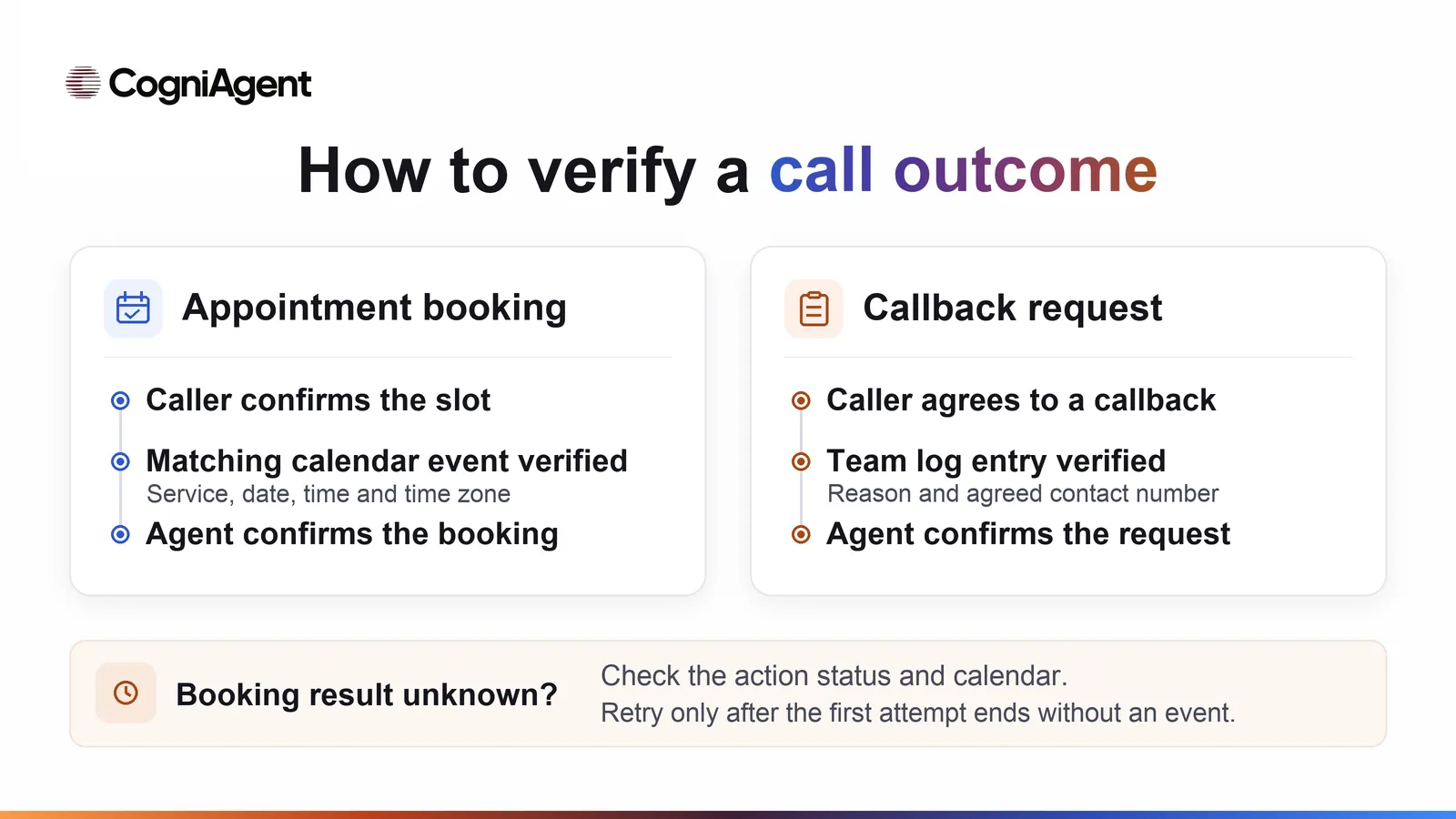
Illustrative booking and callback paths for the pilot.
|
Test call |
What the caller hears |
What the reviewer verifies |
|---|---|---|
|
Free slot and a clear yes |
“An initial consultation on Tuesday, December 8, at 10 a.m. Eastern time. Should I book it?” The agent confirms after the write is verified. |
Verify that the calendar result came before the spoken confirmation. Exactly one event matches the call ID and the confirmed service, date, time, and time zone. |
|
Requested slot is busy |
“That time is taken. I can offer 11 a.m.” If the availability check returns no alternatives, offer the agreed fallback. |
The availability check returned the offered time as free. The existing event stays unchanged. Verify zero new events before confirmation and exactly one matching event after confirmation. If no alternatives are available, verify the agreed fallback and zero new events. |
|
Noise, missing details, or a corrected date |
“Did you say Tuesday or Thursday?” The agent reads back the revised details and asks again. |
Zero events before a clear yes. If the caller confirms, one event matches only the final details. |
|
Caller hangs up before saying yes |
The last prompt asks for confirmation. No booking confirmation is played. |
Zero new events for that call ID. |
|
Write fails or times out |
The agent reports a definite failure or says the result is unconfirmed. |
Test both branches. A rejected write leaves zero events. If the result is unknown, check the action status and calendar before retrying. Record the outcome and verify there is at most one matching event. |
|
Caller asks for a person or makes an out-of-scope request |
The agent offers a callback. If the caller agrees, the agent confirms after the request is saved. |
Check the assigned team’s log for one request with the reason and contact details if the caller accepts, or zero if they decline. In both cases, the calendar stays unchanged and the action log has only permitted actions. |
Log each run with the workflow version, call ID, expected response and system result, observed response and result, evidence reference, and fix decision. Use an approved recording or transcript if available. Record the calendar event ID or callback record ID against the call ID so a reviewer can check the action. After a change, rerun the affected tests and one normal booking. AI agent testing checklist · Google Cloud test-case expectations
Before taking customer calls, point the approved workflow at the live calendar the scheduling desk uses for that service. Run a staff-only check on the intended live route to verify availability, the event write, and the callback destination. Fill in the card before launch. Use the test results to decide whether to start, then use live call outcomes to decide whether to expand.
For this pilot, the verified-correct booking rate is the number of calls that produced exactly one verified event with the confirmed details, divided by all calls that entered the new-booking workflow in the pilot window. Count each call once. Include calls with unknown outcomes in the denominator and report them separately. For example, 18 of 24 calls (75%) produced verified correct bookings, and 2 of 24 remained unresolved at review time. Those figures show how to report results. Set your own thresholds.
Also count calls with a wrong or duplicate booking, a recorded callback request, or a disconnect before confirmation. Use call IDs so each count can be traced back to evidence. For a manual baseline, use the same eligible call type, comparable staffed hours, and the same definition of a correct booking. Check your provider’s definitions before comparing queue or abandonment reports. Amazon Connect, for example, counts caller disconnects while waiting in the queue and excludes inbound contacts who disconnect because they requested a callback. Amazon Connect metric definitions
Once the current window meets your criteria, expand one parameter at a time, such as staffed hours or the call cap. If you add a request type, define its permissions and expected outcome, then add its test calls before routing traffic to it.
CogniAgent’s AI Voice Appointment Agent template documents how to attach a phone number, connect Google Calendar for availability and booking, and use Gmail to email callback requests. The published template covers several appointment actions. For this pilot, restrict the copy to new bookings for one service, test the read-back and confirmation, verify the resulting calendar event, and have the scheduling lead check that callback emails arrive in the monitored inbox. AI Voice Appointment Agent
If you’re still choosing a provider, start with the comparison of conversational AI platforms for customer service. To configure and test a workflow against your pilot plan, explore CogniAgent’s Conversational AI Platform.