Webinar Registration to Email Sequence
Close the gap between registrations and nurture automatically
Core Automation Capabilities

Automated Webinar Registrant Capture & Sync

Targeted ESP Nurture Flow Enrollment

Calendar Invite & Reminder Email Automation

Attendance Tracking & CRM Update Module

Conditional Post-Webinar Follow-Up Sequences

Continuous Data Sync & Record Maintenance
Every Webinar Registration Is a Workflow Waiting to Be Automated
Manual Registration Chaos
Teams spend hours copying registrant details from forms and webinar platforms into email campaigns
Delayed Nurture & Follow-Up
By the time registrants are added to sequences, engagement drops and attendance suffers
Missed Post-Webinar Opportunities
Without timely follow-up, leads go cold and valuable insights are lost
How It Works
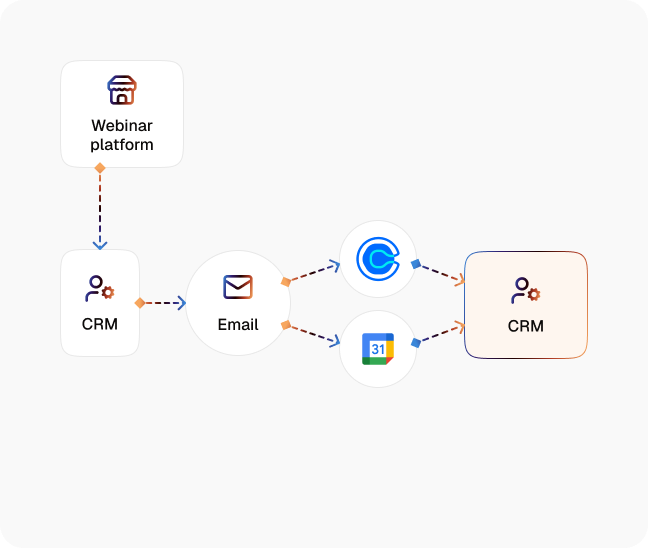
Registrant Detection
CogniAgent monitors your webinar platform or form submissions and captures new registrants automatically.
ESP List Routing
Adds each registrant to the correct email nurture sequence based on source, campaign, or registration type.
Calendar Invite & Reminder Automation
Sends personalized calendar invites, confirmations, and reminder emails without manual effort.
Attendance Tracking
Logs attendance in your ESP or CRM, and triggers conditional follow-up sequences for no-shows or attendees.
Post-Webinar Follow-Up
Automatically sends thank-you emails, replay links, and targeted offers based on engagement or attendance data.
Autonomous Maintenance
Continuous syncing ensures registrant records, attendance, and follow-up sequences remain accurate and up to date.
The Real Impact for Marketing Teams
| Metric | Before Automation | After (With AI Agent) |
|---|---|---|
| Time spent managing webinar registrants | 1–2 hrs per event | <10 mins per event |
| Registrants added to nurture sequences | Manual & delayed | Instant & accurate |
| Calendar invites sent | Manual & error-prone | Fully automated |
| Follow-up engagement | Low | Higher with timely triggers |
| Attendance tracking | Manual & inconsistent | Automatic & accurate |
Step-by-Step Setup
Step 1
Connect your webinar platform (Zoom, GoToWebinar, Webex, Hopin, or custom forms) and ESP
Step 2
Define nurture flow rules, including segment assignments based on registration source, event type, or lead magnet
Step 3
Enable calendar invites, reminders, and post-webinar follow-ups for seamless communication
Step 4
Watch registrants automatically added to sequences, attendance logged, and follow-ups triggered, no manual work required

![Best AI Tools for Auto Repair Shops [2026 Guide]](https://cogniagent-preview-def77a0f.nyc3.digitaloceanspaces.com/media/2026/07/Best-AI-Tools-for-Auto-Repair-Shops-2026-Guide.png)
Frequently Asked Questions
CogniAgent integrates with Zoom, GoToWebinar, Webex, Hopin, and other platforms via API or form capture. New registrations are captured automatically and synced to your ESP or CRM.
Absolutely. You can assign registrants to sequences based on lead source, registration type, form tags, or campaign. CogniAgent ensures each lead receives the right content at the right time.
As soon as a registrant signs up, CogniAgent captures the data, adds them to the correct sequence, and sends calendar invites and reminders within minutes. Post-webinar follow-ups are triggered immediately after the session ends.
Yes. CogniAgent logs attendance and can trigger different follow-up sequences for attendees versus no-shows, ensuring personalized engagement for every lead.
Yes. All registrant and lead data is encrypted in transit and at rest, with role-based access controls. CogniAgent complies with GDPR and SOC 2 Type II standards to protect your information.

No results