Article Updated Nov 09, 2026
 12 min read
Customer Support AI Chatbots for eCommerce: Workflows, Limits, and Results to Measure
Updated Nov 09, 202612 min read Updated Nov 09, 202612 min read
Customer support AI chatbots for eCommerce can handle routine questions when they have approved information, appropriate access to customer data, and clearly defined actions. A shipping-policy answer, an order lookup, and a refund request are different jobs: each requires different information and permissions. The goal is not simply to create fewer tickets. It is to resolve eligible questions accurately, protect customer data, and make sure requests that need a person reach the team.
Start with the request, then decide what the workflow may read or do. The table below is a planning guide, not a list of capabilities that every chatbot has by default.
|
Request |
Data source |
Permitted action |
Stop or route to the team when… |
Evidence of completion |
|---|---|---|---|---|
|
Shipping or return-policy FAQ |
Approved, dated policy |
Answer from the applicable policy or say the answer is unavailable |
The policy is missing, conflicting, or outside its scope |
The answer reflects the current applicable policy; the customer’s issue is resolved if that can be confirmed |
|
Order-status question |
Authorized identity check and permitted order fields |
Read the allowed status and report what the record actually says |
Verification fails, data is unavailable, or the record is stale |
A successful read of the correct record and an accurate response |
|
Missing or damaged delivery |
Customer’s description, permitted order details, and support rules |
Collect relevant facts and create a case |
An exception or remedy needs approval, or case creation cannot be confirmed |
Case reference and a confirmed record; notification status checked separately |
|
Return request |
Verified identity, line item, delivery date, and applicable return rule |
Check eligibility, record a request, or route it for approval within the configured rules |
Data is missing, the request falls outside policy, or approval is required |
Confirmed return record or approval; a payment-provider result is needed to establish that money was refunded |
|
Account or payment issue |
Approved troubleshooting information and, where authorized, relevant account data |
Explain safe troubleshooting or open a support case |
The request needs an unconfigured account change, financial action, or human review |
Confirmed case or separately verified external action |
A policy document can explain the estimated shipping process; it cannot establish the current location of a particular parcel. Likewise, a return record is not proof that money has reached a customer. Treat each as a separate outcome.
For account and payment questions, do not ask customers to paste passwords, one-time codes, or full card details into chat. If a change or payment action is needed, it requires a separately verified integration, permission, and result—not just a conversational answer.
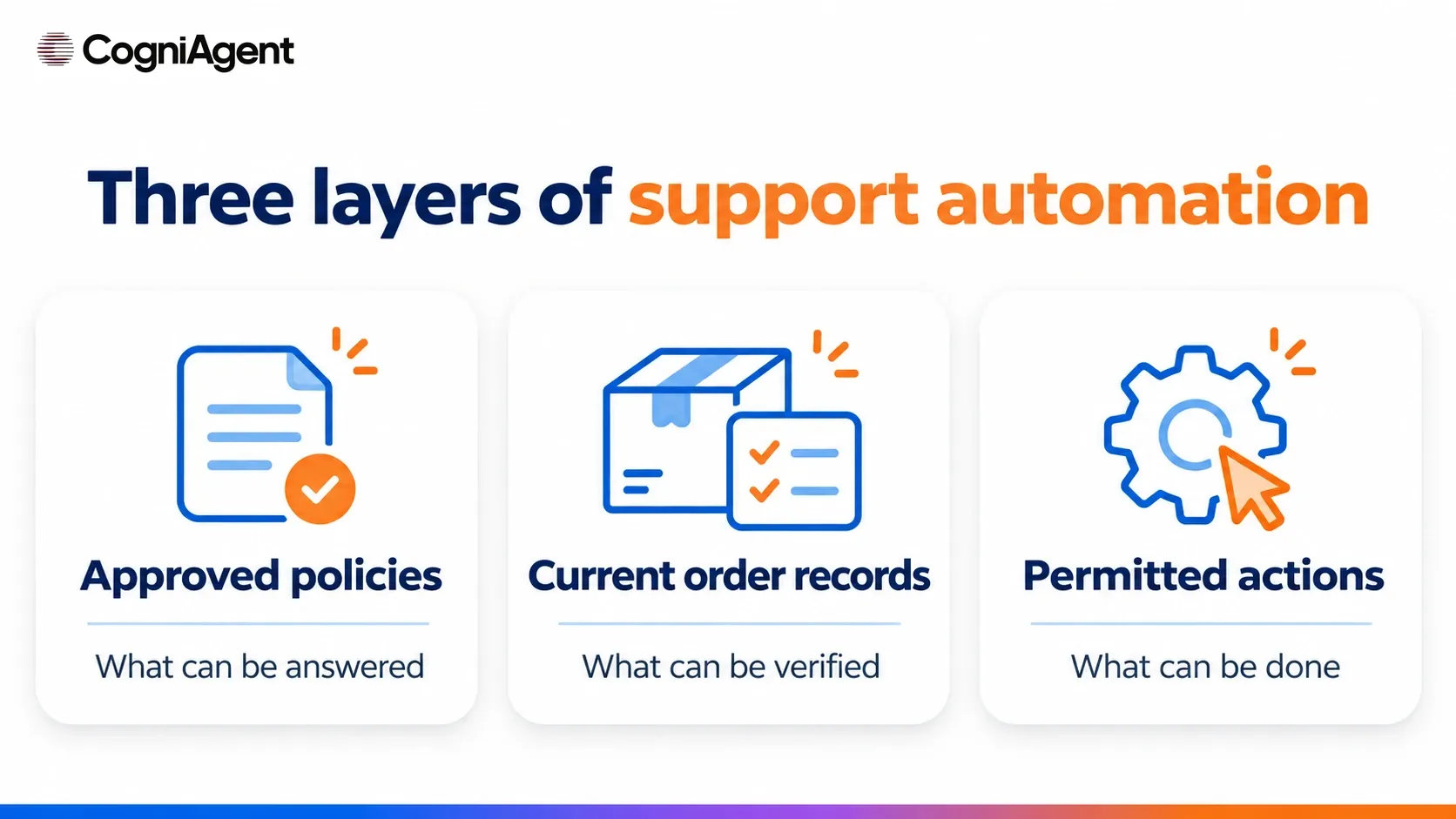
Three layers determine what a support workflow can safely do:
Before exposing customer-specific information, choose an identity check appropriate to the sensitivity of the data and the action. Matching an order number and email may be part of a low-risk process, but it is not automatically sufficient authentication for every account change or financial operation. When verification fails, use a neutral response that does not reveal whether an email address, customer, or order exists.
To prepare your company knowledge base, start with the approved content and assign responsibility for keeping it current. Store credentials in the relevant connections, not in prompts, articles, or screenshots.
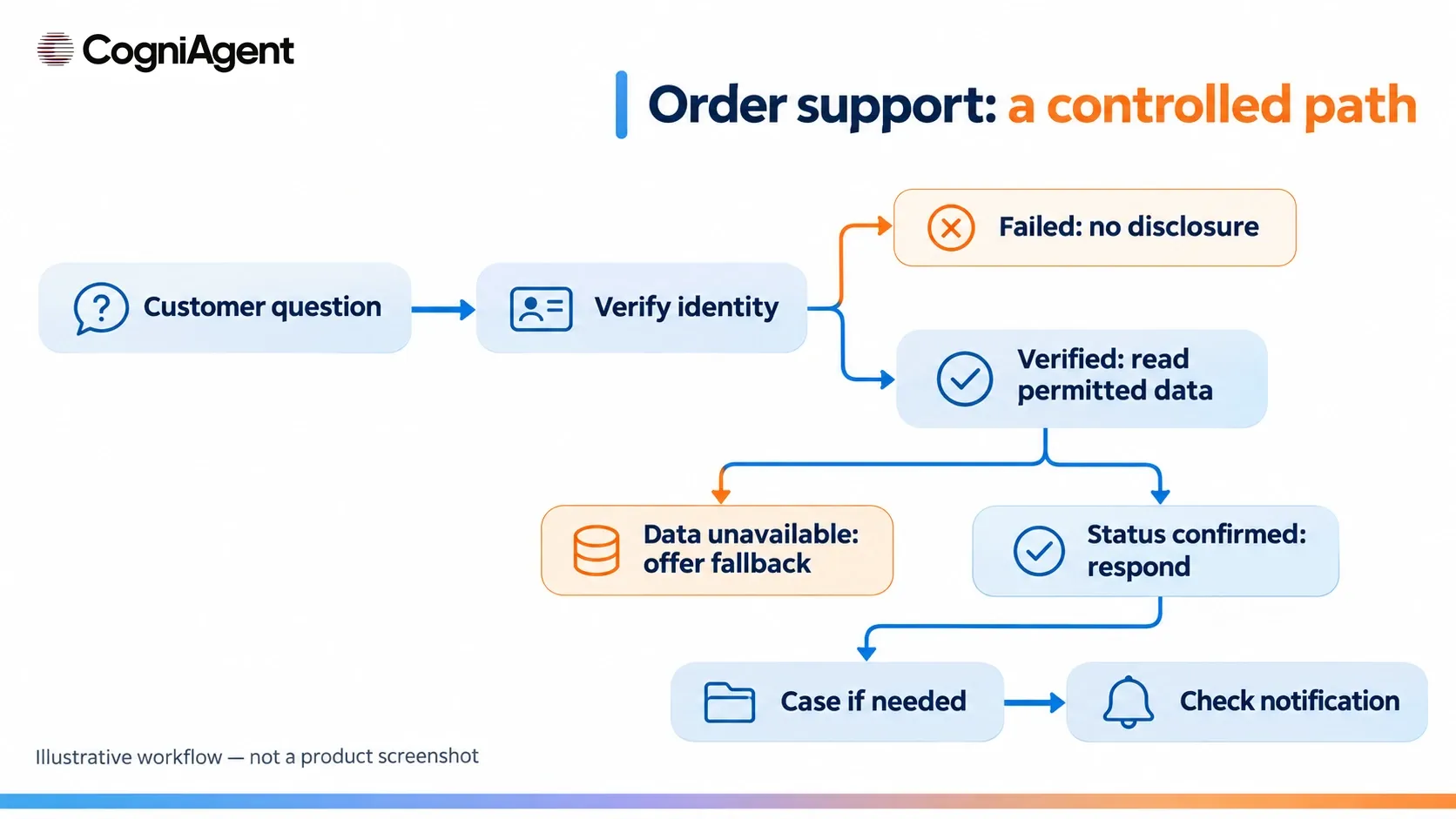
The following is an illustrative scenario, not a CogniAgent customer case or a test result. A shopper asks about a delayed order. The store’s workflow has a defined verification method, permission to read selected order fields, and a separate case-creation route.
The workflow needs explicit alternatives for failures:
An asynchronous case route is not a live transfer to an operator. A person must own the queue, monitor it during defined hours, and have a fallback when notifications fail.
If you are exploring conversational AI for eCommerce, choose a starting point based on the work you want to control. CogniAgent’s AI agent builder is intended for configuring no-code AI agents and their workflows; the data, permissions, and integrations still need to be checked for the specific process.
The eCommerce Support Pack is a starting point for website-chat questions about orders, returns, and damaged items. Its public description uses a Google Sheets workbook and Gmail. The workbook includes Customers, Orders, Items, Policies, Verification, Cases, and Log tabs. The business supplies its own records, policies, and verification rules; the described workflow masks selected information and routes requests requiring a person to a case and email notification.
This is a sheet-backed approach. The template description does not establish a ready-made live connection to every storefront, carrier, or payment provider. Your team must decide how records are maintained, which fields can be shared, who owns cases, and how failed notifications are handled. The template’s setup describes a guard called by the agent rather than run on a schedule; follow its current setup instructions and keep the guard stopped as directed.
Two other templates address narrower starting points:
These descriptions come from the public template pages; they are not a hands-on test of your store’s configuration. AI workflow automation can connect steps, but each read, write, and notification must be configured and checked. A no-code AI builder platform does not remove the need to verify the specific permissions and external results behind an action
Choose a narrow pilot, such as approved policy questions and order-status checks. Use separate test records and accounts, and confirm which integrations can send messages or change external data. A test mode label alone does not guarantee that real emails or writes are disabled.
For every test, inspect three things separately: the customer-facing conversation, the tool execution result, and the external record or notification. A convincing response is not evidence of a successful action.
|
Test |
What to verify |
|---|---|
|
Approved question and missing answer |
The answer matches the applicable policy; an unknown answer is acknowledged. |
|
Valid and invalid identity |
Only authorized fields are shown after an appropriate successful check; failure reveals no account or order existence. |
|
Missing or stale order |
The response does not present old or unavailable information as current. |
|
Disallowed field |
The workflow does not expose a field outside the configured scope. |
|
Tool timeout |
The response does not claim an unconfirmed case or external action succeeded; uncertain results are reconciled. |
|
Repeat request |
Existing records are checked before retrying a case-creation action. |
|
Return above the approval limit |
The request reaches the defined review route without an unauthorized refund promise. |
|
Notification failure |
The case and notification are checked separately, and the fallback reaches the assigned owner. |
Set stop criteria before launch. Disclosure of another customer’s order or an incorrect promise that a refund was issued should block release until the cause is fixed and retested. Your team should set its own quality and budget thresholds based on the scope and risk.
For a broader checklist, see how to test an AI agent before launch. Assign a named case owner, support hours, and a backup contact process before making the workflow available to customers.
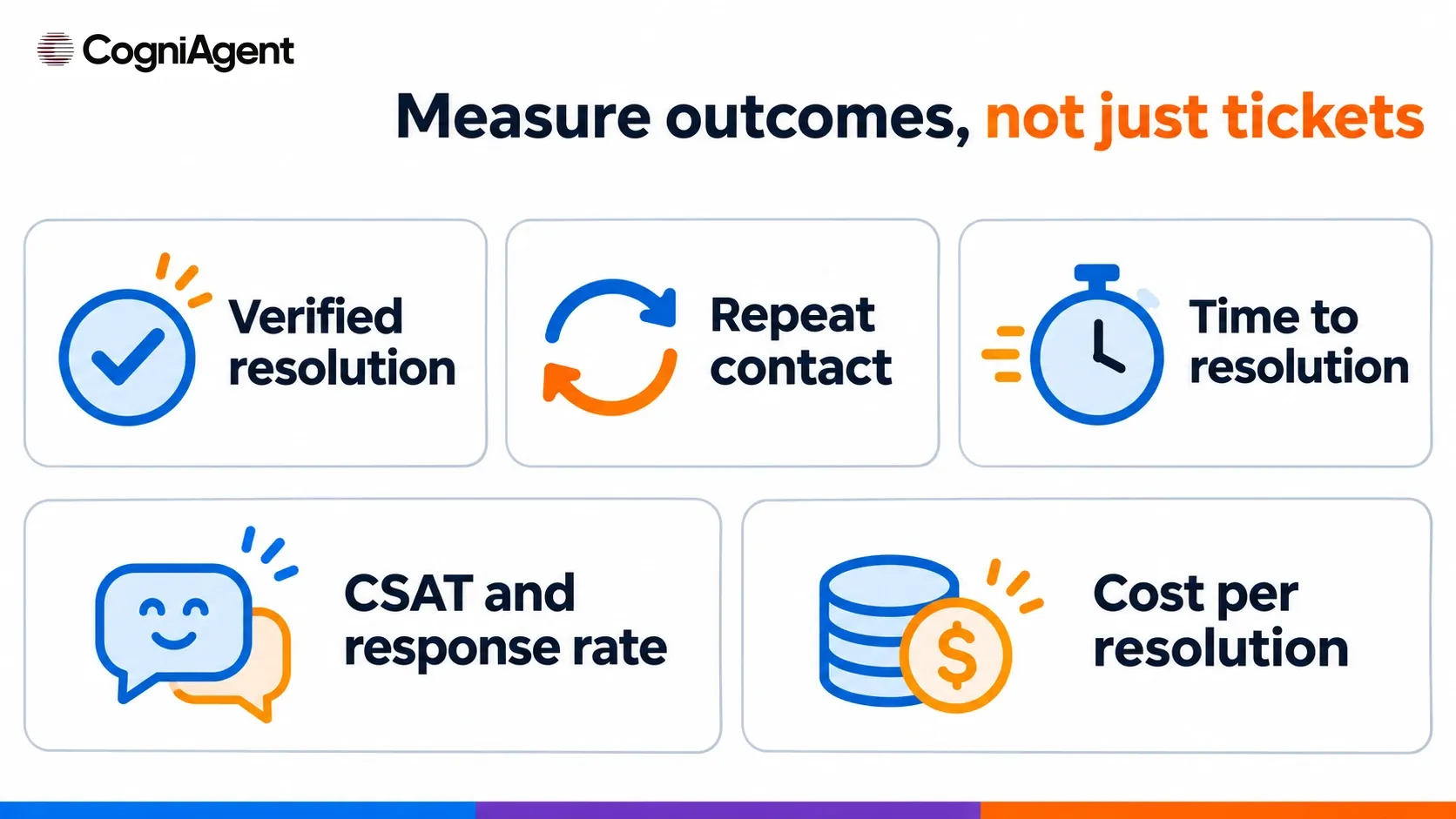
First define the eligible pilot scope: the channels, request types, time period, and cases included in your measurement. Decide how to link repeat conversations to the same problem and what evidence counts as a confirmed resolution. Track reopened cases consistently—for example, remove a reopened case from resolved outcomes until it meets the agreed confirmation rule again.
|
Measure |
Definition |
Why it matters |
|---|---|---|
|
Verified resolution rate |
Eligible requests with a confirmed resolution ÷ all eligible requests in the pilot scope |
Separates a confirmed outcome from an answer or a closed chat. |
|
Repeat contact rate |
Eligible requests followed by another contact about the same issue within a preselected window ÷ all eligible requests |
Helps identify issues that appeared resolved but prompted another contact. |
|
Time to verified resolution |
Time from the start of an eligible request to its confirmed resolution |
Measures more than first-response speed. Compare like request types; report the median and, with enough data, a tail measure. |
|
CSAT and response rate |
Positive or otherwise defined satisfaction responses ÷ all survey responses; responses ÷ invitations sent |
Shows the reported satisfaction among respondents alongside how many people responded. |
|
Cost per verified resolution |
Attributable platform, model, and channel costs plus data maintenance, human review, and rework ÷ verified resolutions |
Accounts for the work behind the full outcome, not just the first automated reply. |
Define the repeat-contact window and the CSAT question before comparing periods. Do not count unanswered surveys as satisfied responses. Review CogniAgent pricing alongside any separate provider, communication, and staff costs relevant to your setup.
Compare periods with similar order volumes, request categories, seasonality, and logging rules. A drop in ticket count can reflect successful answers, but it can also reflect abandoned conversations, inaccessible escalation, or issues recorded in another channel. Check resolution and repeat contacts before attributing the change to the chatbot.
Not necessarily. A workflow limited to general shipping and return-policy questions can use approved, current policy content without access to customer records. Individual order status is different: it requires an authorized source of order data and a suitable identity check.
Only if the specific workflow has an authorized payment action, the necessary approvals, and a way to verify the provider’s result. A return request, eligibility decision, or approval record alone does not show that a refund was completed.
It should say that it cannot confirm the answer and offer the store’s defined support route. If that route creates a case, the response should distinguish confirmed case creation from a pending or failed notification.
Review a representative sample of conversations and compare responses with source records and actual tool results. Monitor verified resolution, repeat contacts, CSAT response rate, and errors; retest after changes to policies, data sources, or permissions.
If you are still selecting a product, compare conversational AI tools for eCommerce or explore a broader comparison of conversational AI solutions. To start a pilot, choose one support process, prepare its approved data, and test the appropriate template within a limited scope.