First Contact and Missed Call Recovery
Live voice pickup on the first ring, missed-call text-back inside 60 seconds, web-chat and email intake from the same canvas
Functional Capabilities
Every separate process in the lead lifecycle (from first ring to post-service review) automated on a single canvas, with live access to your dispatch software, calendar, and CRM across every channel.
Live voice pickup on the first ring, missed-call text-back inside 60 seconds, web-chat and email intake from the same canvas
Problem description capture, system type and age, brand and model, photo or video upload, indoor temperature read, urgency tagging
Homeowner-versus-renter check, service-area validation, warranty status lookup, financing-interest flag, repeat-customer recognition, residential or commercial routing
Diagnostic-fee disclosure, flat-rate menu pricing for common repairs, tune-up package selection, replacement-quote handoff, financing options surfaced
Live technician availability, skill-and-zone matching, time-window selection, calendar block, customer and dispatcher confirmation, route-density optimization
24-hour and 1-hour reminders, technician-en-route alert with ETA, photo-and-name introduction, real-time reschedule, no-show recovery
No-heat and no-cool prioritization, gas-leak and CO escalation script, on-call dispatcher alert, customer holding-pattern guidance until tech arrives
Open-quote reminders at day 1, 3, and 7, objection capture, financing reminder, seasonal pre-summer and pre-winter outreach, dormant-customer reactivation
Tune-up cadence offers, two-visit annual plan upsell, payment-on-file capture, auto-renewal reminders, priority-service member recognition
Job completion check-in, technician rating capture, review-platform routing, repair-versus-replace next-step prompt, referral-program invitation
Every HVAC business handles a different mix of work. The agent runs the same intake, qualification, booking, and follow-up logic across every service line you bill – configured once, applied across the board.
furnace, boiler, heat pump install, repair, replacement
central air, ductless, mini-split, rooftop, chillers
duct cleaning, air purifiers, humidifiers, UV systems
commercial walk-in, reach-in, ice machines, restaurant equipment
single-family, condo, townhome service
offices, retail, restaurants, dental and medical practices
apartment complexes, HOAs, REITs
warehouses, schools, hospitals, mechanical contracting
HVAC operators miss roughly 27% of inbound calls on a normal day, and as many as 62% during peak season or when crews are stacked at job sites (AgentZap, 2026). Each missed call represents $350-$1,200 in lost revenue depending on job type.
The agent answers voice calls live, texts back missed callers within seconds, and runs the same intake on web chat and email. Same response speed at 11 p.m. as 11 a.m. – no voicemail, no after-hours queue.
The average HVAC company takes over 2 hours to respond to a new lead, and only 3% reply within a minute (Hatch, 2025). The first business to respond wins the job 78% of the time (LeadConnect, cited Hatch 2025) – and a 5-minute response is 9x more likely to convert than a 30-minute one.
The agent qualifies the request, captures the system type and urgency, and books the appointment before the homeowner has time to call the next listing on Google.
Estimators send a price, the customer “thinks about it,” and the quote disappears into the inbox. Office staff don’t have time to chase every open ticket.
The agent runs day-1, day-3, and day-7 nudges across the customer’s preferred channel, capturing objections, surfacing financing, and routing live questions to the estimator without dropping context.
A no-heat call at 2 a.m. is treated the same as an “I’d like to schedule a maintenance visit” message. Triage happens later – when it should happen first.
The agent flags no-heat, no-cool, gas, and CO incidents at first contact, escalates to the on-call dispatcher, and gives the customer a holding pattern (safety steps, ETA) until the truck rolls.
Tune-up reminders, two-visit memberships, and renewal prompts all live in someone’s head or in a spreadsheet. Recurring revenue leaks every season.
A Virtual Employee tracks tune-up cadence per customer, runs seasonal pre-summer and pre-winter outreach, captures payment-on-file, and renews memberships before the term lapses.
One person juggles inbound calls, technician routing, parts ordering, and angry-customer recovery. The phone backs up every time something goes off-script.
The agent handles every routine intake, books to the live calendar, and only escalates when the situation actually needs a human. Your dispatcher works on the exceptions, not the queue.
You don't need a developer or an automation specialist. Most HVAC operators have a working agent live within a week.
Single canvas, voice intake, emergency triage, live dispatch booking – no/low code.
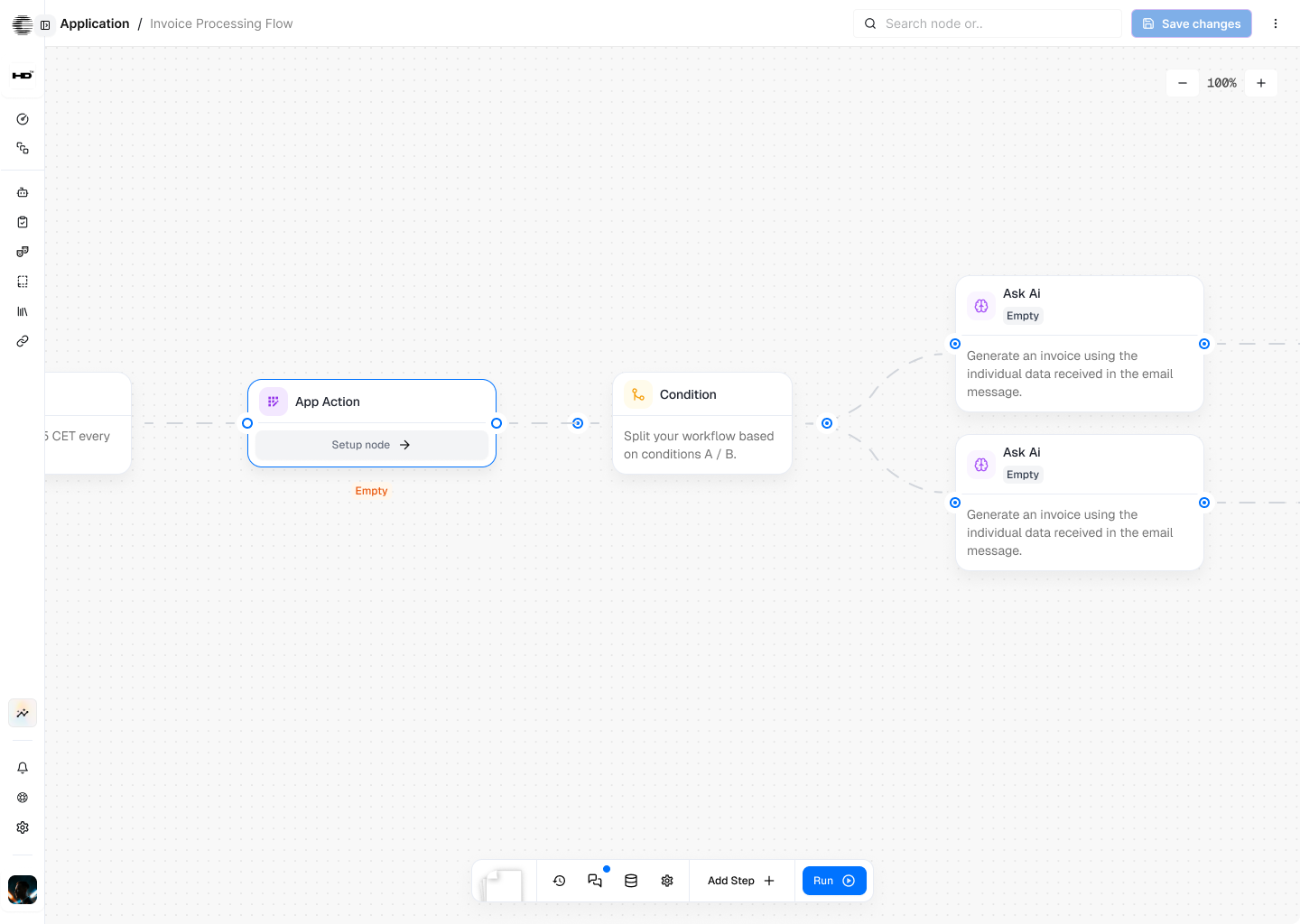
HVAC customers don't all reach out the same way. Homeowners with a no-heat emergency call. Property managers email. Younger customers expect a text-back. The agent meets every one of them where they are.
Inbound voice line that answers on the first ring, captures the problem, and books the appointment. Outbound voice for high-priority quote follow-up and missed-call recovery for callers who don’t read texts. No menus, no hold music.

The recovery channel for every missed call – text-back inside 60 seconds with “we just missed your call, what’s going on with your system?” and a booking link. Also the default for tune-up reminders, technician-en-route alerts, and post-service review requests.

For markets with WhatsApp-first customers – photo and video upload of the unit nameplate, error code on the thermostat, or visible damage right inside the conversation thread.

Engages site visitors directly on your service area, pricing, or tune-up pages. Pre-qualification starts before the form-fill, and the booking happens without a callback.

Covers property managers, multi-site commercial accounts, and lead-gen platforms (Angi, Thumbtack, HomeAdvisor) where the request arrives by email. Intake, quote, and confirmation handled by the agent.

Behind every customer conversation, the platform is doing structured work – reasoning about urgency, writing to your dispatch software, switching between voice and SMS, all while keeping the customer's profile intact. Here's what powers that.
Integrations
2,700+ integrations – the agent reads live data and updates records inside the tools you already run, not afterwards.




















Standard answering services and chatbots take a message. An AI agent for HVAC has to actually run the lead – triage urgency, look up the customer in dispatch, price the visit, and book a technician on a real calendar. The comparison below maps the gaps.
24/7
Inbound coverage across voice, SMS, WhatsApp, web, and email – including evenings, weekends, and during stacked job-site days.
Sub-minute
First-response on every channel; the first business to respond wins the job 78% of the time (LeadConnect, cited Hatch 2025).
9x
Higher conversion versus a 30-minute response window, per Harvard Business Review research on lead response timing.
27%
Industry-average missed-call rate the agent recovers as bookings – revenue most HVAC operators currently lose to voicemail (AgentZap, 2026).
Pay only for what you use. Full visibility on every credit spent.
No subscription. No monthly fee.
Buy credits from $10
* activates on first credit purchase
Custom plan. Annual subscription,
negotiated rate.
Security & Compliance
End-to-end encryption in transit and at rest for call recordings, transcripts, photo and video uploads, and payment-on-file records. Configurable retention windows aligned to state, federal, GDPR, or UK GDPR rules.
Role-based access across dispatch software, CRM, scheduling tools, and financing partner connections. Encrypted channels for every read and write the agent performs mid-conversation, including PCI-scope-aware payment handoff.
Customer data stays yours. Conversations, call recordings, and CRM records are never used to train public AI models. Bring-your-own API keys keep LLM calls inside your provider relationship.
Full activity logs for every call, text, booking, quote follow-up, and dispatch write. Time-stamped records support compliance reviews, dispute resolution, and TCPA / state-call-recording-consent audits.
AI Recruiting Agents
Event-driven workflows that automate high-volume operational processes – lead capture and routing, returns management, order status inquiries, payment verification, inventory alerts, approval workflows, multi-channel content distribution, and showing scheduling. If your team handles it repeatedly and it follows business logic, we can automate it with seamless human handoff when judgment is required.
We focus on three core industries:
eCommerce & Retail: Returns management, inventory alerts, order tracking, payment reconciliation
Marketing Agencies & Teams: Lead capture and qualification, campaign execution, multi-channel distribution, CRM workflows
Real Estate: Inquiry response, showing scheduling, listing alerts, client reminders
These industries have high-volume, repetitive processes where event-driven automation delivers immediate, measurable ROI. However, our cognitive AI platform isn’t limited to these verticals – any business with workflow automation needs, customer service operations, or multi-system coordination can benefit from unified automation.
Our cognitive AI platform handles business workflow automation across customer support, sales operations, marketing campaigns, inventory management, payment reconciliation, order processing, and lead qualification. AI agents manage conversational interfaces (chat and voice), trigger backend workflows, and escalate complex situations to human team members when needed – all on one unified platform.
Yes. Our cognitive AI platform supports a multi-agent architecture where different cognitive AI agents collaborate within unified workflows. Agents share context automatically, transfer conversations intelligently when needed, and coordinate complex multi-department processes. Unlike solutions requiring separate platforms, our event-driven system enables seamless agent cooperation across your entire organization.
Yes, our conversational voice AI allows complete customization of AI agents’ voices, speaking styles, and personalities to match your brand. You can choose from multiple voice options or create custom voices that align with your company’s identity and communication style.
Our conversational voice AI employs advanced voice recognition technology that delivers high accuracy across different accents and speaking styles. Cognitive AI agents built on our platform understand natural speech patterns, industry-specific terminology, and handle background noise effectively while maintaining rapid response times for natural conversation flow.
Not to get started. You provide process knowledge; we show you how to build it. Through collaborative creation, you gain the skills to manage your automation independently without ongoing technical help.
We require payment and professional onboarding to ensure success. Every plan includes dedicated technical assistance (10-20 hours) – you’re not left to figure out complex automation alone. Pro tier offers a 2-week trial period with $10 credits after phone verification. Schedule a consultation with our team to discuss your automation requirements and determine the best approach.
With professional onboarding included, most businesses reach production up towithin 2-3 weeks. Our team helps you configure cognitive AI agents, build event-driven workflows, and integrate with your existing systems. Using pre-built templates for common use cases (returns management, lead capture, order tracking), we can deploy working automation in your first onboarding session.
Every plan includes 10-20 hours of hands-on guided setup. We build your automation together – you learn while creating so you can manage, modify, and improve independently after launch. You walk away with working automation and the knowledge to control it yourself.
This is our core differentiator. Our cognitive AI platform is the only solution that combines automation and humans in an organic way. Event-driven workflows handle routine processes automatically, then hand off seamlessly to your team when situations require judgment, creativity, or relationship management. After human resolution, automation resumes without awkward breaks or system switching.
Traditional workflow builders force you to draw rigid flowcharts that break when business conditions change. Our cognitive AI platform uses an event-driven architecture that responds to real business triggers – inventory changes, customer requests, and system updates. When complexity requires human judgment, workflows hand off seamlessly to your team, then resume automation automatically. This is the only platform where business workflow automation and human expertise work organically as one.
Unlike traditional builders that give you a canvas and say “good luck,” we provide event-driven architecture that adapts to real business complexity. Key differentiators: professional onboarding included (10-20 hours), conversational interfaces native to workflows (not separate tools), voice support with one click, unlimited seats at Teams tier, and transparent ROI with published time equivalents.
You choose your support model. Many operations managers prefer self-service – monitoring dashboards, making adjustments, and adding processes independently. Others prefer ongoing expert involvement available through the Enterprise tier for workflow optimization, new integration setup, and strategic automation planning. Either approach works.
All plans include technical assistance during onboarding (10-20 hours) plus ongoing support for workflow optimization, integration troubleshooting, and system configuration. Enterprise customers receive dedicated success management, SLA guarantees, human workflow review services, and priority response. Our team helps ensure your business workflow automation delivers measurable results.
Yes. Conversational interfaces – both text and voice – live natively inside workflows on our cognitive AI platform. Your existing workflow configurations work across every channel automatically. Add voice support with a single click; no rebuilding required. This unified approach eliminates the need to stitch separate chatbot, voice AI, and automation tools together.
Yes, our cognitive AI platform integrates with over 2,700 business tools, including CRM systems (Salesforce, HubSpot, Pipedrive), eCommerce platforms (Shopify, WooCommerce, Magento), ERP systems, ticketing platforms, and communication tools. Cognitive AI agents access and update these systems automatically through event-driven workflows, eliminating manual data entry and synchronization failures.
Our cognitive AI platform includes enterprise-grade security with data encryption, role-based access controls, and audit logging. For regulated industries, Enterprise plans offer enhanced security features, compliance documentation, and dedicated security reviews. All cognitive AI agents operate within your security policies and integration permissions.
Over 2,700 tools, including CRMs (Salesforce, HubSpot, Pipedrive), eCommerce platforms (Shopify, WooCommerce, Magento), ERPs (Odoo, NetSuite), support systems (Zendesk, Intercom), communication tools (Slack, email, SMS), calendars, spreadsheets, and payment processors. If you use it, we likely integrate with it.

No results