Order Management AI Agent
Let AI extract, validate, and process every purchase order the moment it arrives
Core Automation Capabilities
-

Automated Email-to-ERP Bridge
-

Document Parsing & Data Extraction Engine
-

Vendor Validation & Stock Check Module
-

Slack / Teams Notification Integration
-

Autonomous Order Confirmation Flow
-

Invoice Generation & Dispatch Automation
Every Purchase Order Is a Workflow Waiting to Be Automated
-
Manual Entry Chaos
Teams spend hours keying in line items from PDF POs.
-
Error-Prone Data Transfer
Typos, mismatched SKUs, or wrong pricing disrupt fulfillment.
-
Slow Order Processing
By the time sales approves, the customer’s already waiting.
How Our Order Management AI Agent Works
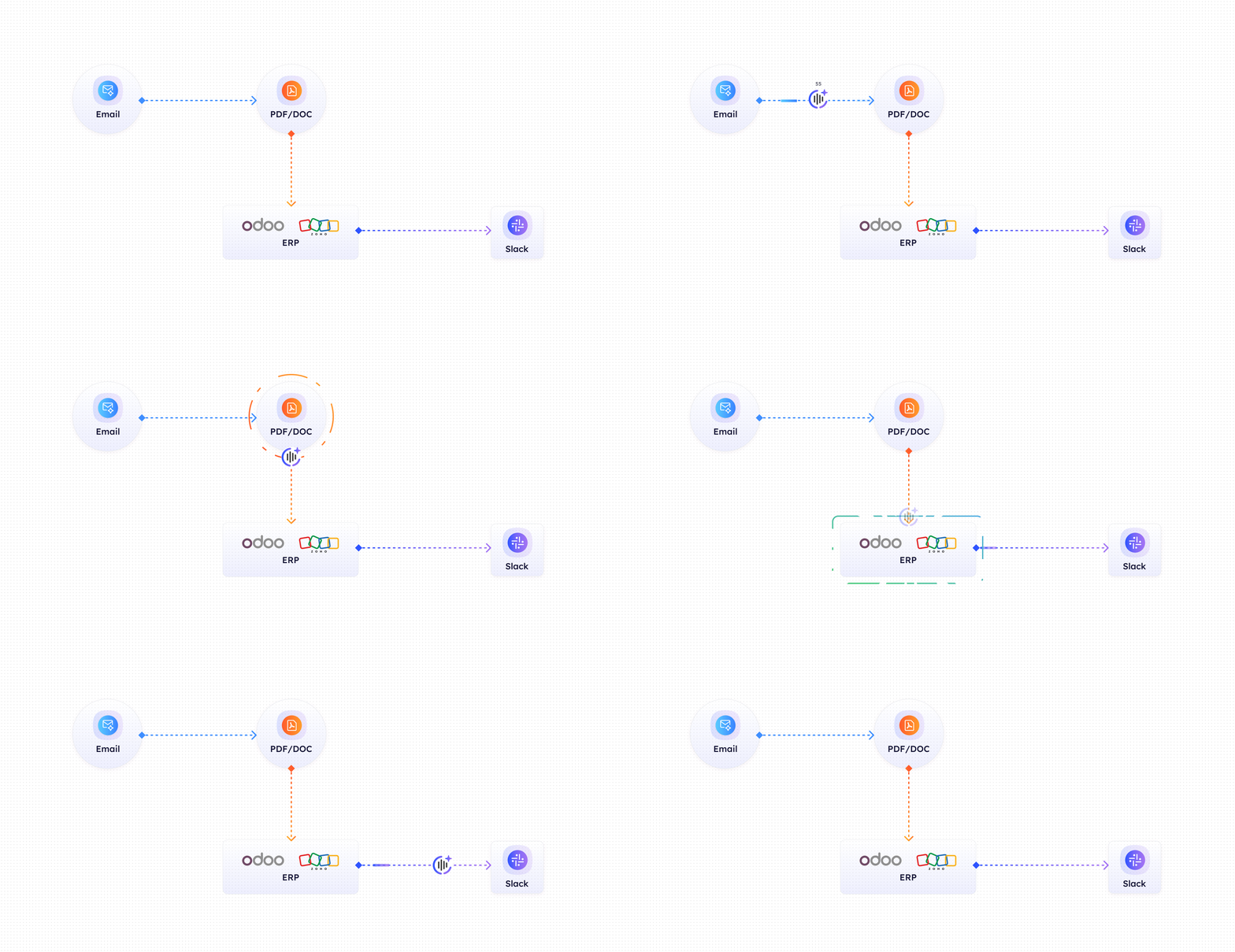
-
Email Detection
CogniAgent monitors your sales inbox for supplier purchase orders.
-
Document Parsing
Automatically reads PDF/Excel attachments, extracts product SKUs, quantities, and totals.
-
Validation
Cross-checks supplier against approved vendor list, confirms in-stock status, and validates totals.
-
Draft Creation
Instantly creates a draft sales order in your ERP (e.g., Odoo, Zoho).
-
Smart Notification
Sends a structured summary to your sales or operations manager via Slack or E-mail for one-click approval.
-
Autonomous Execution
Upon approval, CogniAgent confirms order, generates invoice, and emails the supplier – no manual touch needed.
The Real Impact for E-commerce Teams
| Metric | Before Automation | After (With AI Agent) |
|---|---|---|
| Time spent processing POs | 3–5 hrs/order | <10 mins/order |
| Order entry accuracy | 85–90% | 99.9% |
| PO-to-confirmation time | 1–2 days | <30 mins |
| Email handling effort | Manual & repetitive | Fully automated |
| Sales team focus | Data entry | Strategic selling |
Step-by-Step Setup
-
Step 1
Connect your ERP (e.g., NetSuite, Odoo) and email inbox → configure vendor list and approval workflows.
-
Step 2
Receive your first automated PO draft – zero coding setup required.
-
Step 3
Sales team starts approving orders directly from Slack/E-mail.
-
Step 4
Measure time saved and accuracy improvements – see ROI immediately.
![Top AI Receptionists for Cleaning Services [2026]](https://cogniagent.ai/wp-content/uploads/2026/07/Top-AI-Receptionists-for-Cleaning-Services-2026-300x185.webp)

![Best AI Tools for Auto Repair Shops [2026 Guide]](https://cogniagent.ai/wp-content/uploads/2026/07/Best-AI-Tools-for-Auto-Repair-Shops-2026-Guide-300x185.png)

Frequently Asked Questions
CogniAgent connects seamlessly with major ERP and accounting systems, including NetSuite, Odoo, Zoho, and QuickBooks, as well as any custom ERP through secure APIs. Integration takes only minutes through pre-built connectors or API keys. Once connected, CogniAgent automatically creates, updates, and synchronizes sales orders, invoices, and confirmations.
Absolutely. You can define dynamic approval rules based on vendor, region, PO value, product category, or department. For example, orders under $10,000 may auto-approve, while higher-value POs can be routed to a senior manager in Slack or Teams. CogniAgent allows full flexibility in who reviews and approves what, ensuring compliance with your company’s internal controls while maintaining automation speed.
Speed is one of CogniAgent’s biggest advantages. The system starts processing new purchase orders the moment they arrive in your inbox. Within 5–10 minutes, you’ll receive a fully validated draft order in your ERP – complete with item details, totals, and supplier verification. Most users see their first automated PO draft within the first hour of setup, meaning your team experiences measurable time savings almost immediately after activation.
CogniAgent securely stores data from past automation executions, including the inputs and outputs of each process block. This enables full traceability, auditability, and continuous improvement of automation accuracy. All stored data is fully encrypted both at rest and in transit. No unnecessary personal or raw email data is retained, only structured execution records essential for transparency, debugging, and performance optimization.
Currently, CogniAgent processes structured text-based data with high accuracy, extracting and validating all key details required for automation. Support for additional data formats (such as PDFs, spreadsheets, and scanned documents) is on our roadmap, allowing the AI to soon handle more complex and diverse input sources. As we expand, CogniAgent will standardize data from any format into clean, ERP-ready information to ensure seamless automation at scale.