24/7 Emergency Call Intake
Never lose a job to an unanswered emergency call again
Core Automation Capabilities

24/7 Inbound Call & SMS Handler

Emergency Urgency Classifier

Structured Job Intake Flow

Scheduling Software Integration

Automated Customer Confirmation

Team Dispatch Notification Engine
Emergency Calls Don't Wait for Business Hours
Calls Missed on the Job
Technicians are on-site when the next emergency comes in — and that call goes to whoever answers first.
No After-Hours Coverage
Without a live person available around the clock, urgent inquiries hit voicemail and go cold by morning.
Inconsistent Intake Quality
When calls do get answered, job details are collected inconsistently, leading to dispatch errors and wasted trips.
How It Works
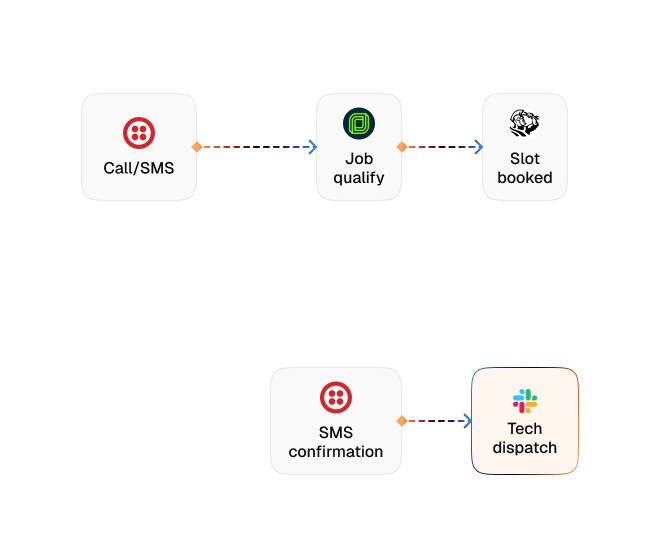
Inbound Detection
CogniAgent picks up every inbound call or SMS the moment it arrives — day, night, weekend, or holiday.
Emergency Classification
The agent identifies the nature of the request, urgency level, and job type through a structured conversational intake.
Customer & Job Data Collection
Name, location, issue details, access requirements, and preferred time window are captured in a single conversation.
Technician Dispatch or Slot Booking
The agent checks availability and either dispatches the nearest technician or books the next available slot directly into your scheduling software.
Instant Confirmation
Customer receives an immediate confirmation via SMS with technician details, ETA, or booking reference.
Team Notification
Your team gets a structured job summary in Slack, email, or your field service platform — ready to act on.
The Real Impact for Home Service & Trades Businesses
| Metric | Before Automation | After (With AI Agent) |
|---|---|---|
| Calls answered after hours | <20% | 100% |
| Avg. response time to emergency inquiry | 45–90 mins | <1 min |
| Job details collected on first contact | 55% | 98%+ |
| Leads lost to competitors due to slow response | High | Near zero |
| Technician dispatch accuracy | Variable | Consistent |
Seamless Setup Timeline
Step 1
Connect your phone number, SMS channel, and scheduling tool — no code required.
Step 2
CogniAgent begins answering every inbound call and message with a structured intake conversation.
Step 3
Your team receives job summaries and dispatch alerts directly in their preferred channel.
Step 4
Customers get instant confirmation — and your competitors stop getting their calls.


![Best AI Tools for Auto Repair Shops [2026 Guide]](https://cogniagent-preview-def77a0f.nyc3.digitaloceanspaces.com/media/2026/07/Best-AI-Tools-for-Auto-Repair-Shops-2026-Guide.png)

Frequently Asked Questions
CogniAgent handles both inbound voice calls and text-based channels including SMS and WhatsApp. The same intake flow runs across all channels — customers get a consistent experience regardless of how they reach out.
CogniAgent integrates with 2,700+ tools including Jobber, ServiceTitan, Housecall Pro, Google Calendar, and most field service management platforms. If your scheduling tool has an API, the connection is straightforward to configure during onboarding.
CogniAgent is built with structured escalation logic. When a request falls outside the agent's configured scope (unusual job type, special access requirements, or a customer requesting to speak with a person) the conversation is handed off to a team member with the full intake summary already attached. No context is lost.
Yes. CogniAgent supports multi-technician and multi-location routing. Inbound jobs can be assigned based on availability, location, or service type — with each technician or location receiving the relevant job summary through their preferred notification channel.
Most businesses are live within days. During your onboarding session, a CogniAgent expert works with you to configure your intake flow, connect your scheduling tool, and test the agent before it goes live. No technical background is required on your end.

No results